
How to Write Meta Descriptions: A Practical Guide to Boost CTR

At its core, writing a meta description is about crafting a compelling, 155-character ad for your webpage. It needs to grab a searcher's attention, include your target keyword, and give them a clear reason to click. Your main goal is to convince someone that your page is the absolute best answer to their query, which directly boosts your click-through rate.
- Meta descriptions should be under 155 characters, include your target keyword, and serve as a compelling ad for your page.
- A strong meta description directly improves click-through rate, which indirectly boosts your search rankings.
- Use active voice, address the searcher’s pain point, and include a clear call to action in every meta description.
Why Meta Descriptions Are Still Your Secret Weapon in SEO
You’ve probably heard the argument, right? "Why bother perfecting a meta description if Google is just going to rewrite it anyway?" It's a fair question, especially when you find out that Google rewrites a staggering 60-70% of them. That statistic alone shows how much search engines now prioritize matching the snippet to the exact query over simply using the text you provide.
But that’s precisely why they’ve become more of a secret weapon than an outdated task. A well-written meta description is no longer just about controlling a snippet; it’s about signaling your page's intent and quality directly to Google.
Your Direct Pitch to Users
Think of your meta description as the one-line elevator pitch you get to make to a potential visitor right there in the search results. It’s your first—and often only—chance to stand out from a sea of competitors. A generic or missing description leaves that critical first impression entirely up to Google's algorithm.
Here’s a quick breakdown of the core elements that make a meta description effective, giving you a clear roadmap for what's to come.
Anatomy of a High-Impact Meta Description
| Element | What It Does | Why It Matters for SEO |
|---|---|---|
| Compelling Hook | Grabs the user's attention immediately with a question or a bold statement. | A higher click-through rate (CTR) signals to Google that your page is a valuable result. |
| Target Keyword | Includes the primary search term the user is looking for. | Reinforces to both the user and Google that your page is relevant to the query. |
| Clear Value Proposition | Explains what the user will gain or learn by clicking. | Sets expectations, reduces bounce rates, and attracts qualified traffic. |
| Call-to-Action (CTA) | Encourages the user to take the next step (e.g., "Learn more," "Shop now"). | Directly prompts the click, turning passive searchers into active visitors. |
| Optimal Length | Stays within the ~155 character limit to avoid being cut off. | Ensures your full message is seen, preventing an awkward or incomplete pitch. |
A solid meta description doesn't just fill a space; it actively works to pull in the right kind of traffic for your page.
A compelling description nails several key things at once:
- It Sets Clear Expectations: It tells users exactly what they'll find when they click, which is great for lowering bounce rates.
- It Builds Instant Trust: A clear, professional summary signals that a trustworthy source is behind the link.
- It Drives Qualified Traffic: By accurately describing the content, you attract people who are genuinely interested in what you have to offer.
The real power of a meta description isn't in forcing Google to use your exact words. It's in providing such a clear, user-focused summary that it heavily influences the high-quality snippet Google does create, or uses it as-is because it’s the best option.
The Signal Behind the Snippet
Even when Google decides to rewrite your description, the original text you wrote remains a powerful signal. It gives the search engine critical context about your page's purpose, your target audience, and its primary focus. Think of it as a key piece of the puzzle that helps Google understand your content on a much deeper level.
Grasping this is way easier when you understand the differences between semantic search vs keyword search and how search engines now prioritize user intent above all else.
This context is absolutely vital. By writing a meta description that perfectly aligns with your page's content and the searcher's likely intent, you are essentially guiding Google toward a better understanding of your page's value. You can find more on this in our comprehensive guide to search engine optimization.
This "guidance" helps ensure that any auto-generated snippet is far more likely to be accurate and compelling, ultimately serving the same goal—earning that click.
The Framework for a Click-Worthy Meta Description
Writing a meta description that actually gets clicks isn't about crafting beautiful prose. It's about strategic engineering. This tiny snippet of text has a massive job: it needs to be a sales pitch, a relevance signal for Google, and a gateway to your website. To get it right every time, you need a framework that starts and ends with the user.
First things first, you have to decode user intent. Ask yourself: what is the person behind this search really trying to do? Are they looking for information ("what is"), comparing their options ("best vs."), or are they ready to pull the trigger ("buy now")? Your meta description must instantly show them you have exactly what they need.
Think of it as a three-step value chain happening right there in the search results.
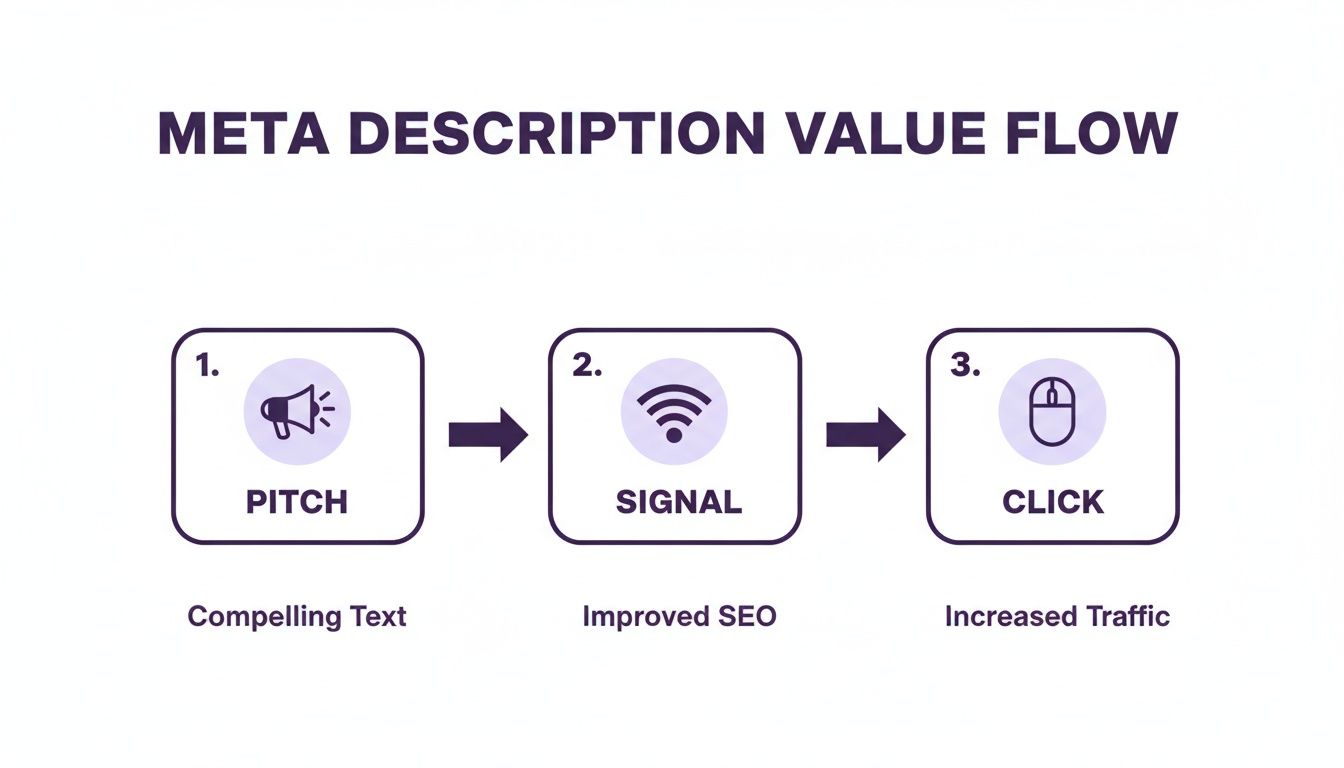
It all starts with a compelling pitch that signals relevance, which convinces the user to confidently click your link over anyone else's.
Weaving in Keywords Naturally
Once you've figured out the user's goal, you can start working in your keywords so they feel helpful, not robotic. The old days of stuffing every possible keyword into your description are long gone. Thank goodness.
Today, it's all about semantic relevance. Your main keyword should absolutely be in there, and putting it near the beginning is a smart move. Google often bolds the search term in the results, which immediately grabs the user's eye.
But don't just stop at one. Sprinkle in some secondary keywords or related phrases to catch a wider net of searches and add crucial context. For instance, if your page is about "custom kitchen cabinets," a great description might also mention "durable materials," "free design consultation," or "local cabinet makers" to answer follow-up questions before they're even asked.
The ultimate test? Read it out loud. If it sounds clunky or like something a machine wrote, you’ve pushed it too far. Write for a person first, Google second.
Practical Writing Formulas That Convert
You don't need to reinvent the wheel every single time. Leaning on proven copywriting formulas gives you a solid foundation for writing persuasive meta descriptions without tearing your hair out.
Here are a few of my go-to formulas:
- Problem-Agitate-Solve (PAS): This one is a classic for a reason. You start with the user's pain point, poke at it a little, and then position your page as the perfect solution. It works wonders for service businesses.
- Feature-Benefit-CTA: This is your best friend for product pages. State a key feature, immediately explain how it benefits the customer, and then tell them what to do next with a clear call-to-action.
- The "What, Why, Next" Method: Super simple, super effective. It answers three questions: What is this page? Why should I care? What's the next step? It's direct and gets right to the point.
Let's look at how these play out in the real world.
Scenario 1: Local Service Business (Plumber)
- Weak Description: We offer plumbing services in Sacramento. We do repairs, installations, and drain cleaning. Call us today for a quote.
- PAS Formula Applied: Clogged drain causing chaos? Don't let a minor plumbing issue flood your home and your wallet. Get a fast, reliable fix today from Sacramento's most trusted plumbers. Schedule your service online.
See the difference? The second one connects with a real, stressful problem and offers an easy out.
Scenario 2: Niche E-commerce Store (Handmade Leather Wallets)
- Weak Description: We sell handmade leather wallets. Our wallets are made from genuine leather and come in many styles. Shop our collection.
- Feature-Benefit-CTA Applied: Crafted from full-grain Italian leather, our wallets develop a rich patina that's uniquely yours. Carry a story in your pocket. Explore the collection and find your perfect wallet.
This version doesn't just list a product; it sells an experience. It uses evocative language to create a desire for the benefit—the unique aging of the leather.
Remember, the goal of a meta description is persuasion, not just description. You're not writing a technical summary; you're writing an advertisement for a click.
Respecting the Character Count
Google doesn't have a hard-and-fast rule on character limits, but the display limit is what you really need to care about. To avoid your perfectly crafted message getting cut off with a dreaded "…", aim for around 155 characters. Mobile searches often show even less, sometimes chopping things off closer to 120 characters.
This is why you have to front-load your value proposition. Get your most important message—including your primary keyword and core benefit—out in the first sentence. Assume the last few words might get cut and consider them a bonus if they show up. You can get more great advice on this topic in this guide on how to write meta descriptions that get clicks.
If you're managing a large site, a resource like the Missing WordPress Manual eBook can be a lifesaver for learning how to handle these elements at scale. It’s this blend of smart writing and solid technical know-how that turns good meta descriptions into great ones.
Real-World Examples of Meta Descriptions That Work
Knowing the theory is one thing, but seeing it in action is where the lessons really stick. The fastest way to get good at writing meta descriptions is to look at real examples out in the wild—the good, the bad, and the ugly—and figure out what separates a click from a scroll.
Let's break down some high-performing descriptions across three very different industries: a local restaurant, an e-commerce brand, and a B2B service. By comparing a weak attempt with a strong one for each, you'll start to see the winning patterns emerge.
The Local Restaurant Scenario
For a local business like a restaurant, search intent is almost always immediate. People are hungry now. Your meta description has to close the deal by answering their unspoken questions before they even have to ask.
Bad Example:
The Rustic Spoon is a farm-to-table restaurant in Sacramento. We serve brunch, lunch, and dinner using local ingredients. Come visit us for a great dining experience.
This is technically correct, but it's completely lifeless. It just lists facts ("brunch, lunch, and dinner") without creating any kind of craving or urgency. It's boring, and it will blend right in with every other restaurant on the page.
Good Example:
Savor seasonal, farm-to-table dishes at The Rustic Spoon, Sacramento's top-rated brunch spot. Enjoy our famous avocado toast & craft mimosas. Book your table online!
Why It Works:
- It uses evocative language: "Savor seasonal dishes" sounds way more appealing than "we serve."
- It includes social proof: Calling out its status as a "top-rated brunch spot" builds instant trust.
- It names a specific, desirable product: Mentioning "famous avocado toast & craft mimosas" makes the experience feel real and tempting.
- It ends with a clear, low-friction CTA: "Book your table online!" is exactly what a hungry searcher wants to do next.
This version doesn't just describe a restaurant; it sells an experience and makes it incredibly easy for the user to take action.
The E-commerce Brand Scenario
E-commerce meta descriptions have an even tougher job. You aren't just selling a product; you're selling a solution or a feeling. Your description has to instantly make your item stand out from a dozen others that look almost identical on the search results page.
Bad Example:
Shop our collection of waterproof hiking boots. Made from high-quality materials, our boots come in various sizes and colors. Free shipping on all orders.
Again, this is just a list of features, not benefits. Every brand claims to use "high-quality materials." It fails to connect with the actual problem a hiker is trying to solve.
Good Example:
Conquer any trail with TerraTrek hiking boots. Our 100% waterproof design keeps your feet dry and comfortable, mile after mile. Backed by a lifetime warranty. Shop now.
Why It Works:
- It leads with a benefit-driven verb: "Conquer any trail" taps directly into the user's goal.
- It focuses on a key pain point: "Keeps your feet dry and comfortable" is the exact solution the searcher needs.
- It offers a powerful trust signal: A "lifetime warranty" is a massive differentiator that screams product quality and confidence.
- It has a direct, active CTA: "Shop now" is a clear command that encourages a click.
This description shifts the focus from what the boot is to what the boot does for the customer.
The most effective meta descriptions answer the user's unspoken question: "Why should I choose this result over all the others?" Whether it's through a unique benefit, a trust signal, or a compelling call-to-action, you must provide a clear reason to click.
The B2B Service Provider Scenario
With B2B services, the sales cycle is longer and the user is often in research mode. The goal of the meta description here is to establish authority, clarify the value proposition, and get the user to take that next informational step.
Bad Example:
We are a leading provider of project management software for businesses. Our platform has many features to help teams collaborate and manage tasks. Learn more about our solutions.
"Leading provider" and "many features" are just vague corporate fluff. This description says absolutely nothing of substance and gives a user zero reason to believe this software is any better than the competition.
Good Example:
Stop juggling spreadsheets. Streamline your projects with an all-in-one platform trusted by 50,000+ teams. See how you can deliver projects on time, every time. Start a free trial.
Why It Works:
- It starts with the user's pain point: "Stop juggling spreadsheets" is an instantly relatable frustration for the target audience.
- It uses strong social proof: "Trusted by 50,000+ teams" is a specific, powerful number that builds immediate credibility.
- It highlights a clear, desired outcome: "Deliver projects on time, every time" is the ultimate benefit every project manager wants.
- It offers a risk-free CTA: "Start a free trial" is a much more enticing next step than a generic "learn more."
This example does a brilliant job of translating vague software features into tangible business outcomes, making it far more persuasive.
Advanced Meta Description Optimization Strategies
Once you’ve got the basics down, it’s time to get a little more sophisticated. This is where we bring technology and data into the mix to really gain an edge in the search results.
Advanced optimization isn’t about endlessly rewriting every description by hand. It’s about creating smart systems that scale your efforts and let the data tell you what works. Whether you’re managing a few critical service pages or an e-commerce store with thousands of products, these strategies will help you work smarter, not just harder.
Harnessing AI for Brainstorming and Refinement
Let’s be honest, writer's block is real. This is where AI has become an incredible assistant for SEOs. AI tools are perfect for busting through that block or just brainstorming a few different angles for a single page. You can give an AI your target keyword, a quick summary of the page, and the tone you’re going for, and get several decent variations back in seconds.
The trick is to treat AI as a collaborator, not a replacement. The first drafts it spits out are usually a great starting point, but they almost always need a human touch. Your job is to add the nuance, inject your brand’s personality, and make sure the final version actually connects with what a searcher needs.
Think of it as a way to generate a bunch of raw ideas quickly. For a page selling "eco-friendly yoga mats," you could ask an AI to write five descriptions with different hooks:
- One focused on durability and long-term value
- Another highlighting the sustainable materials
- A third talking up the mat's grip and performance
- A fourth using a classic problem-agitate-solve formula
- A final one with a punchy, direct call-to-action
This gives you a whole menu of options to test without having to stare at a blank screen.
Automating with Dynamic CMS Templates
If you run a large website—especially an e-commerce store—writing a unique meta description for every single product is just not going to happen. That’s where dynamic templates in your Content Management System (CMS) save the day.
Most modern SEO plugins for platforms like WordPress (think Yoast or Rank Math) and Shopify let you build a formula. This formula automatically pulls specific details from the page, like the product name or brand, to build a description on the fly.
A common template for a product page might look like this: "Shop the [Product Name] at [Brand Name]. Made from [Material Attribute], it's the perfect choice for [Product Category]. Get free shipping on orders over $50 today!"
This approach ensures every single page has a solid, optimized description without you lifting a finger. It kills duplicate content issues and guarantees that critical info, like the product name, is always front and center.
A/B Testing Your Way to a Higher CTR
Here it is: the most powerful advanced strategy you can use. Stop guessing what works and start testing. A/B testing your meta descriptions means trying out different versions to see which one convinces more real people to click. Your best friend for this is Google Search Console.
The process is methodical but surprisingly simple:
- Find Your Best Opportunities: Dive into Google Search Console and look for pages with tons of impressions but a disappointingly low CTR. These are your golden tickets. Google already thinks these pages are relevant; you just need to write a better ad for them.
- Come Up With a Theory: Look at the current description and the search queries people are using. Is the copy bland? Is there a weak call-to-action? Form a hypothesis, like, "Adding a 5-star rating to the description will build trust and increase clicks."
- Create a New Version: Write a new meta description based on your theory. The key is to change only one major thing at a time. That way, you’ll know exactly what caused the performance to go up or down.
- Launch and Make a Note: Update the description on your site and jot down the date in a spreadsheet or an annotation tool.
- Check the Results: Give it a few weeks to collect enough data. Then, compare the CTR before and after your change. If it went up, you’ve got a winner. If not, it’s back to the drawing board with a new test.
This cycle turns your SEO from a one-and-done task into a process of continuous improvement. For local businesses, these user signals are incredibly powerful. To see how this ties into the bigger picture, check out our guide on the importance of online review management.
How to Measure Your Meta Description Performance
Writing a compelling meta description is a great start, but it's only half the job. If you aren't measuring its impact, you're just guessing. You're flying blind, relying on gut feelings instead of hard data.
The good news? You don’t need fancy, expensive tools to see what’s working. Your best friend here is the completely free Google Search Console (GSC). This is where you shift from the art of writing to the science of SEO, making data-driven tweaks that get real results.
Identifying Your Low-Hanging Fruit
Your first mission in Google Search Console is to find the pages with the most potential. You're looking for a very specific combo: pages that get a ton of impressions but have a painfully low click-through rate (CTR).
Finding this is like striking gold. It means Google already likes your page and shows it to lots of people, but your meta description and title just aren't sealing the deal. They aren't convincing users to actually click.
To hunt these down, just follow these steps:
- Head over to the "Performance" report in GSC.
- Make sure you can see both the "Queries" and "Pages" tabs.
- Click the filter button, choose "Pages," and sort them by impressions from highest to lowest.
- Now, scan that list. You're looking for pages with a CTR that feels way too low for their high impression count.
These are the pages you should tackle first. A small rewrite to one of these descriptions could give you a serious traffic boost, simply because so many eyes are already on it.
Your meta description is your SERP billboard. If thousands of people are driving by (impressions) but nobody is pulling over (clicks), it's time to change the message on the billboard.
The Core Metrics to Track
When you look at the data, you need to know what the numbers are actually telling you. An optimized meta description can give your click-through rates a massive lift—some studies have seen CTR jump by as much as +43% on organic results.
Even when you aren't in the top spot, a strong description can steal clicks from higher-ranking competitors. For more on this, you can explore detailed findings on meta description best practices.
To keep things simple, here's a quick cheat sheet for the key metrics in Google Search Console you should be watching.
Essential Metrics for Tracking Your Success
| Metric | What It Reveals | How to Act On It |
|---|---|---|
| Impressions | How many times your page appeared in search results. High impressions signal that Google finds your content relevant. | If impressions are high but clicks are low, your meta description is the likely culprit. Time for a rewrite. |
| Clicks | The number of times someone clicked your link from the search results. This is the ultimate goal. | If clicks are low across the board, it could be a ranking issue, but always start by improving your SERP snippet. |
| Click-Through Rate (CTR) | The percentage of people who saw your result and clicked it. (Clicks ÷ Impressions) x 100. | This is your main success metric. A rising CTR after a change means your new description is working. |
Monitoring these three metrics will give you a clear picture of whether your changes are moving the needle in the right direction.
Turning Insights into Action
So you've found an underperforming page. Now what?
Click on that page in your GSC report, then switch over to the "Queries" tab. This shows you the exact search terms people are using when your page pops up. This data is pure gold.
It tells you what users really want. Is your current meta description speaking their language? If people are searching for "emergency plumbing repair" and your description vaguely mentions "plumbing services," there's your problem.
Rewrite the description to perfectly match the main queries. Use the words they're using, answer their unspoken questions, and make it crystal clear that your page is the solution.
Once you update it, jot down the date. Give it a few weeks, then circle back to the data and see if your CTR has started to climb.
Got Questions About Meta Descriptions? Let's Clear Them Up.
As we wrap up this guide, it’s time to tackle some of the most common questions that pop up. Think of this as a rapid-fire round to clear up any lingering confusion and hammer home the core strategies we've covered.
These quick, clear answers will help you handle the nuances of on-page SEO with a lot more confidence.
How Often Should I Update My Meta Descriptions?
You definitely don’t need to be updating every meta description constantly, but you should treat them as living documents. A great time to revisit them is after you've updated a page's content or when you’re kicking off a new marketing campaign.
The best practice here is to regularly check Google Search Console for pages with high impressions but low CTR. These are your prime candidates for a refresh. A simple rewrite on these pages can deliver a pretty significant traffic boost with minimal effort.
What Happens If I Leave the Meta Description Blank?
If you don't provide a meta description, you're basically leaving your search snippet up to Google. The search engine will just pull a chunk of text from the page that it thinks is the most relevant to what the user searched for.
Sometimes, this works out fine. More often than not, it results in an awkward, truncated sentence that does a terrible job of selling your content.
Leaving a meta description blank is a missed opportunity. While Google might cobble together a decent snippet, writing your own gives you a chance to craft a compelling, action-oriented message that actively persuades people to click.
It’s always better to write a unique description for your most important pages. Now, for less critical pages on a massive site, leaving it blank is actually preferable to using a duplicate description across multiple URLs.
Do Meta Descriptions Actually Impact SEO Rankings?
Straight up, meta descriptions are not a direct ranking factor. Google has been crystal clear that it does not use the keywords in your meta description to rank pages.
However, they have a powerful indirect impact on your SEO. A well-written meta description convinces more users to click on your result, which improves your click-through rate (CTR). A higher CTR signals to Google that your page is a highly relevant and valuable answer to a query, and that can positively influence your rankings over time.
Why Does Google Keep Rewriting My Meta Description?
Google’s main goal is to give the user the best possible answer for their search. If it thinks a snippet of text from your page content is a better match for a specific long-tail search than your general meta description, it’s going to use that instead.
This usually happens for a few key reasons:
- Your description doesn't really line up with the on-page content.
- The description is too generic and doesn't hit on what the user actually wants.
- Your page ranks for a huge variety of keywords, and Google is customizing the snippet for each one.
Don't look at this as a failure. Instead, use it as a learning opportunity. Analyze the snippets Google creates to get a better feel for user intent and use those insights to refine your future descriptions.
Ready to turn clicks into customers? The team at Site Igniters combines expert SEO, compelling web design, and smart AI solutions to help your Sacramento-area business dominate the search results. Let's build a strategy that delivers real growth. Get in touch with us today!
Seth Sanders is the founder of Site Igniters, a digital marketing agency in El Dorado Hills, California.