
How to Write Website Copy That Truly Converts

Learning how to write website copy isn't just about stringing fancy words together. It boils down to a three-part rhythm: first, you get inside your audience's head to understand their real problems. Then, you map out a message that actually persuades them. Finally, you write clear, benefit-focused text that tells them exactly what to do next. It's a mix of psychology, strategy, and pure clarity.
- Great website copy starts with deep audience research, understanding their pain points, goals, and the language they use.
- Write benefit-focused copy with clear calls to action on every page; features tell, benefits sell.
- SEO-friendly copy naturally weaves keywords into headlines, subheads, and body text without sacrificing readability.
Laying the Groundwork for High-Converting Copy
Before you even think about writing a headline, the real work begins. Amazing website copy doesn't just appear out of thin air; it’s built on a rock-solid foundation of research and smart planning. This prep work is what makes every word count.
It all starts with understanding your customer on a deeper level. I’m not talking about generic demographics. You need to build a picture of a real person with real problems, hopes, and hang-ups.
This whole process—research, define, then write—is something I constantly preach. It's a simple but powerful flow.
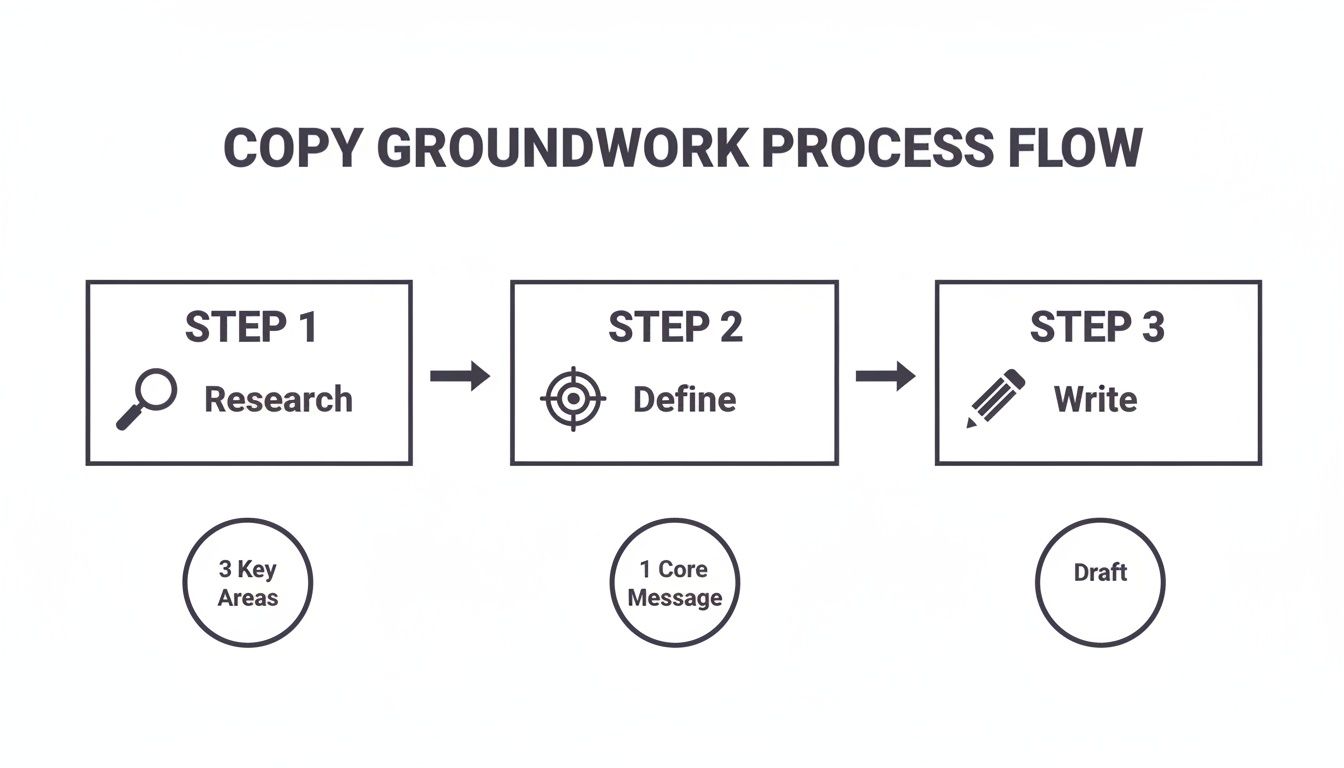
This just goes to show that writing is the last piece of the puzzle, not the first. You have to get your strategy straight before a single word hits the page.
Developing Your Customer Persona
A customer persona is basically a detailed profile of your perfect customer. But don't just focus on their age or where they live; you need to get into their world.
- Goals: What are they really trying to accomplish?
- Pain Points: What's frustrating them or holding them back right now?
- Values: What matters most to them when they're making a buying decision?
- Hesitations: What are they worried about? What might stop them from buying from you?
Don’t just make this stuff up. The best insights come from the real world. Go dig through your customer reviews—and your competitors' reviews, too. Read support tickets. Listen to sales call recordings. You're hunting for the exact words and phrases people use to talk about their problems. That's gold for writing copy that truly connects.
Pro Tip: I like to create a simple one-page doc for each persona. Give them a name, find a stock photo, and write a quick bio. Before you write anything, ask yourself: "Would Sarah understand this? Would this convince her to take action?"
Defining Your Page Goals
Every single page on your website needs to have one main job. If a page doesn't have a clear goal, the copy will feel aimless, and your visitors will get confused. And a confused visitor never converts.
For every page, define one Primary Conversion Goal. This is the number one thing you want someone to do.
Think of it like this:
- Homepage: Get people to click through to a key service page.
- Service Page: Push them to book a consultation.
- About Page: Build trust and get them to look at your work.
- Contact Page: Make it easy for them to fill out your form.
Once you have that primary goal locked in, you can think about Secondary Goals, like getting a newsletter signup or a free download. But the copy should always steer people toward that main objective. This focus is what turns a regular webpage into a machine for getting results.
It also makes your site much easier to use, which is a huge part of digital accessibility. By giving each page a clear purpose, you're not just boosting conversions—you're creating a better experience for everyone. If you want to dive deeper, we have a detailed guide on ADA website compliance that explains how to build a more inclusive site.
Structuring Your Message for Maximum Persuasion
Great copy isn't about using fancy words; it's about psychology. Think of it as building a logical argument that walks a visitor from casual curiosity to making a confident "yes" decision. If you're just throwing random blocks of text on a page, you're missing the point. You need a deliberate messaging hierarchy that builds momentum.
This is exactly why the global copywriting market is blowing up. It’s expected to reach USD 42.83 billion by 2030, which tells you businesses are taking persuasive communication seriously. The demand for real, strategic writing skill skyrocketed after tools like ChatGPT launched, proving that strategy beats automation every time. You can actually dig into the copywriting market's growth and see what’s driving it.
Go Beyond the Basic AIDA Framework
Most marketers have heard of AIDA: Attention, Interest, Desire, Action. It’s a decent starting point, but let's make it more practical for a real website page. I like to think of it as a conversation where each section preemptively answers the next question that pops into your reader's head.
- Attention: Your main headline and hero image have one job: grab them. The visitor needs to know, "Am I in the right place?"
- Interest: Quickly introduce the problem you solve. You want them thinking, "Okay, these guys get my struggle."
- Desire: Here's the meat of your page. Paint a picture of the better future your product or service creates. This is where you build a powerful "I want that" feeling.
- Action: They want it. Now what? Tell them exactly how to get it with a crystal-clear call-to-action (CTA).
This sequence creates a natural journey, guiding visitors from "What is this?" to "I need this."
Craft a Compelling Value Proposition
Your value proposition is the anchor for all your messaging. It's a short, sharp statement explaining why a customer should choose you over anyone else. It has to immediately answer, "What’s in it for me?"
A strong value proposition is not a fluffy slogan. It's specific and focuses on the outcome.
For instance, a generic prop like "Innovative Accounting Solutions" is forgettable. A much better version would be, "We handle your bookkeeping and taxes so you get 10 hours back every month to focus on your business." See the difference? The second one sells a tangible result.
A killer formula I lean on is "Problem-Agitate-Solve" (PAS). First, state the problem your customer faces. Then, agitate it by poking at the frustrations it causes. Finally, present your service as the perfect solution that makes all that pain go away.
Building an Information Hierarchy That Works
Once you've nailed your core message, you need to arrange the supporting details in a way that makes sense. The goal is to answer their questions before they even think to ask them and handle objections before they pop up.
Here’s a simple page structure you can steal and adapt for almost any service:
- Hero Section: Powerful headline and your value proposition, front and center.
- Problem Section: Show them you understand their pain points on a deep level.
- Solution Section: Introduce what you do as the answer to that pain.
- Benefits Section: Detail the positive outcomes they'll get—not just the features you offer.
- How It Works: A simple 3-step process works wonders here. It makes signing up feel easy.
- Social Proof: Sprinkle in testimonials or case studies to build trust.
- Final CTA: End with a clear, low-risk call-to-action.
When you structure your page like this, each section builds on the one before it. You’re not just writing copy anymore; you're engineering a persuasive experience from top to bottom.
Writing Headlines and Body Copy That Connects
Okay, you've done your research and mapped out your messaging. Now for the fun part: turning that strategy into words that actually grab people’s attention and make them feel something.
This is where all the planning pays off. Your headline and body copy work together as a one-two punch to turn a random visitor into someone genuinely interested in what you have to offer.
Crafting Headlines That Stop Scanners
Let's be honest—most people don't read websites, they scan them. Your headline has one job, and it has about three seconds to do it: convince the visitor to stop scrolling and read the next sentence.
If your headline fails, the rest of your page might as well be invisible. Forget about being clever or mysterious; focus on clarity and delivering an immediate benefit.
Headline Formulas for Different Goals
Over the years, certain headline patterns have proven to be incredibly effective. They work because they tap directly into a visitor's needs and motivations.
Here’s a quick breakdown of a few tried-and-true formulas you can adapt for your own business:
| Formula Type | Structure | Example | Best For |
|---|---|---|---|
| Benefit + Timeframe | Promise a specific outcome within a set period. | Double Your Qualified Leads in 90 Days. | Offering a clear, measurable result for services or B2B products. |
| Overcome an Objection | Acknowledge a common pain point and offer the solution. | Finally, a Sunscreen That Doesn’t Feel Greasy. | E-commerce or services where customers have known frustrations. |
| Specific Audience + Outcome | Call out your target customer and state what you do for them. | The Project Management Tool for Growing Marketing Teams. | Niche products or services targeting a well-defined audience. |
These aren't rigid rules, but powerful starting points. The key is to test what resonates most with your audience.
Key Takeaway: The best headlines speak directly to the visitor's self-interest. Always answer their unspoken question: "What's in it for me?"
Turning Features into Must-Have Benefits
One of the most common mistakes I see on business websites is a long list of features. Your customers don't really care that your software has "AI-powered analytics." They care that it helps them "uncover hidden revenue opportunities without spending hours on spreadsheets."
See the difference? A feature is what your product is. A benefit is what the customer gets. You have to connect those dots for them.
Try this simple exercise. List one of your features, then keep asking "So what?" until you land on a real, tangible outcome for your customer.
-
Feature: 24/7 Customer Support
-
So what? You'll never be stuck with a problem at 2 AM. You get instant help when you need it most.
-
Feature: Durable, Scratch-Resistant Flooring
-
So what? Your floors will look brand new for years, even with kids and pets tearing through the house.
This simple shift from talking about yourself to talking about your customer's success is the core of persuasive writing.
Building Trust with Story and Social Proof
Once you've hooked them with benefits, you need to prove you can actually deliver. People are naturally skeptical online, but they trust other people. This is where you bring in the proof.
Weave these elements into your copy to build confidence:
- Customer Testimonials: Use real quotes from happy clients. Adding their name, company, and a photo makes it far more believable. Pull out the most powerful sentence and use it as a standout quote.
- Case Studies: Tell a quick story about how you helped a specific client solve a problem. A simple "Challenge > Solution > Results" format works wonders, especially with real numbers.
- Social Proof Numbers: Don't be shy! Mentioning things like "500+ projects delivered" or "Trusted by 2,000+ local businesses" gives visitors a powerful sense of security.
These elements show potential customers they aren't taking a risk. They're making a smart choice that others have already validated.
Find and Maintain Your Brand Voice
Your brand voice is your company's personality, expressed through words. Are you professional and authoritative? Friendly and casual? Witty and playful?
A consistent voice makes your brand memorable and connects you with the right kind of customer. If you haven't defined yours yet, ask this: "If my brand were a person, what three adjectives would describe them?"
Maybe your answer is "Helpful, Confident, and Straightforward." Now, run every word you write through that filter. This simple check ensures your website sounds like it was written by a human, not a committee.
The demand for genuine, human-sounding copy has never been higher. In fact, freelance demand for skilled writing and content creation surged by 25.2% in 2025, making it the fastest-growing freelance job category. Businesses are realizing that robotic, AI-generated text just doesn't connect and can even hurt trust. You can learn more about the growth of skilled copywriting and why it's so critical in today's market.
Weaving SEO and Accessibility Into Your Copy Without Sounding Like a Robot
Great copy shouldn't feel like a compromise between what sounds good to a human and what ranks on Google. The best website copy does both—effortlessly. This is where you learn how to write for your audience, search engines, and users with disabilities all at once, without your writing ever sounding forced or clunky.
This whole process starts way before you even think about peppering in keywords. It really begins with a commitment to clarity and a great user experience. As it turns out, that’s exactly what both search engines and accessibility standards reward.

Finding Keywords That Match How People Actually Search
Effective SEO isn’t about tricking algorithms; it’s about matching what people are searching for. This is called user intent. You need to get inside the searcher’s head and figure out the specific problem they’re trying to solve when they type something into that search bar.
Focus your energy on long-tail keywords. These are the longer, more specific phrases that reveal a much clearer intent. For instance, instead of a broad keyword like "web design," a far more valuable long-tail keyword is "web design for Sacramento small businesses." You know the person searching for that is much closer to making a decision.
Your keyword research should uncover the exact language your customers use. Are they searching for "accountant" or "bookkeeping services"? Knowing these little nuances is what helps you write copy that truly resonates and ranks.
Where to Place Keywords for a Natural Flow
Once you've got your primary and secondary keywords for a page, the trick is to place them strategically without making your writing sound weird. My golden rule is to always, always prioritize the human reader. If a keyword feels awkward, don't force it.
Here are the key spots to include your focus keyword:
- H1 Tag: This is your page's main headline. It needs to contain your primary keyword and make the page's topic crystal clear. You should only ever have one H1 per page.
- SEO Title: This is the title that shows up in search results and the browser tab. It has to be compelling and include your keyword, ideally near the beginning.
- URL Slug: Keep your URL clean, short, and descriptive (e.g., /services/website-copywriting).
- First 100 Words: Placing your keyword early in the introduction helps signal relevance to both users and search engines right away.
- Subheadings (H2s and H3s): Weave your main keyword or related variations into your subheadings where it makes natural sense.
- Image Alt Text: This text describes an image for screen readers and search engines. It's a perfect, often overlooked, spot to include a keyword naturally.
Crucial Tip: Never keyword stuff. Jamming your keyword into every other sentence is an ancient practice that will get you penalized. The goal is natural integration, not density.
Writing for Everyone: Accessibility and WCAG
Writing for accessibility isn't just some technical box to check; it’s a core part of good copywriting. When your copy is clear, simple, and well-structured, it becomes easier for everyone to use, including people with disabilities. This lines up perfectly with the Web Content Accessibility Guidelines (WCAG).
Accessible writing is good for business and even better for your SEO. Google rewards sites that provide a fantastic user experience, and accessibility is a huge piece of that puzzle. For a deeper look at this relationship, check out this great resource on how accessibility and SEO are deeply connected.
Follow these simple principles to make your copy more inclusive:
- Use Descriptive Link Text: Ditch generic phrases like "click here" or "read more." Instead, use anchor text that clearly describes where the link goes. For example, "Learn more about our SEO services" is way better.
- Write in Simple Language: Aim for a reading level that’s easy for most people to understand. Cut the jargon and overly complex sentences. This has the added benefit of helping with voice search, which favors conversational language. To get ahead of the curve, you should definitely optimize your website for voice search.
- Structure Content Logically: Use headings (H1, H2, H3) to create a clear hierarchy. This helps users with screen readers navigate the page efficiently and allows all your readers to scan for information easily.
- Provide Context for Images: Use alt text to describe the content and function of every single image on your site. Don't skip this.
By focusing on clarity and structure, you automatically make your copy more SEO-friendly and accessible. It’s a true win-win that improves the user experience and helps you connect with a much wider audience.
Nail Your Calls to Action and Test Your Way to the Top
So you’ve done all the hard work. Your copy grabbed their attention, built some serious interest, and made them want what you have. But now comes the moment of truth: you have to ask for the click. A weak Call-to-Action (CTA) here is like fumbling the ball on the one-yard line. This is where you turn a reader’s curiosity into a real business result.
A great CTA doesn't feel like a pushy sales pitch. Instead, it feels like the most natural next step in the conversation you've been having with the reader. It needs to be crystal clear, super concise, and all about the value they get by clicking. Remember, confusion is the ultimate conversion killer. Your instruction has to be impossible to misunderstand.
Writing CTAs That Actually Get Clicks
It's time to banish generic buttons like "Submit" or "Click Here" from your vocabulary. Your CTA copy has to be specific and action-oriented. It should fill in the blank for the user: "I want to…"
For example, instead of a button that just says "Download," a much stronger version is "Get My Free Marketing Plan." See the difference?
The idea is to lower the barrier to entry and make them feel confident. Using low-commitment language is a great way to do this. "Get a Free Quote" feels a lot safer than "Buy Now," which makes it an easier first step for someone who just landed on your site.
Here are a few pointers for crafting CTAs that get the job done:
- Lead with a Strong Verb: Kick things off with an action word. Think Get, Start, Join, or Discover.
- Highlight the Value: Tell them exactly what's in it for them. "Start Your Free Trial" is decent, but "Start My 30-Day Free Trial" is way better because it's specific and reassuring.
- Create Urgency (But Be Honest): Phrases like "Book Your Spot Now" work wonders for limited-time deals or events. Just use them sparingly and honestly, or you risk sounding like spam.
Don't forget the visual side of things. Your CTA button's design matters just as much as the words. Use a color that contrasts with the rest of the page so it pops, and give it plenty of white space. You want to draw the eye right to it.
Before we move on, let's put these ideas into a quick checklist you can use to audit your own CTAs.
CTA Effectiveness Checklist
Use this table to quickly evaluate whether your CTAs are built to convert. Each point is designed to remove friction and make the user's decision to click an easy one.
| Element | Best Practice | Why It Works |
|---|---|---|
| Clarity | Is the action completely obvious? | A user should know exactly what will happen when they click. "See Pricing" is clearer than "Learn More." |
| Verb Choice | Does it start with a strong, action-oriented verb? | Verbs like "Get," "Start," and "Join" prompt action and create momentum. |
| Value Proposition | Does it state the benefit to the user? | "Get My Free Ebook" highlights the value, making the click more appealing than a simple "Download." |
| Friction | Is the language low-commitment? | "Request a Demo" feels less intimidating than "Schedule a Sales Call," reducing hesitation. |
| Visibility | Does the button's color and placement make it stand out? | A high-contrast button with ample white space is easy to spot and encourages interaction. |
Reviewing your buttons against this checklist is a simple but powerful way to spot opportunities for immediate improvement.
Start Testing Your Copy to Get Better Results
Listen, no copywriter—no matter how many years they've been at it—gets it perfect on the first draft. That's why testing isn't just a "nice-to-have," it's a core part of writing website copy that actually works. A/B testing (or split testing) is just a fancy way of saying you compare two versions of a webpage to see which one performs better.
You show version A to half your visitors and version B to the other half. By tracking what they do, you get cold, hard data on which headline, body copy, or CTA truly connects with your audience. This data-driven approach takes the guesswork out of the equation.
The real magic of A/B testing is how small tweaks can lead to huge wins. Simply testing “Get Your Free Quote” against “Request a Consultation” could boost your leads by 20% or more. If you're not testing, you're just guessing.
How to Run a Simple A/B Test
Getting started with testing doesn't mean you need a huge budget or a data science degree. Tools like Google Optimize (which is being integrated into Google Analytics 4) make it pretty straightforward for anyone.
Here’s a simple game plan:
- Start With a Hypothesis: This is just an educated guess. For example: "I believe changing the CTA from 'Learn More' to 'See Pricing' will get more clicks because it's more direct and answers a key user question."
- Create One Variation: This is critical. Change only one thing at a time. If you change the headline and the button color and the main image, you'll never know which change actually made the difference.
- Let the Test Run: Don't call it quits after a day. You need enough data for the results to be statistically significant. Let it run until you have a clear winner based on a decent number of visitors.
- Analyze and Do It Again: Once a winner emerges, make that version the new standard for everyone. Then, come up with a new hypothesis and start the cycle all over again.
This constant loop of testing and refining is what separates the pros from the amateurs. It even applies to video—you can test different thumbnails or titles to see what grabs attention. In fact, you can learn more about the powerful benefits of video marketing and see how these same testing principles can supercharge that content, too. Continuous optimization isn't just a strategy; it's the key to long-term growth.
Common Questions About Writing Website Copy
Even after you get the hang of writing for your website, a few tricky questions always seem to pop up. It's totally normal. Over the years, I've heard the same practical challenges from countless business owners trying to get their copy just right. Let's tackle some of the most common ones I hear so you can move forward with confidence.
How Long Should My Website Copy Be?
Honestly? It should be exactly as long as it takes to convince the right person, and not one word more. There’s no magic word count.
A homepage, for instance, needs to pack a punch right away with short, powerful statements that communicate your value. A detailed service page, on the other hand, might need a lot more text to walk through benefits, explain your process, and answer every "what if?" a potential customer might have.
Stop focusing on the word count. Instead, obsess over clarity and completeness. Put yourself in the shoes of a skeptical prospect and ask, "Do I have everything I need to make a decision?" Just be sure to use headings, bullet points, and short paragraphs to keep even longer pages from feeling like a wall of text.
Can I Use AI to Write My Website Copy?
Absolutely, but with a big caveat. AI tools like ChatGPT are incredible assistants, but they shouldn't be the final author of your copy. Think of AI as a brainstorming buddy or a machine that churns out a rough first draft. It's fantastic for generating outlines, simplifying dense topics, or coming up with a dozen different headline ideas in seconds.
The problem is that purely AI-generated text almost always lacks a genuine brand voice. It can't capture the subtle nuances that build an emotional connection and, frankly, it often sounds generic. That generic feel can slowly erode the trust you’re trying to build.
The smartest way forward is a hybrid approach. Let AI do the initial heavy lifting. Then, a skilled human writer needs to come in to refine, edit, and inject the personality and persuasive spark that actually gets people to click "buy."
What's the Biggest Mistake People Make?
This one is easy. The single most common—and most costly—mistake is writing about features instead of benefits. As the business owner, you’re an expert on what your product does. You might say, "Our software has a cloud-based dashboard."
Your customer doesn't care about that. They only care about what it does for them. A benefit-focused version would be, "Access your critical business data from anywhere, on any device." You have to translate every feature into a clear, desirable outcome for your reader.
Get in the habit of constantly answering your visitor's unspoken question: "Why should I care?" Shifting to this perspective is the absolute cornerstone of good copy. If you want to dig deeper into this concept, there's great info on copywriting for a website that converts.
How Often Should I Update My Website Copy?
Your website copy isn’t a one-and-done project; it’s a living asset. At a minimum, plan on reviewing and refreshing your copy once a year. You should also update it whenever there's a big change in your business.
That could be triggered by things like:
- Launching a new service or product
- Pivoting to a new target audience
- Repositioning your brand in the marketplace
Even more importantly, keep an eye on your analytics. If you notice a key page has a high bounce rate or low conversions, that’s your signal to revisit the copy right away. Consistent updates also tell search engines that your site is active and relevant, which is always a nice little boost for your SEO.
Seth Sanders is the founder of Site Igniters, a digital marketing agency in El Dorado Hills, California.