
What Does a Small Business Website Cost? A Practical Budgeting Guide

Figuring out what a new website will cost feels a lot like asking, "How much does a car cost?" The answer can be anything from a few hundred bucks for a DIY project to $10,000+ for a completely custom build.
- Website costs range from a few hundred dollars for DIY to $10,000+ for custom agency builds.
- Choose between DIY, freelancer, or agency based on your budget, timeline, and technical needs.
- Always budget for hidden ongoing costs like hosting, SSL, maintenance, and security updates.
The final price tag really boils down to what you need it to do. Are you building a simple digital brochure, or do you need a powerful online store with all the bells and whistles? The complexity of the design and who you get to build it are the biggest factors.
Your Quick Guide to Website Budgeting
Before we get into the nitty-gritty, let's get a bird's-eye view of what you should expect to spend. A small business website cost isn't a single number but a whole spectrum of possibilities, shaped by what you want to achieve. This is your high-level overview to get the conversation started.
Think of it like building a house. You could go with a pre-fab model (a DIY template), hire a general contractor for a semi-custom job (a freelancer), or bring in an architect for a one-of-a-kind design (an agency). Each path has a very different price and requires a different amount of your own time and effort.
Key Cost Drivers to Consider
To set a smart budget, you have to know where the money is actually going. Your total cost is a mix of the big one-time payment to get it built and the smaller, regular fees to keep it running.
These are the main things that will determine your final bill:
- Initial Design & Development: This is almost always the biggest upfront expense. It covers everything from the visual look and feel to the actual coding that makes it all work.
- Domain Name: This is your website's address, like
yourbusiness.com. You're essentially renting it, so this is a small annual fee. - Web Hosting: Think of this as the plot of land your website "house" is built on. It's a recurring fee for server space that keeps your site online and accessible to visitors.
- Ongoing Maintenance: This is crucial. It covers security updates, regular backups, and software patches to make sure your site stays fast, secure, and functional.
Estimated Website Costs at a Glance
To give you a clearer picture, this table breaks down the typical costs associated with the most common approaches to building a website.
| Method | Typical Upfront Cost | Typical Annual Cost | Best For |
|---|---|---|---|
| DIY / Template | $0 – $500 | $50 – $300+ | Solopreneurs, hobbyists, or those on a very tight budget with time to learn. |
| Freelancer | $1,000 – $8,000 | $300 – $1,200+ | Small businesses needing a professional but straightforward site without agency overhead. |
| Web Design Agency | $10,000+ | $1,200+ | Businesses needing a custom, high-performance website with ongoing strategy and support. |
Keep in mind these are starting points, and complex features like e-commerce or custom integrations will increase the cost in each category.
Establishing a Realistic Budget Range
A good rule of thumb for a professional small business website is an initial investment somewhere between $500 and $10,000. DIY platforms fall on the low end, freelancers typically land in the middle, and a full-service agency build usually starts at the high end and goes up from there.
Once your site is live, plan on budgeting another $100–$1,200+ every year for the essentials like hosting, security, and your domain name.
Your website is not just an expense; it's a foundational investment in your business's growth. The right budget aligns with your goals, ensuring your digital presence is a powerful asset, not a financial drain.
For a deeper dive into all the potential expenses you might encounter, check out this excellent a realistic small business website budgeting guide. Getting a handle on these core costs from the get-go helps you make much smarter decisions for your business.
Understanding the Core Website Costs
Every small business website, no matter how simple or complex, has a few foundational pieces. It's a lot like building a new retail shop. Before you can worry about paint colors and what to put on the shelves, you have to lock down the street address, the plot of land, and the keys to the front door. Your website works the same way.
Getting a handle on these non-negotiable costs is the first step to building a realistic budget. It helps you make sense of quotes from developers and ensures your small business website cost estimates cover all the basics from day one. Without these parts, your website simply can't exist online.
Your Digital Address: The Domain Name
First things first, every website needs a unique address so people can find it. This is your domain name—the yourbusiness.com you type into a browser. Think of it as your digital identity and a critical piece of your brand. You don't actually buy a domain name forever; you just rent it, usually on a yearly basis.
This is often the smallest part of your budget, but you could argue it's one of the most important for getting recognized.
- Standard Cost: Plan on spending $10 to $20 per year for a common domain like
.com,.net, or.org. - Initial Offers: A lot of hosting companies will throw in a free domain name for the first year to get you to sign up.
- Privacy Protection: For an extra $10 to $15 a year, you can add domain privacy. This hides your personal contact info from public databases, which is great for avoiding spam.
Choosing a domain name that's easy to remember and says something about your business is a huge decision, making this small annual fee a fantastic investment.
Your Digital Land: Web Hosting
If the domain is your address, web hosting is the piece of land where your website's files—all the code, text, and images—actually live. Without a host, your domain name would just point to an empty lot. This service is what keeps your site up and running for visitors 24/7.
Hosting prices can be all over the map, depending on the performance and resources you need. It’s just like real estate—location and size determine the price.
Web hosting is the engine that powers your website. A slow or unreliable host can directly harm your user experience and search engine rankings, as 47% of consumers expect a webpage to load in two seconds or less.
You’ll generally run into three main types of hosting:
- Shared Hosting ($3 – $10/month): This is the go-to for budget-conscious owners. Your site shares server space with hundreds of others. It’s perfect for brand-new sites with low traffic, but things can slow down if one of your "neighbors" gets a sudden rush of visitors.
- VPS Hosting ($20 – $60/month): A Virtual Private Server gives you your own dedicated slice of a server. It’s a major step up in speed and reliability, making it a great fit for businesses that are starting to see real growth.
- Dedicated Hosting ($80 – $300+/month): Here, you get an entire server all to yourself. This means maximum power, security, and control. It’s really for high-traffic websites and especially eCommerce stores that can't afford a single second of downtime.
Your Digital Security: The SSL Certificate
Finally, you need a way to secure the connection between your website and its visitors. An SSL (Secure Sockets Layer) certificate encrypts any data shared on your site, like info from a contact form or credit card numbers. It's the little thing that puts the "s" in https and adds that reassuring padlock icon in the browser bar.
Having an SSL certificate isn't really optional anymore. It's a baseline requirement for building trust with customers and for getting any love from search engines like Google, which will flat-out label sites without one as "Not Secure." For most businesses, that warning is a customer-repellent.
- Cost: The good news is that many hosting providers now include a basic SSL certificate for free.
- Premium Options: For businesses that handle extra-sensitive data or need higher levels of validation (like banks or major online stores), premium SSL certificates can run anywhere from $10 to $300 per year.
Once you've got these three core costs—domain, hosting, and SSL—nailed down, you have a solid foundation for your website budget. They're the recurring, must-have expenses that keep your digital doors open for business.
Choosing Your Path: DIY vs. Freelancer vs. Agency
Deciding how your website gets built is the single biggest factor that will determine your final small business website cost. The path you take shapes everything from the initial budget and your personal time commitment to the quality of the final product.
Think of it like getting dinner. You could cook at home (the DIY route), hire a private chef for a special occasion (a freelancer), or head to a fine-dining restaurant for a full-service experience (an agency). Each option gets you a meal, but the cost, effort, and outcome are worlds apart.
No matter which path you take, some costs are unavoidable.
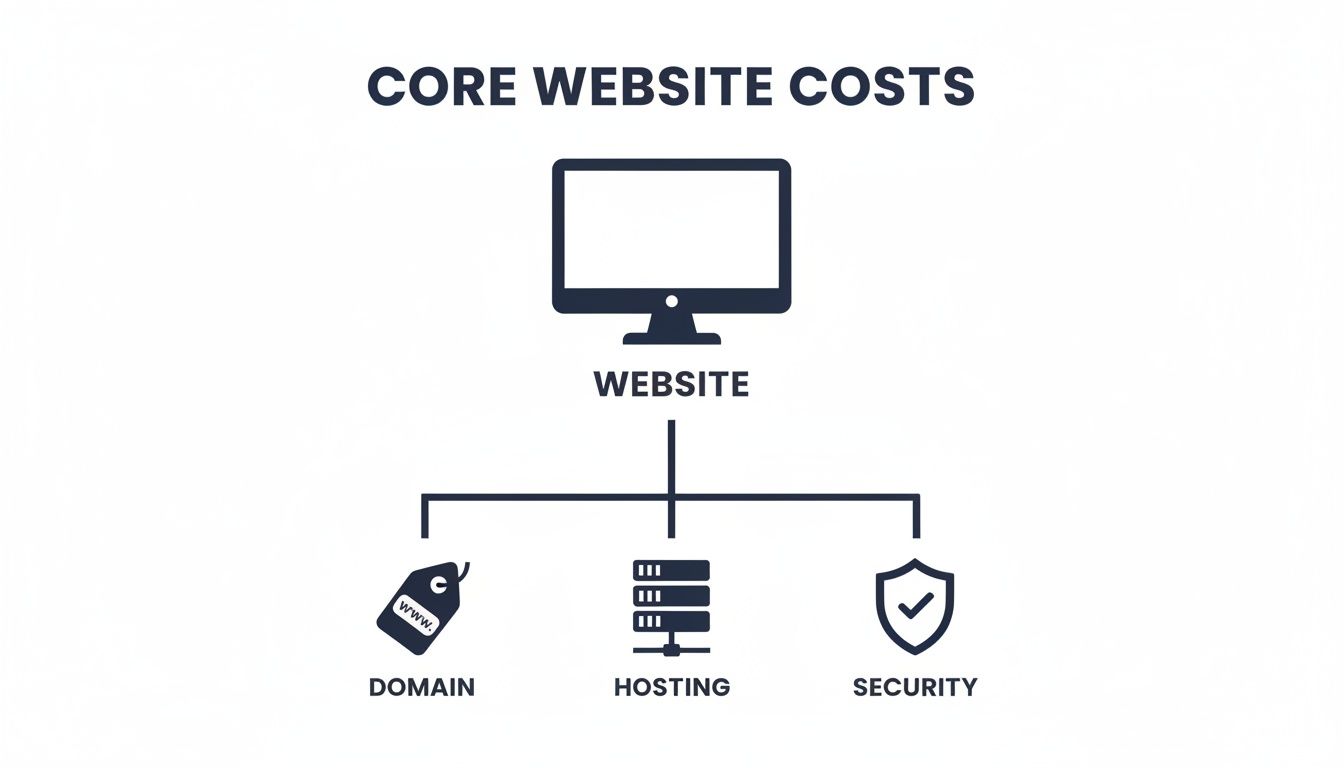
This diagram shows that every website is built on the core pillars of a domain, hosting, and security. These are the foundational, recurring costs you'll have regardless of who builds the site.
The DIY Approach: Cooking at Home
The Do-It-Yourself (DIY) path means rolling up your sleeves and using a website builder like Squarespace, Wix, or Shopify. This is the most budget-friendly option in terms of upfront cash, but it demands a serious investment of your time.
You're in the driver's seat for everything: choosing the template, writing the copy, and arranging all the pieces yourself. It's a fantastic choice for brand-new businesses, solopreneurs, or anyone with a very tight budget and a willingness to learn.
- Pros: Lowest upfront cost, total creative control, and a great way to learn the basics of web management.
- Cons: Can be incredibly time-consuming, has a steep learning curve, you're limited by template functionality, and you're on your own for troubleshooting.
- Best For: Hobbyists, new startups, or businesses that just need a simple "digital business card" and have more time than money.
This route is empowering, but you have to be realistic about your own skills and available hours. The most common mistake DIY builders make is underestimating the time commitment.
Hiring a Freelancer: The Private Chef
Hiring a freelancer is like bringing in a professional to handle the heavy lifting. You get a customized website tailored to your specific needs without the overhead of a big team. A good freelancer brings specialized expertise, whether that's in design, development, or both.
This is the middle ground, offering a professional result at a more accessible price point than an agency. Market studies show the average professional small-business website design falls between $2,000 and $9,000, and this option fits squarely in that range.
- Pros: A professional, custom-built site; more affordable than an agency; direct communication with the person doing the work.
- Cons: Quality can vary wildly; you're reliant on one person's schedule; might lack a strategic, marketing-focused approach.
- Best For: Small businesses that have outgrown their DIY site and need a more polished, professional online presence on a moderate budget.
Partnering with an Agency: The Fine-Dining Restaurant
Working with a web design agency is the premium, full-service option. You aren't just paying for a website; you are investing in a comprehensive strategy executed by a team of specialists—project managers, strategists, designers, developers, and copywriters.
This path has the highest small business website cost but delivers a strategic asset built for growth. An agency handles everything from initial market research to post-launch support and marketing, ensuring your site is not just beautiful but also effective at bringing in business. A thorough discovery process is key to getting this right. You can learn more about our structured website discovery process to see how a strategic foundation is built from the ground up.
- Pros: The highest quality and reliability; a strategic, data-driven approach; ongoing support and expertise; access to a full team of specialists.
- Cons: Highest cost; longer timelines; potentially less direct contact with individual creators.
- Best For: Established businesses, companies planning for rapid growth, or those needing complex features like custom e-commerce or software integrations.
Website Build Method Comparison
To make the choice clearer, here’s a side-by-side look at what you can expect from each approach. Think about which factors matter most to your business right now.
| Factor | DIY (e.g., Squarespace, Wix) | Freelancer | Agency |
|---|---|---|---|
| Initial Cost | $0 – $500 | $2,000 – $9,000 | $10,000+ |
| Your Time | Very High | Medium | Low |
| Customization | Low (Template-based) | High (Custom design) | Very High (Fully bespoke) |
| Strategy | None (You provide it) | Limited (Often design-focused) | Comprehensive (Full team) |
| Support | Platform help-desk only | Varies (Often project-based) | Ongoing (Retainers available) |
| Expertise | Your own skills | Specialized (e.g., design, code) | Multi-disciplinary Team |
Choosing the right path comes down to an honest look at your budget, timeline, technical comfort, and long-term business goals. A mismatch can lead to frustration and wasted money, but the right choice will set a strong foundation for your digital success.
Budgeting for Hidden Costs and Ongoing Maintenance
Launching your website is a huge milestone, but it's the starting line, not the finish line. A lot of business owners make the mistake of seeing their website as a one-time purchase, and it’s a costly one.
Think of it like buying a car. You don’t just pay the sticker price and drive it forever, right? You have to budget for gas, insurance, oil changes, and the occasional repair to keep it running safely and smoothly. Your website is exactly the same. The real small business website cost includes ongoing maintenance and a few "hidden" expenses that are easy to forget about until they pop up unexpectedly.
The Non-Negotiables of Website Maintenance
Some ongoing tasks are absolutely essential. Neglecting them is like never changing the oil in your car—everything seems fine for a while, right up until a catastrophic and expensive failure. These are your website’s insurance policy.
- Software and Plugin Updates: The web is always changing. Your website's core software, themes, and plugins need regular updates to patch security holes, fix bugs, and stay compatible with new browsers.
- Security Monitoring and Malware Scanning: Hackers use automated bots that are constantly looking for vulnerable websites. Proactive security monitoring finds and blocks threats before they can cause damage, protecting your business data and your customers' trust.
- Regular Backups: If your site ever crashes—whether from a server hiccup, a bad update, or a security breach—a recent backup is your lifeline. Without one, you could lose everything and be forced to rebuild from square one.
You can usually cover these core tasks with a monthly retainer from a freelancer or agency, typically costing between $50 and $200 per month. If you're using a DIY platform, these services are often rolled into your subscription, but it's smart to double-check exactly what's included.
Planning for Growth and Evolving Needs
Beyond just keeping the lights on, your budget also needs to account for growth and keeping your site relevant. These aren't just about preventing disaster; they’re about improving performance and seizing new opportunities.
A critical area that often becomes a hidden cost is accessibility. Making sure your website can be used by people with disabilities isn't just the right thing to do; in many cases, it's a legal requirement. Ignoring this can lead to expensive lawsuits and shut out a whole segment of potential customers. You can learn more about these rules and how to get ahead of them by understanding the fundamentals of ADA website compliance. Trust me, it's far cheaper to build a site accessibly from the start than to try and fix it later.
Your website is a living part of your business, not a static brochure. A successful site requires a budget that supports continuous improvement, content creation, and strategic promotion.
Here are some other common ongoing costs you should plan for:
- Premium Plugin and Software Renewals: Many of the best website features come from premium plugins that require annual license renewals. These can cost $50 to $200 per year, each.
- Content Creation: To attract visitors and climb the ranks on Google, you need fresh, valuable content. That might mean budgeting for a copywriter to create blog posts ($100 – $300 each) or hiring a photographer for new project photos ($500+ per shoot).
- SEO and Digital Marketing: A beautiful website doesn't do much good if nobody can find it. A professional SEO retainer to improve your Google rankings can run anywhere from $500 to $2,500+ per month.
- Periodic Redesigns: A website's design usually looks fresh for about 3-5 years. After that, it can start to feel dated and might not work well on the latest devices. Budgeting for a redesign or a major refresh will keep your site from becoming obsolete.
How Advanced Features Impact Your Budget
A simple, informational website is your digital business card. It tells people who you are and what you do, and that's a great start. But what happens when you need your website to actually do more work for you? Adding advanced functionality is the natural next step as your business grows, but this is also where the small business website cost can start to climb.
Think of it like this: a basic website is a standard sedan. It gets you from point A to point B reliably. Advanced features are like upgrading that sedan to a fully-equipped commercial van with refrigeration and custom shelving. The core purpose is the same—transportation—but the specialized gear makes it a much more powerful (and more expensive) business tool.
The eCommerce Game Changer
Adding the ability to sell products directly from your site is one of the most common and powerful upgrades you can make. It's also one of the most complex. eCommerce isn't just a simple "feature"; it’s an entire system that has to juggle everything from product pages and inventory to secure payments and shipping logistics.
When businesses add an online store, costs jump pretty dramatically. A custom eCommerce build can start in the $5,000–$20,000+ range, and that's just to get it off the ground. On top of that, you have ongoing transaction fees from payment processors like Stripe or PayPal, which usually take around 2.9% + $0.30 for every single sale. These recurring costs mean the true annual expense for an eCommerce site can easily hit $1,000–$10,000+ after it’s launched.
Beyond the Shopping Cart
While eCommerce is a huge cost driver, other interactive features also add layers of complexity and expense to your project. Each one needs specialized development, premium plugins or software, and careful integration to make sure it plays nicely with the rest of your site.
Here are a few common examples and what they really involve:
- Membership Portals: If you want to create exclusive content areas for paying members, you'll need secure login systems, user profile management, and rules to restrict content.
- Booking and Appointment Systems: For any service-based business, a calendar that can handle scheduling, take payments, and send out reminders is essential but tricky to implement correctly.
- Custom Integrations: Need your website to "talk" to your CRM, inventory software, or another third-party service? These custom connections require skilled developer hours to build and maintain.
Advanced functionality transforms your website from a passive brochure into an active business asset. The investment is higher, but the potential return from automated sales, streamlined bookings, and improved customer engagement is often substantial.
Planning for Functionality and Growth
It's easy to get carried away and want every bell and whistle you can think of. But taking a more strategic approach will save you a ton of money and headaches down the road. Start by figuring out the single most valuable function your customers need right now. Is it scheduling a consultation? Or is it buying a product? Build that first, and make sure it works flawlessly.
For other features, like customer support, you can often find powerful, low-cost solutions to get started. When thinking about chatbots, for example, don't assume you need an expensive custom build from day one. You can explore free chatbot options for your website to see what's out there.
Remember, every feature you add needs to be maintained and supported, which adds to your long-term costs. Focusing on a phased rollout lets you manage your budget while building a site that can grow with your business. Adding features over time also ties your investment to real customer needs, ensuring you're getting a positive ROI.
Making a Smart Investment in Your Website
It’s easy to look at your website as just another line item on a budget—a necessary expense to check off the list. But that mindset is a trap. The most successful businesses see their website for what it truly is: a strategic investment engineered to bring in real money.
Making a smart call on your small business website cost isn't about pinching pennies or finding the absolute cheapest quote. It’s about finding the sweet spot where your investment delivers the maximum value and growth for your company.
Instead of asking, "How much is this going to set me back?" start asking, "What could this earn me?" That single change flips the script. Budgeting becomes less of a defensive chore and more of an offensive game plan.
Calculating Your Website's Potential ROI
To really treat your site like an investment, you have to connect the dots between what you spend and what you get back. Return on Investment (ROI) isn't some high-flying concept for Wall Street; it's a practical tool for every single business owner.
You can get a ballpark estimate of your potential ROI by looking at a few key numbers:
- Lead Generation: How many solid, qualified leads does your site need to pull in each month to make the investment worthwhile?
- Conversion Rate: What percentage of your visitors need to take action, whether that’s filling out a form or making a purchase? The industry average sits around 2-3%, but this can swing wildly depending on your business.
- Average Customer Value: When you land a new customer, what are they worth to you over the entire time they do business with you?
Once you have those figures, the math is simple but eye-opening. Let's say your new website costs $5,000 to build and your average customer is worth $500. You only need that website to bring in 10 new customers to completely break even on your initial investment. Everything after that is profit.
A website's true value isn't measured by its price tag, but by its ability to consistently generate leads, automate sales, and build brand equity—making it one of the hardest-working assets in your business.
Smart Strategies to Maximize Value
Making a smart investment also means knowing where to spend and where to save without sacrificing quality. You don’t need to build the Taj Mahal of websites with every bell and whistle from day one. In fact, a phased approach is almost always the smarter, more budget-friendly route.
Start with what's called a "minimum viable product." This is a clean, professional, and streamlined site that does its main job exceptionally well, whether that’s grabbing leads or just making a killer first impression. As your business grows and the revenue starts flowing, you can reinvest that success back into the site, adding more advanced features and functionality.
This approach ties your spending directly to your growth, making sure every dollar you put into your website is working for you.
Frequently Asked Questions About Website Costs
Thinking about the financial side of a new website brings up a lot of good questions. Getting a handle on the variables is the key to setting a realistic budget and making an investment you can feel good about. Here are some straight answers to the most common worries business owners have about what a website really costs.
Can I Get a Professional Website for Under $1000?
Yes, you can, but that price point involves some serious trade-offs. To keep the project under $1,000, you’re pretty much looking at two paths: a high-effort DIY approach using a premium template on a platform like Squarespace, or hiring a very new freelancer.
A DIY site means you're investing a huge amount of your own time to learn the ropes and build everything from scratch. A junior freelancer might get it done, but you're rolling the dice on quality, customization options, and clear communication. For comparison, most experienced freelancers and professional agencies start their projects in the $2,000-$5,000 range for a basic, well-built informational site.
Why Is There Such a Huge Price Difference Between Quotes?
That massive swing in pricing comes down to experience, the process involved, the scope of the project, and how the provider runs their business. A freelancer who is just starting out might charge less to build up their portfolio. An established agency, on the other hand, charges more for a complete process that includes strategy sessions, custom design, dedicated project management, and support after the site goes live.
The scope of work is the other huge factor here.
A simple five-page brochure site is a completely different animal from a 20-page site with an integrated booking system. To make a fair comparison, always make sure you're looking at quotes based on the exact same, clearly defined scope of work.
How Much Should I Budget for Annual Website Maintenance?
A solid rule of thumb is to set aside 10-15% of the initial build cost for your yearly maintenance budget. This is a vital part of the total small business website cost that keeps your investment safe, secure, and running smoothly.
For a straightforward informational website, this usually works out to $300-$1,200 per year. That covers the essentials like:
- Hosting and domain renewal
- Regular security updates and monitoring
- Consistent site backups
- Software and plugin patches
If you have a more complex site, especially one with an online store, you should plan on budgeting $1,200-$5,000+ each year. This higher cost covers more intensive security, performance tuning, and often includes a support retainer so you have an expert on call when you need one.
At Site Igniters, we build strategic websites designed to grow with your business and provide transparent, ongoing support to protect your investment. Contact us today for a clear, comprehensive quote tailored to your Sacramento business needs.
Seth Sanders is the founder of Site Igniters, a digital marketing agency in El Dorado Hills, California.