
Web Design Cost Calculator A Guide to Budgeting Your Website


A web design cost calculator is a handy tool that spits out a rough estimate for your website project. You plug in some key details—like design complexity, e-commerce needs, and the number of pages—and it gives you a ballpark figure. Think of it as a starting point for your budget, a way to get a feel for the potential investment before you even talk to a designer. But remember, the final price will always circle back to your specific, detailed requirements.
- A web design cost calculator estimates project costs based on complexity, page count, features, and design customization level.
- Website costs range from ,000 for simple sites to ,000+ for custom enterprise solutions with advanced functionality.
- The biggest cost drivers are custom design, ecommerce features, content creation, and ongoing maintenance and hosting.
Decoding Your Website Investment
Trying to budget for a new website can feel like you're staring at a puzzle with half the pieces missing. You know you need a solid online presence, but figuring out the cost is often a shot in the dark. This is exactly where a web design cost calculator comes in—it's more than a number-cruncher; it's a strategic planning tool to help you map out your project from the get-go.

Why a One-Size-Fits-All Price Fails
Imagine you're building a house. A small, standard home built from a pre-made blueprint has a predictable, relatively low cost. Now, picture a custom-architected mansion with unique rooms, smart-home tech, and premium materials. The price tag is going to be wildly different, right?
Web design works the same way. A simple brochure site is like that standard blueprint, while a complex e-commerce platform with custom features is the architectural mansion. That's why you'll never see a fixed price list for websites.
Your final investment is shaped by several core components that a good calculator helps you think through:
- Design Complexity: Are you looking for a clean, template-based look, or do you need a fully custom, branded user experience (UX) with unique animations and graphics?
- Technical Features: Does your site need e-commerce functionality, user login portals, integrations with third-party software, or a custom content management system (CMS)?
- Business Goals: Is your main goal to generate leads, sell products directly, or establish brand authority? Each objective demands different features and strategies.
The Growing Importance of Professional Design
Investing in a well-structured, professionally designed website has never been more important. The global web design market was pegged at USD 58.5 billion in 2022 and is on track to hit nearly USD 100 billion by 2031.
This boom is driven by the absolute necessity for mobile-first, user-friendly sites that actually convert visitors into customers. Basic projects often start in the $6,500 to $15,000 range, but adding features like e-commerce or ensuring ADA/WCAG 2.1 compliance can easily push costs to $20,000 and beyond. You can check out more web design statistics to see why a quality site is a non-negotiable asset for business growth.
By getting a handle on these foundational cost drivers, you can start aligning your budget with real business outcomes, like better search rankings and higher user engagement. This knowledge empowers you to make smarter decisions and use a web design cost calculator much more effectively.
The Core Factors That Drive Website Costs
Ever looked at two websites that seem pretty similar and wondered why one costs $5,000 and the other $50,000? The answer is always hiding under the hood. It’s a lot like buying a car—the final price isn't just about the basic model you see on the lot. It's about the engine you choose, the tech package you add, and the custom finishes that make it yours.
To get a real, honest number from any web design cost calculator, you have to know what these core drivers are. They’re the big levers that shift your budget one way or another. Let’s pull back the curtain on the "Big Three" that shape almost every website quote you'll ever see.
The Impact of Design Complexity
This goes way beyond picking a color scheme and a nice font. We’re talking about the entire user journey—the User Interface (UI) and the User Experience (UX). A simple, template-based site is like a prefab home. It’s functional, affordable, and gets you up and running fast, but your options for customization are pretty limited.
A completely custom-designed website, though, is like hiring an architect. It kicks off with deep research into who your customers are and what they need. From there, we map out every page with wireframes, craft a unique visual style from scratch, and build interactive prototypes. This approach guarantees every single pixel has a job to do, guiding visitors smoothly toward making a purchase or filling out a form. Things like custom animations, interactive graphics, or a flawless mobile experience all add to this complexity, which naturally bumps up the cost.
Feature Requirements and Functionality
This is, without a doubt, the biggest cost accelerator in any web project. The features are your website's engine. A simple “brochure” website might just need an "About Us" page and a contact form—that’s it. But an e-commerce store? That’s a high-performance engine with a ton of moving parts.
Just think about some of these common requests and how they expand a project’s scope:
- E-commerce Functionality: We're talking product catalogs, secure payment gateways like Stripe, inventory management, and customer account dashboards.
- Secure User Logins: Building a members-only area or a private portal requires serious security, authentication protocols, and database work.
- Third-Party API Integrations: Need your site to talk to a CRM like Salesforce, your email marketing tool, or a booking system? Each connection needs development time to make sure data flows seamlessly.
- Content Management System (CMS) Customization: If you want custom post types, advanced search filters, or unique content blocks in a CMS like WordPress, that means adding layers of development.
The rule is simple: the more your website does, the more it will cost. Each feature adds hours of design, development, and testing to the project timeline.
Here’s a look at how different features can impact the bottom line.
Website Feature Cost Breakdown
This table provides estimated cost additions for common website features, helping you understand how functionality impacts your budget.
| Feature Type | Typical Cost Range (Addition to Base Price) | Impact on Business |
|---|---|---|
| Basic E-commerce | $2,000 – $10,000+ | Opens up direct revenue streams and online sales channels. |
| User Accounts & Portals | $3,000 – $15,000+ | Creates a personalized experience and builds customer loyalty. |
| API Integrations | $1,500 – $7,500+ per integration | Automates workflows and connects essential business tools. |
| Custom CMS Modules | $1,000 – $5,000+ per module | Simplifies content management for your team and enhances site structure. |
| Advanced Search/Filtering | $2,500 – $8,000+ | Improves user experience by helping visitors find exactly what they need, fast. |
Adding features isn't just about spending money; it's an investment in tools that will help your business run more efficiently and grow faster.
The Technology Stack
Finally, what’s running everything behind the scenes—the "tech stack"—is a huge factor. This is the mix of programming languages, frameworks, and databases used to build your website. A site built with standard HTML, CSS, and a popular CMS like WordPress will have a very different price tag than a sophisticated web application built on modern frameworks like React or Vue.js.
The tech you choose affects more than just the upfront cost. It has a long-term impact on performance, security, and how easily your site can grow with your business. A more advanced stack often requires developers with specialized skills, which can mean higher hourly rates. Think of it as the difference between a reliable four-cylinder engine and a high-performance V8. Both will get you down the road, but one is built for much more power and complexity.
Recent data shows that features are the biggest financial driver, making up 61.5% of a project's cost, with UI/UX design coming in second at 46.1%. For a lot of small businesses, a freelancer might build a site for anywhere between $500 to $8,000. But for a custom platform that weaves together SEO and advanced personalization—the kind of work we do at Site Igniters—costs can range from $5,000 to $25,000. That price reflects a much deeper investment in strategy and functionality. You can see more on how these pricing tiers break down in industry reports.
Typical Website Costs By Project Type
Punching numbers into a web design cost calculator is a solid start, but those figures really click once you know where your project fits in the grand scheme of things. Websites aren't a one-size-fits-all deal; their price tags are tied directly to what they need to do. It's like building a physical space—you wouldn't pay the same for a small pop-up kiosk as you would for a massive flagship store.
To give you a real-world baseline, let's walk through the three most common types of website projects. This will help you get a feel for what to expect, from a simple online business card to a powerful, custom-built machine. Each tier serves a completely different business need and, naturally, comes with its own price range.
To give you a clearer picture, we've broken down how these projects compare in terms of cost and purpose.
Website Project Type Cost Comparison
| Project Type | Initial Build Cost Estimate | Annual Maintenance Estimate | Ideal For |
|---|---|---|---|
| Foundational Brochure Site | $3,000 – $10,000 | $500 – $2,000 | Small businesses, consultants, and service providers needing a professional online presence to build credibility and generate leads. |
| Robust E-commerce Platform | $10,000 – $25,000+ | $2,500 – $10,000+ | Retailers, direct-to-consumer brands, and anyone who wants to sell products directly to customers through a digital storefront. |
| Complex Custom Web App | $25,000 – $100,000+ | $5,000 – $25,000+ | Startups and established companies that need a unique software solution to solve a specific business problem or automate a core process. |
As you can see, the investment grows with complexity. What you're really paying for isn't just a "website," but a business tool designed to achieve a specific goal.
Foundational Brochure Websites
Think of a brochure website as your digital handshake. Its main job is to plant your flag online, show you're a serious professional, and give people the essential info. These sites are perfect for local service businesses, consultants, or anyone who just needs a clean, straightforward platform to explain who they are, what they offer, and how to get in touch.
They keep the feature list lean and mean:
- Core Pages: Usually around 5-10 pages, like a Homepage, About Us, Services, and a Contact page with a basic form.
- Basic Design: Often starts with a high-quality template that gets customized, which helps keep the design hours in check.
- Essential SEO: Includes the on-page fundamentals to help you show up when people search for you locally.
The initial build for this type of site typically falls between $3,000 – $10,000. It's an affordable way for businesses to establish credibility and capture leads from people ready to make a call or fill out a form.
This chart breaks down where that money generally goes.
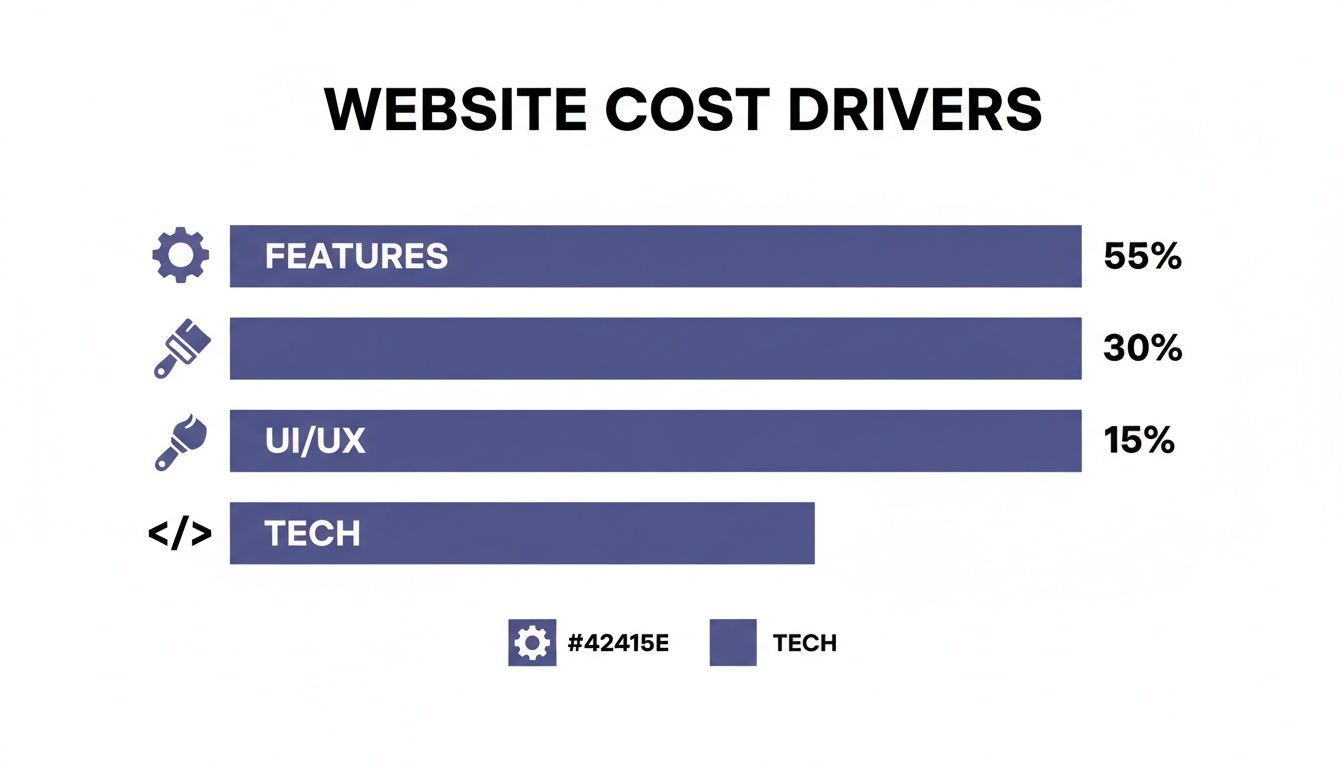
As you can see, the features—what the site actually does—are almost always the biggest cost driver.
Robust E-commerce Platforms
Once your goal is to sell products online, you’ve outgrown a simple brochure site. An e-commerce platform is a whole different beast. It’s a much more complex project because it needs to do some heavy lifting, like securely processing payments, managing inventory, and giving customers a smooth shopping experience. This is your digital storefront, open 24/7.
An e-commerce build requires a much deeper set of features:
- Product Management: This includes everything from product catalogs and detailed pages to inventory tracking systems.
- Shopping Cart & Checkout: You'll need secure payment gateway integrations, shipping calculators, and tax settings.
- Customer Accounts: Most stores have user profiles where customers can track orders and save their info.
Expect an initial build cost in the $10,000 – $25,000+ range. This gets you a professionally designed store with all the standard e-commerce features. The price can easily climb higher for advanced needs like custom product filters, subscription models, or tying into third-party logistics software.
Complex Custom Web Applications
At the very top of the ladder, you have custom web applications. These aren't just websites; they're full-blown software solutions built from scratch to solve a unique business challenge. Think of project management tools, a custom CRM, or a members-only portal with interactive dashboards. You can check out a few examples of these more sophisticated projects by viewing our past work at Site Igniters.
These projects are built from the ground up to handle very specific operational needs.
- Unique Functionality: The whole application is designed around a business's proprietary workflow or process.
- Advanced Security: They require serious measures to protect sensitive user data and business intelligence.
- Scalable Architecture: Built on a powerful tech stack made to handle tons of users and complex database tasks.
The initial build cost for a custom application starts around $25,000 and can easily go to $100,000+. The price is completely dependent on the complexity of the features and the technology used. These are long-term investments designed to become a core, competitive advantage for a company.
Understanding the Hidden Costs of Web Accessibility
When you’re mapping out your budget with a web design cost calculator, it's easy to get caught up in flashy features and custom visuals. But one of the most important—and frequently ignored—cost factors is something working behind the scenes: web accessibility.
Building a website that everyone can use isn't just a nice thing to do; it’s a legal and business requirement.
Ignoring accessibility is like building a gorgeous storefront with a grand staircase but no ramp. You’re not just being thoughtless; you're shutting the door on a huge slice of potential customers and exposing your business to some serious legal heat. This isn't an "add-on"—it's a fundamental piece of modern web design.
What Is Web Accessibility Compliance?
In a nutshell, web accessibility means making sure your website can be used by people with disabilities. That includes individuals with visual, auditory, motor, or cognitive impairments. A few key standards and laws drive this, and they have a direct impact on your project's scope and final price tag.
- ADA (Americans with Disabilities Act): This is a civil rights law that bans discrimination based on disability. Courts have repeatedly applied it to the digital world, ruling that websites are "places of public accommodation" and must be accessible.
- WCAG (Web Content Accessibility Guidelines): Think of these as the technical rulebook for how to make a site accessible. Most legal challenges point to WCAG 2.1 Level AA as the gold standard for compliance.
- Section 508: This one is specific to federal agencies and any business that contracts with them. It mandates that all their electronic and IT resources are accessible.
Failing to meet these standards can lead to nasty demand letters and costly lawsuits. We're talking legal fees and settlements that easily climb into the tens of thousands of dollars. The number of website accessibility lawsuits is exploding, with thousands filed every single year, making this a very real business risk.
Building an accessible website from the very beginning is an investment. It protects your brand’s reputation, expands your audience, and keeps you out of legal trouble. It's way cheaper to build it in from day one than to scramble and retrofit a non-compliant site later.
Factoring Accessibility Into Your Budget
So, how does this all translate to dollars and cents? When you’re budgeting, accessibility isn't a single line item. It’s woven into nearly every stage of the design and development process. For a full breakdown of the legal side of things, check out our guide on achieving ADA website compliance.
The costs for creating and keeping up an accessible website generally fall into three buckets.
-
Accessibility Audits: Before you can fix anything, you have to know what's broken. An audit identifies all the barriers on your site. This process uses automated tools, but more importantly, it requires manual testing by experts using assistive tech like screen readers. A good initial audit can run from $1,500 to $5,000+, based on how big and complex your website is.
-
Design and Code Remediation: This is where the heavy lifting happens and where most of the cost lies. Fixing accessibility issues means skilled developers have to dive into your site’s code. This includes things like:
- Adding proper alt text to every single image.
- Ensuring high color contrast so text is readable.
- Making the entire site navigable using just a keyboard.
- Implementing ARIA labels to give screen readers the right context.
- Structuring forms correctly with clear labels and error messages.
-
Ongoing Monitoring and Training: Accessibility isn't a "set it and forget it" task. Every time you add a new blog post, product, or feature, it has to be compliant too. This means you need a plan for ongoing monitoring and for training your team to maintain these standards. Following a comprehensive website accessibility checklist is a great way to make sure nothing slips through the cracks.
Budgeting for Redesigns and Long-Term Maintenance
Launching your website is a huge milestone, but it's definitely not the finish line. Thinking of your site as a one-time purchase is like buying a car and never planning for gas, oil changes, or insurance. A great website is a living, breathing business asset that needs continuous investment to perform, stay secure, and actually deliver a return.
A website that just sits there will inevitably fall behind. Technology moves fast, design trends shift, and your own business goals will change. That's why budgeting for the full lifecycle of your site—including future redesigns and crucial ongoing maintenance—isn't just a good idea; it's a non-negotiable part of a smart business strategy.
Planning for Future Website Redesigns
Let's be honest: no website lasts forever. A full redesign is typically needed every three to five years to keep your site looking modern, working effectively, and matching your brand. Ignoring this cycle is a surefire way to watch your key metrics—like traffic and conversions—slowly wither away as your site becomes outdated.
So, how do you know it's time to start planning? Look for these common triggers:
- Outdated Brand Identity: Your branding has evolved, but your website still looks like the old you.
- Poor Mobile Performance: The site is clunky, slow, or just a pain to use on smartphones, which is where most of your users are.
- Declining Search Rankings: Your SEO is slipping as competitors with newer, faster sites start leapfrogging you in the search results.
- Low Conversion Rates: Your website simply isn't turning visitors into leads or customers like it used to.
The cost of a redesign is often pretty similar to building a new site from the ground up since it involves the same core stages: strategy, design, and development. Industry data shows redesigns can run anywhere from $3,000 to over $75,000, all depending on the site's size and complexity. For example, an e-commerce redesign for a home services or healthcare business might land in the $5,000 to $20,000+ range when you factor in SEO and marketplace integrations. Dig into more details on these enterprise web design costs to get a better feel for the investment.
The Essentials of Ongoing Maintenance
Beyond those major overhauls, your website needs regular, consistent upkeep just to function correctly. This is where a website maintenance plan comes in. Think of it as a service plan for your digital storefront, making sure everything runs smoothly and securely, month after month.
A maintenance plan is your website's insurance policy. It protects your investment from security threats, technical glitches, and performance degradation, ensuring it remains a valuable asset for your business.
A good maintenance plan is a recurring monthly cost that covers the absolute must-do tasks to keep your site healthy.
- Security Updates: Regularly patching your CMS, themes, and plugins is the number one way to prevent hacks.
- Performance Optimization: This covers things like cleaning up your database and compressing images to keep your site loading lightning-fast. A slow site frustrates users and kills your search rankings.
- Regular Backups: If the worst happens—a major crash or security breach—having recent backups of your site's files and database is critical for a quick recovery.
- Uptime Monitoring: This service makes sure you're the first to know if your website goes down for any reason, so you can minimize downtime.
- Analytics Reporting: A solid plan should include monthly reports on key metrics, helping you track performance and make smarter decisions.
For a small to medium-sized business, you can expect to budget anywhere from $150 to $850 per month for a comprehensive maintenance and hosting package. It might seem like just another expense, but it’s a small price to pay to protect a five-figure investment and ensure your website keeps generating value for years to come.
How to Prepare Your Website Project Budget
Okay, you've got a handle on the different cost factors and project types. Now it's time to turn that knowledge into a real, workable budget. A web design cost calculator is a fantastic starting point, but the real magic happens when you translate your business goals into concrete project requirements.
Think of it like building a house. You wouldn't just tell an architect "I want a house" and hope for the best. You'd come prepared with a list of must-haves, your style preferences, and how you plan to use the space. A well-defined plan for your website prevents expensive changes down the line and gets everyone on the same page from day one. Getting into the details, like exploring strategies for estimating the time and cost of creating a design system, helps an agency see your vision clearly and give you a much sharper quote.
Your Pre-Quote Project Checklist
Before you start reaching out to agencies, take a few minutes to run through this checklist. Having these answers ready will make the whole process smoother and lead to a far more accurate budget.
-
Define Your Primary Goal: What is the #1 thing you need this website to do? Is it about generating leads, selling products online, or establishing your brand as an authority? Every decision flows from this single objective.
-
Identify Your Target Audience: Who, specifically, are you trying to reach? Sketch out a quick profile of your ideal customer. What do they need? What problems are they trying to solve?
-
List Must-Have Features: What functionality is absolutely non-negotiable for launch? This could be anything from e-commerce shopping carts and payment processing to a blog, a private customer portal, or specific software integrations.
-
Outline Your Core Pages: Look beyond the homepage. What are the essential pages your site can't live without? Think About Us, Services, Contact, and maybe a few Case Studies or a Portfolio.
-
Gather Inspiration: Find 2-3 examples of websites you love, even if they're in completely different industries. Make a few notes on what you like about their design, user experience, or specific features.
A detailed brief is the most powerful tool you have for controlling costs and ensuring a successful outcome. It transforms a vague idea into an actionable plan, setting your project up for success from the very beginning.
With this information in hand, you're ready to have a truly productive conversation with a potential web design partner. The next step is to formalize these ideas. To help with this crucial phase, we recommend starting with our in-depth website discovery process to fully map out your project's scope and objectives. This groundwork is what empowers you to build a powerful digital asset that hits all your business goals.
Got Questions About Website Costs? We've Got Answers.
Even with a detailed guide, it’s totally normal to have a few questions buzzing around when you’re trying to pin down a budget for a new website. A web design cost calculator is a fantastic starting point, but let's be real, specific situations often need a bit more explaining. We get these questions all the time, so we’ve put together some quick, straight-to-the-point answers.
Think of this as the final piece of the puzzle, clearing up any lingering doubts so you can move forward on your project with confidence and a crystal-clear understanding of your investment.
How Much Does a Simple Small Business Website Cost?
For a basic "brochure" style website, a small business should expect to invest somewhere between $3,000 and $10,000. This range is the sweet spot for getting all the essentials you need to establish a professional, trustworthy online presence.
So, what does that price tag usually get you?
- A professional design for 5-10 core pages (think Home, About Us, Services, Contact).
- A mobile-responsive layout that looks sharp on any screen, from a phone to a desktop.
- Basic on-page SEO setup to help Google find you.
- A simple contact form so potential customers can actually reach you.
The price starts to creep up once you add more complex tools, like an e-commerce store to sell products, a private portal for clients to log in, or any other custom feature that goes beyond just displaying information.
Key Takeaway: Think of this price range as your foundation. It gets you a solid, professional platform that you can build on as your business grows and your online needs get more sophisticated.
Can I Just Build a Website Myself to Save Money?
Absolutely. You can definitely go the DIY route with platforms like Squarespace or Wix, and you can often get started for under $500. For brand-new businesses or anyone on a shoestring budget, this is a super popular option because it keeps the initial cash outlay low.
But, and it's a big but, this approach comes with trade-offs. Building a site yourself demands a massive amount of your own time—time you could be spending actually running your business. You’ll also hit a ceiling with design limitations, and the site might not have the polished, professional feel, custom functionality, or powerful SEO that a pro-built site delivers. For a business that needs its website to be a lead-generating machine, these limitations can quickly become a serious bottleneck.
What’s Included in Ongoing Website Maintenance Costs?
Ongoing maintenance is non-negotiable if you want to protect your investment and keep your site running smoothly. These plans usually run between $100 and $500+ per month, depending on how complex your site is and how much support you need.
Think of a maintenance plan as an insurance policy for your website. It typically covers the essentials that keep your site healthy and secure:
- Software and Plugin Updates: This keeps your site's code up-to-date, patching up security holes before they become a problem.
- Security Monitoring: Actively scanning for malware, hacking attempts, and other suspicious activity.
- Regular Site Backups: If the worst happens, you'll have a recent copy of your site ready to restore.
- Performance Checks: Making sure your site stays fast and responsive for your visitors.
Some plans also throw in a few hours for small content changes or technical help each month, which can be a lifesaver.
Ready to stop guessing and get a precise, data-driven estimate for your website? The team at Site Igniters builds websites that don't just look amazing—they're engineered with proven SEO strategies to drive real business growth. Contact us today for a personalized quote!
Seth Sanders is the founder of Site Igniters, a digital marketing agency in El Dorado Hills, California.