
How to Rank on Google Maps a Guide for Local Businesses

Ranking high on Google Maps can be a massive win for any local business. It all comes down to mastering three key principles: relevance, prominence, and engagement. In the old days, proximity was everything. Not anymore. Today’s algorithm is smarter, rewarding businesses that give searchers the most useful and trustworthy experience. Your path to the top of the Local Pack starts way before a customer is even in your neighborhood.
- Google Maps rankings depend on relevance, prominence, and engagement rather than proximity alone.
- A fully optimized Google Business Profile is the single most important factor for map pack visibility.
- Local citations, consistent reviews, and on-site local SEO signals reinforce your rankings over time.
Understanding How Google Maps Rankings Work
Before we get into the nitty-gritty tactics, you need to understand the "why" behind it all. Nailing your Google Maps ranking isn't about some secret hack. It's about building a solid digital footprint that screams "trustworthy" to Google. Think of it like a three-legged stool—if one leg is wobbly, the whole thing falls over.
Your Google Business Profile (GBP) is the absolute foundation. But it doesn't work in a vacuum. It needs support from your website, customer reviews, and online citations to build real local authority. A perfectly optimized profile tells Google what you do and where you are. The other pieces prove you're a legitimate, active business that people should check out.
The Three Pillars of Local Search Visibility
At its core, Google’s local algorithm tries to mimic a real-world referral. It wants to recommend the absolute best business for whatever someone is looking for. To do that, it sizes you up based on a few key criteria:
- Relevance: This is simple: how well does your business match what the user searched for? Your business categories, the services you list, and the keywords in your profile and on your website all play a big role here.
- Prominence: How well-known is your business, both online and off? Google looks at things like the number and quality of your reviews, your website's authority, and whether you're listed in other credible local directories.
- Engagement: How are people interacting with your listing? Clicks for directions, phone calls, and photo views are all strong signals that tell Google your business is a popular spot and a valuable local resource.
This diagram breaks down how these three elements work together to push you up the rankings.
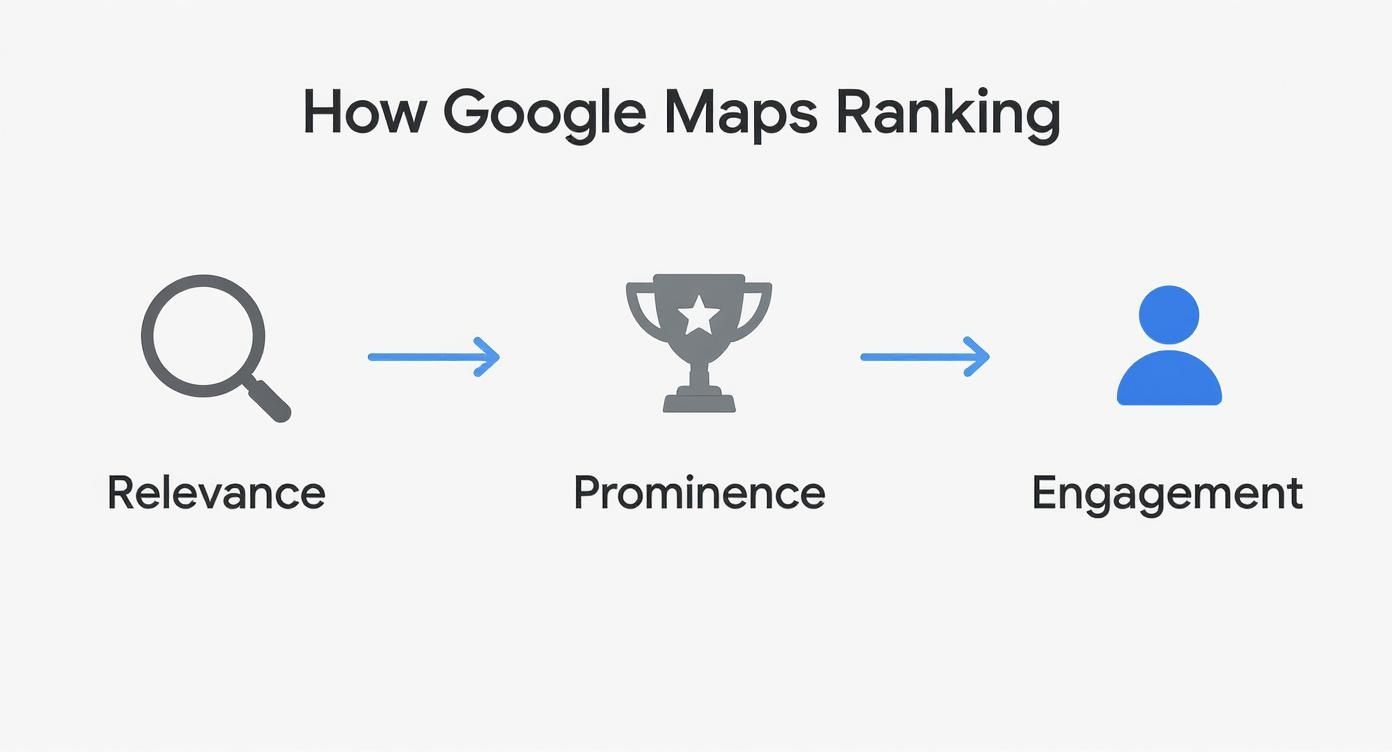
The real takeaway is that these factors are all connected. Getting more great reviews (prominence) leads to more clicks and calls (engagement), which signals to Google that you're highly relevant for those searches. It’s a powerful cycle.
To give you a clear roadmap for the rest of this guide, here’s a quick summary of the core components we’ll be covering.
Key Pillars of Google Maps Ranking
| Pillar | Primary Focus | Key Action |
|---|---|---|
| Relevance | Matching your business to user search queries. | Fully optimize your Google Business Profile with accurate categories, services, and keywords. |
| Prominence | Building your business's reputation and authority online. | Actively manage your online reviews and build consistent citations across the web. |
| Engagement | Encouraging user interaction with your Google Maps listing. | Use GBP features like Posts, Q&A, and high-quality photos to attract clicks and calls. |
Mastering these three areas is your ticket to the top of the local search results.
The Financial Impact of the Local Pack
Landing a spot in the top three results—what we call the "Local Pack"—can completely change your business. Something like 86% of customers use Google Maps to find local businesses, and those top spots get almost all of the attention. Even moving up one or two positions can mean a serious boost in calls and foot traffic.
If you're interested in learning more about the broader principles that drive all search visibility, you can dive deeper into our guide to search engine optimization (SEO).
Nail Your Google Business Profile to Maximize Visibility
Think of your Google Business Profile (GBP) as your digital storefront. For many potential customers, it's the very first time they'll interact with your brand, and frankly, it's the single biggest factor in how you show up on Google Maps. A thin, half-finished profile is a massive missed opportunity. A fully loaded, optimized one? That's a magnet for local customers.
Just having your name and address listed isn't going to cut it anymore. To even be in the game, you have to treat your GBP as a living, breathing hub of information. You need to give Google every possible signal about who you are, what you do, and why you're the best local option. Every single field you fill out is another chance to prove your relevance.
Get Your Business Categories Right
Your primary category is the absolute foundation of your profile's relevance. It needs to be the single most accurate description of your main business. For example, if you run a cafe that also serves lunch, your primary category should be "Cafe," not "Restaurant." Getting this specific is non-negotiable.
But don't just set your primary category and walk away. Google gives you a bunch of slots for secondary categories, and you need to use them to capture every possible relevant search.
- For a Plumber: Your primary is obviously "Plumber." But you'd also want to add secondary categories like "Water Heater Installation & Repair," "Drain Cleaning Service," and "Emergency Plumber."
- For a Cafe: The primary is "Cafe." Secondary categories could be "Coffee Shop," "Bakery," and even "Breakfast Restaurant."
Layering in this level of detail is how you start showing up for all those specific, high-intent searches. This directly impacts where you rank on Google Maps when someone is looking for a particular service you offer.
Write a Business Description That Connects
That business description box is prime real estate. You get 750 characters to tell your story and sprinkle in some important local keywords. Don't just make a boring list of your services; tell people what makes you different.
Try to weave in terms that actual people in your area would use. A plumber based in Sacramento could mention they serve "El Dorado Hills" or are the "go-to for Folsom plumbing emergencies." This adds a layer of local context that both Google and your potential customers will notice.
Key Takeaway: A great business description speaks to the customer first but is also keyword-aware. It's your elevator pitch for anyone searching locally, so you have to make it count.
Use Every Single Feature Available
A complete profile is a trustworthy profile in Google's eyes. The algorithm rewards businesses that give users the most comprehensive information possible. Your job is to go through your GBP dashboard and make sure every single applicable section is filled out accurately.
Here are a few features you absolutely can't afford to skip:
- Services & Products: Get granular here. If you're a roofer, don't just put "roofing." List out "Roof Repair," "Shingle Replacement," and "Gutter Cleaning" as separate items with their own descriptions. This is how you rank for those specific "long-tail" searches.
- Attributes: Think of these as quick, helpful tags. Are you "Woman-owned"? Is your location "Wheelchair accessible"? Do you offer "Online appointments"? Clicking every single attribute that applies helps you show up in more filtered, specific search results.
- High-Quality Photos & Videos: Visuals are everything for building trust. The data is clear: businesses with photos get 42% more requests for directions. Get high-resolution shots of your storefront, your team working, and your finished products or services. Pro tip: try to geo-tag your photos to add yet another location signal for Google.
The playbook for how to rank on Google Maps has changed. It's not just about being the closest business anymore. User engagement signals, real reviews, and the richness of your profile are now heavily weighted. An active, complete profile is more critical than it's ever been.
For a deeper dive, this comprehensive Google My Business optimization guide can give you even more actionable steps. Remember, completing your profile isn't a one-and-done task—it's the foundational work that everything else in your local SEO strategy is built on.
Build Local Trust With Citations and Reviews
Your Google Business Profile is a great start, but it's just you telling Google that your business is legitimate. To really climb the rankings in Google Maps, you need external proof—other sources that vouch for you.
This is where two of the most powerful local trust signals come into play: business citations and customer reviews. When you get both of these right, you're not just telling Google you're a real, prominent local business; you're letting the rest of the web confirm it. That's a game-changer.
The Power of Consistent NAP Citations
A citation is simply any online mention of your business's core information: its Name, Address, and Phone number. You'll see this abbreviated as NAP. These pop up everywhere, from big directories like Yelp and Angi to your company's Facebook page.
Think of Google's web crawlers as digital detectives. They're constantly scanning the internet, cross-referencing the information they have about your business. When they find your exact NAP details listed consistently across dozens of reputable sites, it builds a mountain of evidence that you are who you say you are.
But if the information is inconsistent? That creates doubt and can seriously hurt your visibility.
Crucial Tip: Even tiny variations can throw a wrench in the works. "Main St." vs. "Main Street" or "(916)" vs. "916-" might seem trivial, but to an algorithm, it's an inconsistency. The goal is a perfect, identical match for your NAP everywhere it appears.
Before you do anything else, run a quick audit. Just Google your business name and see what comes up. You might be shocked to find an old address or a wrong phone number lurking on some obscure directory you've never even heard of.
Here are the most important places to get your NAP right:
- Major Data Aggregators: Services like Data Axle and Neustar Localeze are the big kahunas. They feed business information to hundreds of other online directories, so getting it right here is a huge win.
- Top-Tier Directories: Yelp, Bing Places, Apple Maps, and Foursquare are non-negotiable. Make sure you're listed and accurate on all of them.
- Industry-Specific Sites: This is where you can get a real edge. A contractor needs to be on Angi. A restaurant without a TripAdvisor profile is missing out. These niche citations carry a ton of weight with Google.
Cleaning up these listings can be tedious work, I won't lie. But it's absolutely fundamental to building the local authority needed to rank.
Turn Customer Voices Into Ranking Fuel
If citations build foundational trust with Google's algorithm, then reviews build social proof that influences both the algorithm and actual customers.
Let's be real: a business with 45 detailed reviews and a 4.8-star rating is going to crush a competitor who has three generic five-star reviews, even if everything else is identical. It’s not even a fair fight.
Google sees a high volume of positive, recent reviews as a massive signal of real-world prominence. It's proof that people are not just finding you, but they're having experiences worth talking about. Better yet, all that user-generated content is often packed with valuable keywords about your services and location, giving your relevance a natural boost.
You can't just sit back and hope customers leave reviews. That's not a strategy. You have to make it incredibly easy and natural for them to share their feedback.
Develop a Winning Review Strategy
The best approach is to build a simple, repeatable process for encouraging reviews. This usually means asking at the perfect moment—right after a successful job or a great in-store interaction—and removing any friction from the process.
But a great strategy doesn't stop at just asking. You have to engage. Responding to every single review (yes, even the negative ones) shows both Google and potential customers that you're an active, attentive business owner who genuinely cares. If you want to dive deeper, our guide on effective review management lays out a full playbook for building and protecting your online reputation.
And if you're ready to really turn up the volume, you can explore more advanced strategies to get more Google reviews.
The key is consistency. Building a five-star reputation is a marathon, not a sprint. By pairing clean, consistent citations with a robust review strategy, you're sending Google the loudest possible signals of trust and prominence—exactly what it takes to climb the Maps rankings.
Aligning Your Website with Local SEO Goals
Your Google Business Profile doesn’t operate in a silo. If you really want to dominate the local pack, your website and your GBP need to be in perfect sync, sending clear, consistent signals to Google about who you are, where you are, and what you do.
Think of your website as the home base that confirms everything you’re claiming on your Google Maps listing. When Google's crawlers see that perfect alignment, it builds a massive amount of trust. This digital handshake is a huge ranking factor. If the info is mismatched, it just creates confusion and can tank your visibility.
Weave Your Location Directly into Your Website
First things first, your website needs to feel like a local resource, not some generic, placeless brochure. This means sprinkling local keywords and signals throughout your key pages to anchor your business to its community. Your homepage is the best place to start.
Instead of a generic headline like "Plumbing Services," try something like "Sacramento's Most Trusted Plumbing Experts." Go a step further and mention specific neighborhoods or service areas in your content—phrases like "emergency plumbing in El Dorado Hills" leave no doubt about where you operate.
Pro Tip: If you have multiple storefronts or serve a wide area, build out dedicated location pages. Each page needs unique content about that specific spot, complete with local testimonials, photos from jobs in that area, and its own embedded Google Map.
Create Content That Speaks to Your Community
Going beyond your standard service pages is where the real magic happens. Creating locally relevant content is one of the best ways to build your authority and show Google you're a real part of the community, not just a business that happens to be there.
Here are a few ideas to get you started:
- Community Event Recaps: Did you sponsor the local little league team or set up a booth at a neighborhood festival? Write a blog post about it and share some photos.
- Local Project Case Studies: Showcase a recent job you nailed. A post titled "Complete Kitchen Remodel in Folsom" is dripping with local relevance and attracts exactly the right kind of customer.
- Neighborhood Guides: A real estate agent could write a guide to the best parks or schools in a suburb they specialize in, naturally weaving their expertise into helpful, local content.
This kind of content doesn't just pull in local search traffic; it also gives other local businesses and organizations a reason to link back to your site, which is a powerful signal to Google.
Lock in Trust with On-Page NAP and Schema
Your website absolutely must display your Name, Address, and Phone number (NAP). The gold standard here is to put this information in the footer of every single page. Most importantly, it must be an exact match to what's on your Google Business Profile. No variations.
To really kick it up a notch, you need to implement Local Business schema markup. This is just a snippet of code added to your website that spoon-feeds search engines all your key business info—what you do, where you are, your hours—in a perfectly structured format they can easily digest.
Implementing schema is like handing Google a laminated, easy-to-read business card. It removes any guesswork and seriously boosts your chances of showing up in rich results. Speaking of results, user engagement is a massive factor. Data shows the top spot in the local pack grabs around a 15.1% click-through rate (CTR). Schema helps make your listing more compelling.
Finally, having a mobile-friendly website is non-negotiable, since so many local searches happen on a phone while someone is out and about. This also means thinking about how people search now. To get ahead of the curve, check out our guide to optimize your website for voice search. By aligning all these on-page SEO elements with your local goals, you create a unified front that Google's algorithm is built to reward.
Advanced Strategies for Dominating Local Search
Getting your business into the top spots on Google Maps is a huge win, but local search is a battlefield. If you want to stay there, the initial setup is just the beginning. To truly own your local market, you have to stop thinking of your Google Business Profile as a static listing and start treating it like an active, living part of your business.
This means you’ve got to actively use the more advanced features Google gives you. These aren't just bells and whistles; they’re tools designed to prove your business is active, relevant, and plugged into the local community. Mastering these ongoing tasks is how you build a real competitive advantage and leave the other guys wondering what you're doing right.
Use Google Posts to Signal Freshness
Think of Google Posts as free, high-visibility ad space right on your profile. These are short updates, special offers, and event announcements that show up directly in your Maps and search results. It’s a powerful way to grab attention and, just as importantly, signal to Google that your business is active right now.
Posting regularly shows Google you're actively managing your profile, which is a factor they reward. Stale, forgotten profiles tend to slide down the rankings. I always tell clients to aim for a new Post at least once a week to keep things fresh and maintain momentum.
- Promote an Offer: A local pizzeria could create a Post for a "20% Off Tuesday" special.
- Announce an Update: A home services company might share a Post announcing new extended service hours for the summer.
- Highlight an Event: A retail shop can promote an upcoming sidewalk sale or a new product launch.
Every Post is another chance to naturally work in relevant keywords while giving potential customers a real reason to choose you.
Proactively Manage the Q&A Feature
The Questions & Answers section on your GBP is a goldmine, but most businesses ignore it. Customers can ask questions directly on your profile, and here’s the kicker: anyone can answer them. If you’re not paying attention, you risk having incorrect information posted by a well-meaning but totally wrong customer.
The best move here is to get proactive. You can actually populate this section yourself by asking and answering the most common questions you get every day. This lets you control the narrative and provide accurate, keyword-rich answers that help both users and Google understand exactly what you do.
Expert Tip: Put yourself in your customer's shoes. What are the top five things people always ask you? Go to your own GBP, ask those exact questions, and then immediately answer them from your business account. You’ve just built a perfect little FAQ right on your listing.
Build Authority with Local Link Building
In traditional SEO, you're chasing links from big, authoritative websites anywhere in the world. But for local SEO, there's a massive premium on getting links from other businesses and organizations right in your own backyard. These local links are powerful endorsements that tell Google you're a trusted, legitimate part of the local community.
Honestly, a link from your local Chamber of Commerce website is often worth more for your Google Maps ranking than one from some random high-authority blog in another country. It's all about building digital connections that mirror real-world relationships.
Start looking for links from sources like these:
- Local Business Associations: Think Chamber of Commerce, downtown business groups, or industry-specific local organizations.
- Community Sponsorships: Sponsoring a local little league team or a community festival almost always gets you a link from their website.
- Neighborhood Blogs or News Sites: Getting featured in a local publication provides a fantastic, highly relevant backlink.
- Supply Chain Partners: A plumber could get a link from the local hardware store they buy from.
Building these relationships doesn't happen overnight, but the payoff in local authority is huge and directly impacts how well you rank on Google Maps.
Monitor Your Performance with Geo-Grid Tools
Finally, you can't improve what you don't measure. A funny thing about Google Maps is that your ranking can change dramatically depending on where the searcher is physically standing. You might be #1 when someone searches from across the street but completely invisible to a customer just two miles away.
This is where geo-grid tracking tools are absolutely essential. Tools like Local Falcon or BrightLocal run searches from hundreds of different points across your service area and generate a visual map of your rankings. This "grid" shows you instantly where you’re strong and, more importantly, where your blind spots are.
By looking at this data, you can spot specific neighborhoods where your visibility is weak and adjust your strategy. Maybe you need to create a location-specific landing page or run a targeted ad campaign for that area. This kind of precise monitoring is what allows for real, continuous optimization, ensuring you dominate your entire market, not just the block your office is on.
Answering Your Google Maps Ranking Questions
Diving into local SEO can feel like opening a can of worms. As soon as you start putting these strategies into practice, new questions and specific challenges pop up. Let's walk through some of the most common questions I hear from business owners trying to get a handle on their Google Maps rankings.
Getting clear answers helps you stop guessing and start moving forward with confidence. You want to know your time and effort are going toward tactics that will actually move the needle.
How Long Does It Take to See Results on Google Maps?
This is the million-dollar question, and the honest-to-goodness answer is: it really depends. Local SEO is a long game, not a get-rich-quick scheme. While some simple tweaks to your Google Business Profile—like adding fresh photos or updating your services list—might give you a little bump within a few weeks, major ranking improvements are a different beast entirely.
For most businesses, especially if you're in a competitive market, you should budget about three to six months of consistent work to see stable, meaningful gains in your Google Maps rank. That timeframe gives you enough runway to build citations, earn reviews, and let Google's algorithm process all the positive signals you're sending. Patience and consistency are your best friends here.
Can I Rank in a City Where I Don't Have an Address?
I see this all the time with service-area businesses, but it's an incredibly tough hill to climb. The entire Google local algorithm is built on proximity to a real, verified physical address. When you try to rank in a city where you don't have a legitimate storefront or office, you're fighting against the very foundation of how Google Maps works.
You can—and should—define your service area in your GBP, but your ranking power will always be strongest right around your verified address. Trying to game the system with a virtual office or a P.O. Box is a direct violation of Google's guidelines and a quick way to get your profile suspended. The smartest play is to completely dominate the area around your actual location.
Key Takeaway: Pour your energy into maximizing visibility where you physically exist. For service businesses, this means building out location-specific pages on your website for the other cities you serve. This helps you capture traffic from organic search, which is a much more effective strategy than trying to trick Google Maps.
Do Negative Reviews Hurt My Google Maps Ranking?
A few bad reviews aren't going to sink your business. In fact, a profile with a mix of reviews often looks more authentic to potential customers than a page with a perfect, spotless five-star record. People know nobody's perfect.
When it comes to Google's algorithm, here's what actually matters:
- Overall Star Rating: Your average score carries more weight than any single review.
- Total Review Volume: A high number of reviews tells Google you're a prominent, active business.
- Your Responses: This one is huge. How you handle criticism matters. A professional, helpful response to a negative review shows Google (and future customers) that you're an engaged business that cares about customer service. That's a strong positive signal.
Don't live in fear of a bad review. Instead, see it as a chance to show off your great customer service. The way you respond can often win over more new customers than the original negative review might have lost you. Just focus on generating a steady stream of positive reviews to keep that overall rating high.
At Site Igniters, we specialize in turning local search challenges into growth opportunities. Our team combines deep SEO expertise with a focus on practical outcomes, helping businesses in Sacramento and beyond build the visibility they need to thrive. If you're ready to stop guessing and start ranking, visit https://siteigniters.com to learn how we can create a winning strategy for you.
Seth Sanders is the founder of Site Igniters, a digital marketing agency in El Dorado Hills, California.