
local business search engine marketing: Grow Local Reach

Think of local business search engine marketing like this: it’s the art of making sure that when someone down the street is looking for what you sell, your business is the first one they see. It's how you get your digital signpost planted right where your most valuable, ready-to-buy customers are searching.
- Local search engine marketing puts your business in front of nearby customers at the exact moment they are ready to buy.
- Google Business Profile optimization and local SEO are the two most impactful tactics for local visibility.
- Online reviews and community-focused content build trust and boost your local search rankings.
Why Your Business Needs Local Search Marketing
Imagine you run the best coffee shop in town. The coffee is amazing, the pastries are perfect, but it's tucked away in an alley with no sign out front. That’s exactly what your business is like online if you ignore local search marketing. We live in a world of smartphones and "near me" searches, so connecting with local customers isn't just a smart move—it’s absolutely essential to stay in the game.
This strategy is your digital blueprint for getting found. It puts your business on the map where it truly counts, turning a casual searcher into a customer who walks through your door the very same day.
The Power of Local Intent
The way people find businesses has completely changed. An incredible 46% of all Google searches are now looking for local information. What's more, a whopping 76% of people who look up something nearby on their phone will visit a related business within 24 hours. That’s not just interest; that's immediate action.
This infographic really drives home the point.
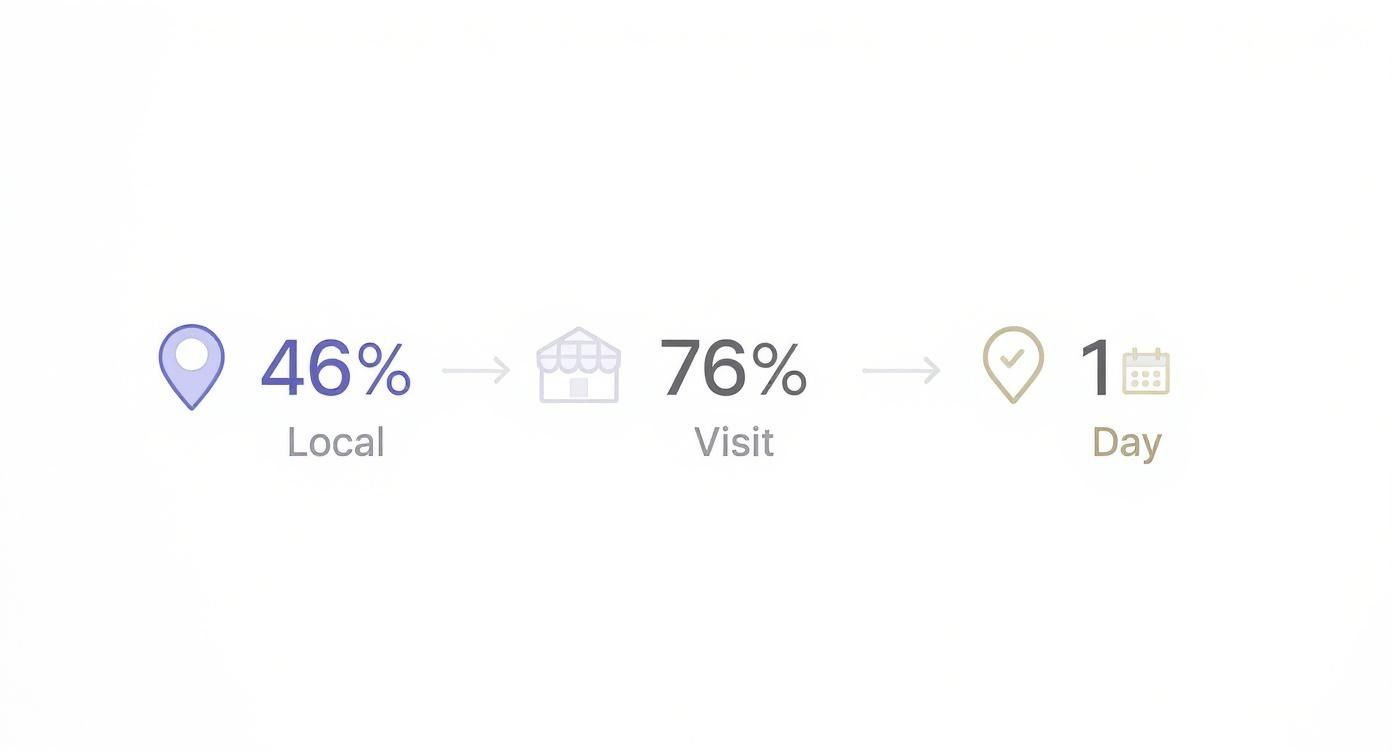
These numbers paint a clear picture of a journey that starts with a tap on a screen and ends with a real-life visit, often in less time than it takes to get a package delivered.
When you optimize for local search, you're not just casting a wide net. You're aiming a spotlight directly on people who are just moments away from making a decision to buy. Your online presence goes from being a passive brochure to an active, customer-grabbing machine.
Getting new customers in the door with local search is step one. The next is to keep them coming back. You can explore proven strategies to build customer loyalty and grow your business for the long haul. That powerful combo of finding new customers and keeping the old ones is how you truly win in your local market.
Build Your Digital Storefront With Google Business Profile
Think of your Google Business Profile (GBP) as your digital storefront. For local customers, it's the sign, the front door, and the welcome mat they see first on Google Search and Maps. Honestly, it's often the single most powerful factor that makes a local searcher choose you over the competition.
Creating and optimizing this profile isn't just a good idea; it's a must-do for any business that wants to be seen by nearby customers. A well-managed GBP gives people instant, trustworthy information and signals to Google that you're a legitimate, relevant answer to what they're looking for.
Claiming and Verifying Your Profile
First things first, you have to take ownership. You either need to create a new profile from scratch or claim an existing one that Google may have auto-generated for your business. It's a straightforward process, but it’s the only way you get control over what shows up.
Once you start the claim, Google needs to verify that you’re the real owner. This step is designed to protect everyone—business owners and customers alike—from sketchy activity.
You'll typically verify your business through one of these methods:
- Postcard by mail: Google sends a postcard with a unique code to your physical business address. It's old-school, but it works.
- Phone call or text: A code gets sent directly to your official business phone number.
- Email: A verification code is sent to your business email address.
- Video recording: Sometimes you’ll be asked to record a quick video showing your location, branding, or proof that you manage the business.
Completing this is non-negotiable. An unverified profile is like a locked store. People might see it, but they can't trust it, and Google certainly won't prioritize it in search results.
Optimizing Every Detail for Maximum Impact
Getting verified is just the starting line. The real magic happens when you meticulously optimize your profile. Treat every single section as a chance to answer a customer's question before they even have to ask it.
Your goal is to fill out every single relevant field available. Profiles that are 100% complete get more engagement because they provide a richer, more trustworthy experience for users and give Google more data to work with.
Start with the absolute essentials and make sure they are perfect.
Perfecting Your Core Information
The foundation of your profile is your NAP data: Name, Address, and Phone number. This information must be identical everywhere it appears online, from your website to every last local directory. Even a tiny difference, like using "St." on GBP and "Street" on your site, can confuse search engines and hurt your rankings.
Next, nail down these key areas:
- Business Category: This is a huge ranking factor. Choose a primary category that perfectly describes your main service (e.g., "Plumber," not something vague like "Home Services"). Then, add secondary categories for everything else you do (e.g., "Drain Cleaning Service").
- Service Area: If you go to your customers, like a landscaper or mobile dog groomer, define the specific cities or zip codes you serve. You can even choose to hide your physical address if customers don't come to your location.
- Hours of Operation: Keep your hours updated, especially for holidays and special events. Nothing frustrates a potential customer more than showing up to a closed business when Google said it was open.
For a deeper look at the nitty-gritty of this process, our guide on how to optimize your Google My Business profile lays out the detailed steps to get it right.
Engaging Customers with Dynamic Content
A static profile is a wasted opportunity. Your GBP is a living, breathing tool for connecting with your audience. Keeping it fresh shows both customers and Google that your business is active and paying attention.
Use these features to bring your profile to life:
- Photos and Videos: Upload high-quality pictures of your storefront, your team, your products, and your work in action. Businesses with more than 100 photos get way more engagement.
- Google Posts: Share updates, special offers, upcoming events, or new products. These Posts show up right on your profile for seven days (or until an event ends) and are perfect for grabbing attention with timely info.
- Q&A Section: Don't wait for people to ask questions—answer the common ones yourself! Proactively seeding your Q&A is a great move. Also, keep an eye on this section to respond quickly to new questions, since anyone can ask or answer on your profile.
To help keep your profile buzzing with activity, tools like a GMB Post Generator can help you create fresh updates for your audience. Consistent engagement turns your profile from a simple listing into a vibrant hub for your local community.
Master Your Local SEO Foundation
So, you’ve polished up your Google Business Profile until it shines. Think of that as your digital storefront. Now, it’s time to build your reputation across the entire digital neighborhood. This is all about strengthening your website's authority and sending loud, clear signals to search engines that you’re the best local answer for whatever customers are looking for.
This process is a lot like getting endorsements from all over town. Every mention of your business online acts as a vote of confidence. The more consistent these endorsements are, the more trustworthy your business looks to both Google and your future customers.
Build Authority With Local Citations
Local citations are just mentions of your business’s key info—Name, Address, and Phone number (NAP) on other websites. You'll find them in online directories like Yelp, Apple Maps, and all sorts of industry-specific portals.
Each consistent citation reinforces your location and proves you’re a legitimate operation. But inconsistency? That just creates confusion for search engines. If one directory lists your address as "Main St." and another has it as "Main Street," it's like two different people giving slightly different directions to the same place. It erodes trust, fast.
Your number one goal here is NAP consistency. Every single listing must be an identical match to the information on your Google Business Profile and your website. This creates a clean, undeniable data trail that search engines can easily follow to verify who you are and where you are.
A strong and consistent citation profile is like having dozens of trusted locals all pointing to your front door. It removes all doubt for search engines, making it easier for them to recommend you with confidence.
While local SEO is catching on, there’s still a huge opportunity for businesses that actually get it right. By 2025, it's projected that only 64% of small businesses globally will have a local SEO presence. That means a solid strategy right now can give you a massive competitive edge. For businesses already investing in local search, the top priorities are managing Google Business Profiles (52%), content creation (39%), and website design (34%). You can dig into more of these trends in recent local SEO statistical findings.
Strengthen Your Website With On-Page SEO
Citations build your reputation across the web, but your own website needs to be the central hub of local relevance. On-page SEO is how you optimize your site's content and structure to basically scream "local expert" to search engines. It’s about making it crystal clear what you do and where you do it.
This goes way beyond just sprinkling your city name on your homepage. It requires a much more thoughtful approach to both your content and the technical details behind the scenes.
To give you a clear roadmap, here are the essential pillars of a solid local SEO strategy.
Core Components of a Local SEO Strategy
This table breaks down the essential pillars of local SEO, outlining the primary focus and key actions for each component to provide a clear, strategic overview.
| SEO Pillar | Primary Focus | Key Actions |
|---|---|---|
| Google Business Profile | Creating a complete and accurate digital storefront. | Fill out every section, use high-quality photos, encourage reviews, use Q&A. |
| Local Citations | Ensuring consistent NAP (Name, Address, Phone) across the web. | Build listings on relevant directories, correct inconsistent data. |
| On-Page SEO | Optimizing your website's content and structure for local relevance. | Create location-specific pages, embed maps, use local schema markup. |
| Link Building | Earning links from other local websites to build authority. | Sponsor local events, join chambers of commerce, partner with local businesses. |
| Reputation Management | Monitoring and responding to online reviews. | Actively request reviews, respond to both positive and negative feedback. |
By focusing on these core areas, you create a powerful, interconnected strategy that puts your business on the map—literally.
Three key on-page tactics are absolutely essential for local success:
- Create Location-Specific Service Pages: If you have multiple locations or serve several distinct areas, create a dedicated page for each one. A plumber serving Sacramento and Roseville should have separate pages optimized for "plumber in Sacramento" and "plumber in Roseville," each with unique, localized content.
- Embed Interactive Maps: Go ahead and add a Google Map directly onto your contact and location pages. This isn't just for show; it's a direct, visual signal of your physical location that helps both users and search engines confirm your address.
- Implement Local Schema Markup: Schema is a special type of code you add to your website that helps search engines understand your information better. Think of it as translating your business details into Google's native language. Local Business schema explicitly tells Google your NAP, hours, and business type, making your data much easier to process and feature in search results.
These on-page elements work hand-in-hand with your citations to create a powerful, unified local presence. As search habits evolve, keeping your site modern is key. For example, tons of local searches now happen through voice assistants, so it's smart to optimize your website for voice search to capture that growing audience.
By mastering these foundational pieces, you’re not just getting listed—you’re building a dominant local authority that’s impossible to ignore.
Earn Customer Trust Through Reviews and Reputation
When it comes to local business search engine marketing, your online reputation isn't just a nice-to-have; it's the currency you trade on. Think of your online reviews as today's word-of-mouth. They’re the social proof that convinces a potential customer to go from just finding you to actually trusting you.
A steady stream of positive reviews tells both search engines and people that you're the real deal. For Google, it signals that your business is active, legitimate, and delivering a quality experience—a factor that can give you a serious boost in local search results. For customers, it’s a quick gut check on what they can expect.

Why Every Single Review Matters
You can't overstate how much reviews sway customers. The latest numbers show that 75% of consumers consistently read online reviews when checking out local businesses, and a massive 83% turn to Google specifically to do it.
It gets better. The data also reveals that just a one-star bump in your average rating can crank up engagement—like calls and website clicks from your Google Business Profile—by an incredible 44%. That’s a direct line from your reputation to your bottom line. You can dig into more stats like these in this detailed local SEO report.
With a connection that strong, proactively managing your online reputation has to be a core part of your strategy.
How to Get More Customer Reviews
So, how do you get more reviews? You ask for them. Happy customers are usually more than willing to share their experience, but life gets in the way. A gentle, well-timed nudge is often all it takes. Just be sure to play by the rules—Yelp, for instance, strictly prohibits asking for reviews, while Google actively encourages it.
Here are a few simple, ethical ways to get more feedback:
- Make It Painless: Create a direct link to your Google review page. Share it in an email, send it via text, or put it on a QR code on your receipts. The less friction, the more likely they'll follow through.
- Time It Right: The perfect moment to ask is right when a customer is happiest. This could be immediately after a successful service, the moment they receive their product, or right after they've told you in person how much they love your work.
- Personalize Your Ask: A personal email from the owner or the specific employee who helped them works wonders compared to a generic blast. Mentioning the product they bought or the service they received shows you see them as more than just another sale.
The Art of Responding to Feedback
Responding to your reviews is just as important as getting them in the first place. It shows you're an engaged owner who actually cares about what customers have to say—good or bad. In fact, businesses that take the time to reply to at least 32% of their reviews can see an 80% higher conversion rate.
Think of your public review responses as a form of customer service. How you handle feedback—especially the tough stuff—is like a billboard for future customers, telling them exactly how they can expect to be treated.
Here’s a simple framework for handling any kind of feedback:
- Acknowledge and Thank: No matter what they said, always start by thanking them for their time.
- Highlight the Positive: For great reviews, echo the specific compliments they gave. This not only shows you're listening but reinforces what you do best.
- Address the Negative Professionally: For critical feedback, stay calm. Never get defensive. Apologize for their bad experience, show a little empathy, and briefly explain what you'll do to make it right. If you can, offer to take the conversation offline to solve the problem directly.
This approach shows you're transparent and committed to great service, which can turn a potentially negative situation into a chance to build even more trust. If juggling all this feels like too much, professional review management solutions can give you the tools and strategy to keep your online reputation shining.
Create Content That Speaks to Your Community
Great local search marketing is about more than just showing up in search results; it’s about weaving your business into the very fabric of your community. Your content is the best tool you have to make that happen. It’s how you go from being just another option to being the trusted local resource people—and search engines—turn to first.
This means you have to ditch the generic blog posts that could be about any city, anywhere. You need to create content that speaks directly to the unique needs, quirks, and interests of your audience. It’s about proving you’re not just in the community, you're of the community.
Target Hyper-Local Keywords
The first step is to start thinking like a local. What specific problems are people in your town trying to solve? The keywords they use will naturally include neighborhood names, local landmarks, or even references to local events. This is where you can really shine.
Let's say you're a plumber in a city known for its historic, pre-war homes. A generic post on "how to prevent burst pipes" is fine, but it won't connect. A much smarter article would target a keyword like "preventing frozen pipes in [City]'s older homes." That title immediately tells a specific group of locals with a specific problem that you understand them.
Here are a few more ways this plays out:
- A local boutique: Instead of a generic "summer fashion trends," you could write about "What to Wear to the [Local Neighborhood] Art & Wine Festival."
- A landscaping company: Forget "drought-tolerant plants." Try a guide on "The Best Native Texas Plants for a [City Suburb] Backyard."
- A financial advisor: A post on "Navigating [State]'s Unique Property Tax Laws" is infinitely more valuable than a general article about taxes.
This approach doesn't just pull in better, more qualified traffic. It shows you have a deep, practical understanding of your community.
Creating localized content is like speaking a dialect only your community understands. It builds an immediate sense of connection and trust that generic content simply cannot match, signaling to Google that you are the definitive local authority on the topic.
Weave Your Community into Your Content
Beyond just keywords, the best local content tells a story that actually features the community. This builds a real emotional connection and sends powerful local signals to search engines, proving you’re invested in the place where you do business.
The trick is to make your community the star of the show.
Showcase Your Local Involvement
Are you sponsoring a little league team or setting up a booth at a neighborhood festival? Write about it!
- Create event recaps: After a community event, post a blog with photos. Be sure to mention other local businesses and organizations that participated.
- Highlight partnerships: If you work with another local business, feature that collaboration. This is a fantastic way to earn valuable local backlinks.
Reference Local Landmarks and Stories
Tying your content to well-known local spots makes it instantly relatable and familiar.
- A moving company could create a "Neighborhood Guide to [Community Name]," pointing out popular parks, schools, and coffee shops near [Local Landmark].
- A real estate agent might write a piece on the architectural history of a specific historic district, telling the stories behind the homes they list.
When you consistently create content that celebrates and serves your local area, you hit two major goals at once. You build a genuine bond with potential customers and send unmistakable signals to search engines that your business is the most relevant answer for local searches.
How to Measure Your Local Search Success
Putting a solid **local business search engine marketing** strategy in place is a massive first step. But how do you actually know if all that hard work is paying off? Measuring your success isn’t about getting buried in spreadsheets; it’s about zeroing in on the specific actions that lead to real-world growth.
This is how you prove your strategy is working and make smart tweaks to get even better results. Your most direct source of truth is your Google Business Profile (GBP) Insights. Think of it as the digital cash register for your local search efforts—it tells you exactly how people are finding you and what they do next.
Interpreting Your GBP Insights
GBP Insights boils down customer behavior into a few simple, powerful metrics. The first thing you'll want to check is how people are stumbling upon your listing in the first place.
- Direct Searches: These folks already know you. They searched for your business name or address directly, like "Main Street Cafe."
- Discovery Searches: This is the goldmine. These are people who searched for a category, product, or service you offer, like "coffee shop near me," and Google showed them your profile. A high number here means your local SEO is doing its job and reeling in new customers.
- Branded Searches: This group searched for your brand or a brand related to your business. It’s a great sign of strong brand recognition in your local market.
Those discovery numbers are your clearest signal that you're growing beyond your existing customer base. Once you know how they found you, the next step is to see what actions they're taking.
Your most important metrics are the ones that connect a digital click to a real-world action. These are the numbers that directly translate your online visibility into tangible business results, like a phone call from a new lead or a customer walking through your door.
This is where you track the real magic—the conversions. GBP Insights totals up all the actions taken from your profile, giving you a crystal-clear picture of how people are engaging with your business.
Key Actions to Monitor
You'll want to focus on the data that directly impacts your bottom line. These are the big three when it comes to a successful local campaign.
- Website Clicks: How many people visited your website after finding you on Google? This is a huge metric for driving online leads, bookings, or e-commerce sales.
- Phone Calls: This one's straightforward—it tracks how many potential customers tapped the "call" button right from your profile. For any service-based business, this is often the most valuable conversion you can get.
- Direction Requests: This metric shows how many users asked Google Maps for directions to your storefront. It’s the clearest possible link between a local search and actual foot traffic coming through your door.
By keeping an eye on these numbers every month, you'll start to see clear trends. Are direction requests up after you added those new photos? Did phone calls jump after you started using Google Posts more often? This data gives you the power to double down on what works and fix what doesn't, making sure your local business search engine marketing efforts are always getting better.
Answering Your Local Search Questions
As you start putting local search marketing into practice, you're bound to have some questions. It's totally normal. Getting a handle on these common points helps clear the fog and lets you focus on what really matters: getting found by local customers.
Let's tackle the questions I hear most often from business owners. The goal here is to give you short, straight-to-the-point answers so you can move forward with confidence.
How Long Does Local Search Marketing Take to Show Results?
This is the big one, and the honest answer is: it's a marathon, not a sprint. While you might see some quick wins within a few weeks—especially after giving your Google Business Profile a serious tune-up—building real, lasting authority takes time. Think of it like building a reputation in your neighborhood; it doesn't happen overnight.
For most businesses, you're looking at a consistent effort for about 3 to 6 months before you start seeing significant, stable results. This gives all your hard work—building citations, getting reviews, and creating local content—enough time to gain traction with search engines and build trust.
What Is the Difference Between Local SEO and Traditional SEO?
The main difference boils down to two things: geography and intent. Traditional SEO is a global game. It's about ranking for broad terms like "best running shoes," trying to be the best answer for anyone, anywhere in the country or even the world.
Local SEO, on the other hand, is all about your own backyard.
Its entire purpose is to make your business pop up for customers right in your service area, especially in that all-important Google 'Map Pack.' To do that, it leans heavily on local signals like your Google Business Profile, local directory listings, and community-focused content to prove you're the right choice for someone nearby.
For any business with a local customer base, this isn't just a small distinction—it's everything.
Can I Use Local Search Marketing Without a Physical Storefront?
Absolutely. Local search is a perfect fit for what we call service-area businesses (SABs)—the pros who travel to their customers. Think plumbers, electricians, mobile dog groomers, or consultants. If you work from home or an office without a public entrance, this is for you.
Your Google Business Profile is designed for this exact scenario. You can:
- Set your service area by listing the specific towns, zip codes, or general regions you cover.
- Hide your physical address so customers don't show up at your home office or private workshop.
This setup makes sure you still show up in local searches for customers in the areas you serve, even if you don't have a brick-and-mortar shop for them to visit.
Ready to put your business on the local map and connect with customers right in your community? The team at Site Igniters combines expert SEO strategies with design-centric web solutions to help you get found and grow. Learn more about our digital marketing services and start turning local searches into loyal customers.
Seth Sanders is the founder of Site Igniters, a digital marketing agency in El Dorado Hills, California.