
A Guide to seo for small business owners: Practical SEO Tips

Is SEO actually worth the effort for a small business? The short answer is yes. It's not just another task on your endless to-do list; it’s the single most powerful engine you have for sustainable growth. SEO connects you with customers who are already looking for exactly what you offer.
- SEO is the most cost-effective growth engine for small businesses, connecting you with customers actively searching for your services.
- Start with Google Business Profile optimization and local keyword targeting for the fastest wins.
- Consistent content creation around your core services builds authority and compounds traffic over time.
This guide is your playbook for turning those online searches into real-world business.
Why SEO Is Your Best Marketing Investment
For a lot of small business owners, SEO sounds complicated and expensive. It’s easy to push it to the back burner in favor of things that feel more immediate, like firing off a social media post or boosting an ad. But that mindset misses the whole point of what makes search engine optimization so powerful.
Unlike a paid ad that vanishes the second you stop paying, a good SEO strategy is an asset that grows over time. It builds on itself, creating a reliable, consistent stream of qualified traffic to your website.
Think about a local bakery that uses SEO to show up on the first page of Google for "custom birthday cakes in Sacramento." Every single person who types that into the search bar is a potential customer walking through their door, and it didn't cost them a dime per click.
This visual breaks down the core process into four key pillars. It's the roadmap to getting that kind of growth.
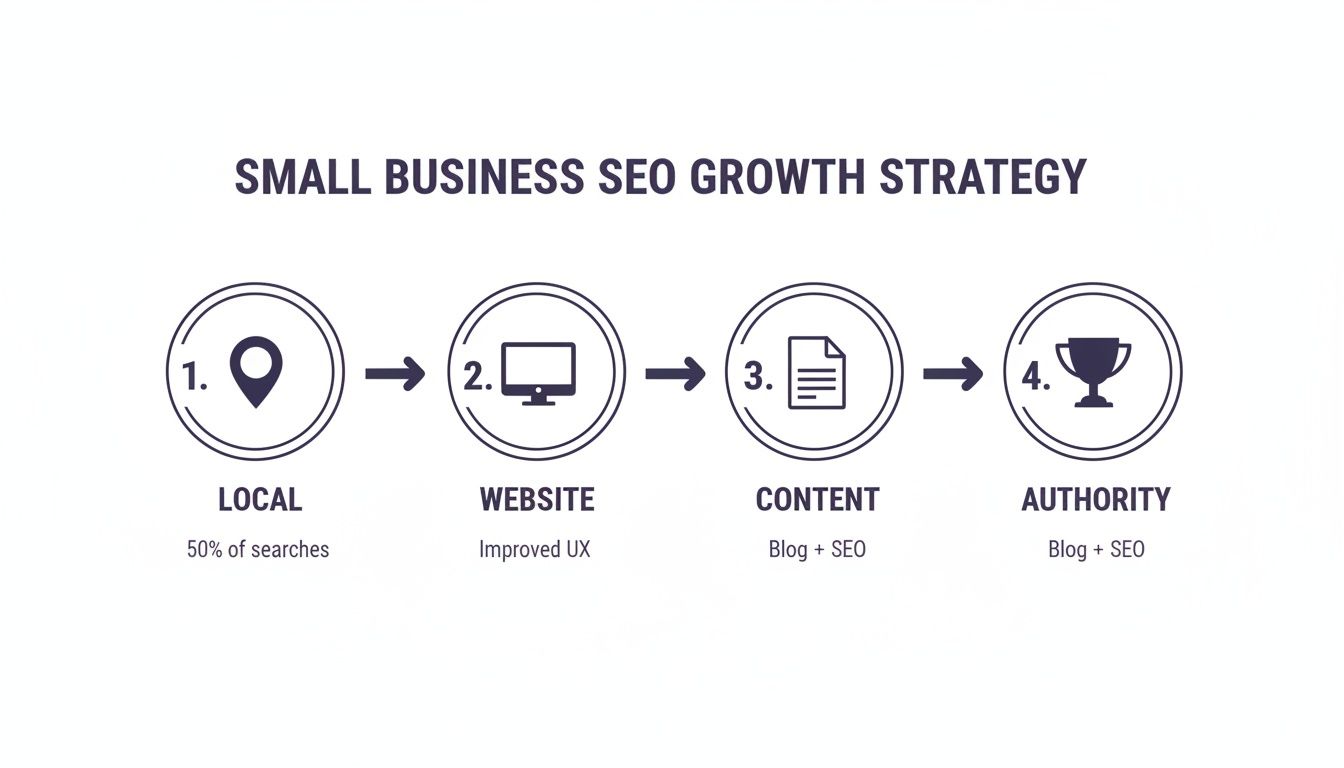
Each of these steps—from nailing your local search presence to building real authority—is a critical piece of the puzzle. Get them right, and you turn your website into a lead-generation machine that works for you 24/7.
The True Value of Organic Search
The numbers don't lie. Investing in SEO isn't just a "nice-to-have"; it's a financial no-brainer for small businesses. Companies that stick with it can see an average ROI of 400% within just two years. It's one of the smartest long-term plays you can make.
And considering that organic search drives a massive 46.98% of all website traffic, it’s a channel you simply can’t afford to ignore.
SEO is about being the answer your customers are looking for, right when they need you most. It’s less about chasing algorithms and more about building a helpful, authoritative presence that Google naturally wants to reward.
From Visibility to Conversion
At the end of the day, ranking high on Google is only half the battle. The real goal is to turn that visibility into paying customers. This means every SEO effort you make has to be tied to a clear business outcome.
To really maximize your marketing spend, you need to understand the powerful SEO lead generation strategies that bridge the gap between a click and a sale. The rest of this guide will give you a step-by-step roadmap to do exactly that.
Dominate Your Local Market with Google
For most small businesses, winning the marketing game really starts in your own backyard. Local search is where your most interested, ready-to-buy customers are hanging out. Your most powerful tool to reach them? It's completely free: your Google Business Profile (GBP).
Don't mistake this for just another online listing. Your GBP is often the very first impression a potential customer has of your business. It’s your digital storefront, and you need to treat it that way.
Think about it. When someone searches for "emergency plumber in Sacramento," they aren't just browsing—they have a pipe bursting right now. A perfectly tuned GBP puts your business right in their path, showing up in that coveted "Local Pack" map section at the top of the search results. Getting this right is the absolute foundation of any smart SEO strategy for a small business owner.
Your Google Business Profile Is More Than a Listing
Just claiming your profile and walking away isn't going to cut it. The goal here is to fill out every single section so completely that Google sees your business as the most relevant, trustworthy, and helpful answer for local searches. That means going way beyond just your name, address, and phone number.
Every empty field is a massive missed opportunity. Here’s where to focus your energy first:
- Get Hyper-Specific with Categories: Don't just pick "Contractor." Go deeper. Choose "Kitchen Remodeler," "Bathroom Remodeler," and "General Contractor." The more precise you are, the better Google gets at matching you to someone searching for exactly what you do.
- Write a Compelling Business Description: This is your elevator pitch to your local community. Use your main keywords naturally, but more importantly, talk about what makes you the best choice in town. Mention specific neighborhoods you serve and what sets you apart.
- Upload High-Quality Photos and Videos: Show people what you're all about; don't just tell them. Post crisp photos of your completed projects, your team in action, and your storefront or work vehicle. According to Google, businesses with photos get 42% more requests for driving directions. That's real foot traffic.
A complete and active Google Business Profile is the single most impactful thing a local business can do for quick SEO results. It works on two fronts: building trust with potential customers and signaling relevance to Google's algorithm at the same time.
The Power of Social Proof and Consistent Information
Once the profile is built out, two ongoing tasks will make or break your long-term success: managing customer reviews and making sure your business info is identical everywhere it appears online.
Reviews are a huge ranking signal. Google wants to send its users to businesses that other people love. You need to get into the habit of asking your happy customers to leave a review. And just as crucial—respond to every single one, good or bad. A thoughtful, professional response to a negative review can actually win over more future customers than a dozen 5-star ratings. For more great ideas on this, check out our complete guide on how to optimize your Google Business Profile.
Beyond reviews, Google is constantly checking your business information across the web to verify it. This is where local citations come into play. A citation is simply a mention of your business's Name, Address, and Phone number (NAP) on other sites like Yelp, Angie's List, or industry-specific directories. If your NAP is inconsistent—maybe an old address is floating around or a typo in your phone number—it sends confusing signals to Google and can seriously ding your local rankings.
Don't underestimate how much this matters. A staggering 78% of local searches on a mobile device lead to an offline purchase within 24 hours. And with 46% of all searches on Google having local intent, optimizing for your neighborhood isn't just a good idea; it's absolutely essential for growth.
To help you get this right, we've put together a checklist of the most important optimization tasks for your profile.
Google Business Profile Optimization Checklist
Use this table to work through the most critical elements of your GBP, ensuring you haven't missed a single opportunity to stand out.
| Optimization Task | Why It Matters | Pro Tip from Site Igniters |
|---|---|---|
| Verify Your Business | Unlocks all features and proves to Google you're a legitimate, active business at your listed address. | Do this immediately. If you move, you'll need to re-verify, so keep your address current. |
| Complete All Profile Sections | Every completed section gives Google more context about what you do, increasing your chances of ranking for relevant searches. | Don't skip the "from the business" description or the attributes section (e.g., "woman-owned," "free wifi"). |
| Choose Specific Categories | Helps you rank for niche, high-intent searches instead of just broad, competitive terms. | Select a primary category that best describes your core business, then add several secondary categories. |
| Upload High-Quality Photos Weekly | Shows customers your work and signals to Google that your business is active. Fresh content is rewarded. | Add photos of finished jobs, your team, and your location. Geo-tag them with your city name for an extra boost. |
| Enable Messaging Feature | Allows potential customers to contact you directly from your profile, reducing friction and capturing more leads. | Download the Google Maps app to your phone to ensure you can respond to messages instantly. |
| Utilize Google Posts | Acts like a mini-blog on your profile. Perfect for promoting offers, events, or new products to searchers. | Posts expire after 7 days, so make it a weekly task to publish a new one to keep your profile looking fresh. |
| Generate & Respond to Reviews | Reviews are a top local ranking factor. Responding shows you value customer feedback. | Create a simple link for customers to leave a review (you can find this in your GBP dashboard) and share it. |
| Set Up Q&A Section | Pre-emptively answer common questions. This saves you time and helps customers get info quickly. | Seed your own Q&A by asking and answering the top 5-10 questions you get from customers. |
| Ensure NAP Consistency | Inconsistent Name, Address, and Phone (NAP) data across the web confuses Google and hurts your ranking. | Use a tool like Moz Local or BrightLocal to audit your citations and fix any inconsistencies you find. |
Tackling this checklist is one of the highest-impact activities you can do for your business's online visibility. It's the first domino to fall in a successful local SEO strategy.
Build a Website That Google and Customers Trust
With your local presence dialed in, it's time to focus on the next major pillar of your SEO strategy: your website. Think of it as your digital headquarters. It’s the one place online where you control the entire customer experience, from their first click to their final purchase.
Making this space trustworthy and easy to navigate for both Google and your potential customers is absolutely non-negotiable.
This isn’t about becoming a coding whiz overnight. It’s about nailing a few high-impact, on-page SEO elements that tell search engines exactly what your business is about and why you're the best at it.
Finding the Words Your Customers Use
Before you can optimize a single thing, you have to get inside your customers' heads. What words and phrases are they actually typing into Google when they need your services? This is keyword research, and it’s the foundation of everything that follows.
Don't overcomplicate this. You can start with something as simple as Google's own search bar. Type in a core service, like "kitchen remodeling," and pay close attention to the "People also ask" and "Related searches" sections. These are real queries from real people—a goldmine of ideas for page titles, headings, and future blog posts.
Your goal is to find phrases that show clear intent. "Kitchen remodel cost Sacramento" is far more valuable than a broad term like "kitchens." It signals a customer who is much further along in the buying process and closer to making a decision.
Crafting Pages That Earn Clicks
Once you have a list of target keywords, you need to put them where they matter most. These core elements act like signposts, guiding both your visitors and search engine crawlers.
- Title Tags: This is the clickable blue headline that appears in Google search results. It needs to be compelling and include your primary keyword, ideally near the beginning. Something like, "Expert Kitchen Remodeling in Sacramento | Your Company Name."
- Meta Descriptions: This is the short blurb of text under your title tag. While it's not a direct ranking factor, a well-written meta description acts like a mini-ad, convincing searchers to click on your result instead of a competitor's.
- Intuitive URLs: Keep your page URLs simple, clean, and descriptive. A URL like
yourdomain.com/sacramento-kitchen-remodelingis infinitely better than a jumbled mess likeyourdomain.com/page-id=123.
Organizing Your Content with Headers
Within your pages, header tags (H1, H2, H3) create a logical structure that makes your content easy to digest. Think of it as an outline. Your main page title should be your one and only H1 tag. Subheadings that break up the content should be H2s, and any points under those can be H3s.
This hierarchy makes your content scannable for busy human readers. Just as important, it gives a clear outline to search engines, helping them understand the main topics and subtopics you cover on each page.
The Non-Negotiables: Speed and Mobile Experience
Finally, none of the above matters if your website is painfully slow or looks broken on a smartphone. It's a hard truth. Over 60% of all searches now happen on mobile devices, and Google heavily prioritizes sites that offer a smooth mobile experience.
Your site has to load quickly—we're talking under three seconds. Slow-loading pages don't just frustrate users; they lead to higher bounce rates, which sends a huge red flag to Google that your site offers a poor experience.
Use a free tool like Google's PageSpeed Insights to test your site's performance. It will give you a score and, more importantly, actionable recommendations for improvement. A fast, mobile-friendly website isn't just a technical detail; it’s a fundamental sign of trust and professionalism that directly impacts your ability to rank and win new business.
Create Content That Answers Questions and Drives Sales

Content is your secret weapon. It’s how you go from being just another name in a directory to becoming a trusted local authority. Think of it as your chance to solve your customers' problems and show off what you know long before they ever decide to call you.
For a lot of small business owners, "content marketing" sounds like a huge, intimidating task. But its goal is simple: be genuinely helpful.
Forget about pumping out generic articles just for the sake of it. Your content needs to be a direct answer to the real questions your ideal customers are asking Google every day. A huge part of this is figuring out how to choose keywords for SEO that actually reflect what people are searching for. Get this right, and you'll create hyper-relevant content that pulls in the exact audience you want to work with.
Brainstorming Content That Connects
Start by thinking about what your customers really struggle with. What are the top five questions you find yourself answering over and over? Boom. Those are your first content ideas right there.
A local HVAC company isn't just selling air conditioners; they're selling comfort and relief from the summer heat. Instead of a generic post like "Why AC is Important," they could write a guide titled, "Choosing the Right AC Unit for an Old Sacramento Home." See the difference? It's specific, useful, and screams local expertise. It tackles a real problem for a specific group of people.
Content marketing for small businesses isn't about being a professional writer. It’s about being a professional problem-solver and sharing what you already know in a clear, accessible way.
To get the ball rolling, here are a few practical formats that almost always work well:
- "How-To" Guides: Walk customers through a simple task related to your industry. A painting contractor could write, "How to Prep Your Walls for a Perfect Paint Job."
- Checklists: Break down a complicated process into easy-to-follow steps. A landscaper might offer a "Spring Yard Cleanup Checklist for El Dorado Hills."
- Answering Common Questions: Dedicate a whole page or post to your FAQs. This is also a fantastic way to naturally optimize your site for voice search, since so many of those queries start with "how," "what," or "why."
Weaving in Keywords Naturally
Once you’ve got your topic, you can start weaving your keywords into the content. The trick is to make it sound completely natural, like you're just having a conversation. A great gut check is to read your writing out loud. If it sounds robotic or stuffed with awkward phrases, it’s not ready.
Your main keyword should pop up in a few key places:
- The title of your page (your H1 tag)
- Somewhere in the first paragraph
- In at least one subheading (an H2 or H3 tag)
- Naturally throughout the rest of the content
Remember, you're writing for people first, search engines second. Google has gotten incredibly smart at understanding context, so being clear and genuinely useful will always beat clumsy keyword stuffing. Digging into how to optimize your website for voice search is a great way to learn more about this, because natural language is king there.
Using Internal Links to Guide Your Visitors
As you start building up this library of helpful content, don't let those pages be dead ends. Internal linking—the simple act of linking from one page on your site to another—is an absolute powerhouse for both your visitors and your SEO.
When you link from a blog post about "Signs You Need a New Roof" directly to your "Roof Replacement Services" page, you create a seamless path for a potential customer. You're guiding them from learning to taking action. This keeps people on your site longer, improves their experience, and passes authority between your pages, giving your most important service pages a nice little SEO boost.
Earn Trust with Links and Track Your Growth

The phrase "link building" sounds way more intimidating than it really is. For a small business, it’s just about building relationships and earning trust in your community.
Think of it this way: a link from another website is like a vote of confidence. When a reputable local site points to yours, Google sees that as a strong signal that you’re a credible, authoritative voice in your field.
This doesn't mean you need a huge budget or some complicated email campaign. In fact, some of the most effective, budget-friendly link-building strategies for a local business come from real-world community engagement.
Practical Link Building for Local Businesses
You're already a part of your community, so that's the best place to start. These simple, authentic actions can earn you some of the most powerful links you’ll ever get.
- Sponsor a Local Team: Sponsoring a kid's sports team or a local charity 5K almost always gets you a link from their website. It’s a total win-win—you build goodwill in the community and boost your SEO authority at the same time.
- Partner with Your Neighbors: Team up with a non-competing business in your area. A local real estate agent, for instance, could partner with a trusted mortgage broker. You could feature each other in a blog post or create a "local partners" page on your sites.
- Get Some Local Press: Don't be afraid to reach out to local bloggers, news outlets, or community magazines. Share a unique story about your business, offer to be an expert source for an article, or announce a special event. A single feature in a local publication provides a high-quality, highly relevant link.
The best links for a small business often come from real-world connections, not digital trickery. Focus on being a valuable member of your local community, and the links will naturally follow.
Measuring What Truly Matters
Doing all this work is one thing, but knowing if it's actually working is another. This is where a lot of small business owners get overwhelmed by data, but you only need two free tools from Google to get a clear picture.
Forget about mastering every feature. Just focus on a few key metrics that tell you what you need to know.
Your two new best friends for measurement are:
- Google Search Console (GSC): This is your direct line to Google. It shows you exactly which keywords people are using to find you, flags any technical issues holding you back, and tracks how many clicks your pages are getting from search results.
- Google Analytics (GA4): This tool tells you what happens after someone clicks through to your site. You can see which pages are the most popular, how long people stick around, and where your traffic is coming from.
Start by checking GSC once a week. Just look at your organic traffic (visits from search engines) and your top-performing queries (the keywords bringing you the most clicks). Then, pop over to GA4 and check the engagement rate on your most important pages. A high engagement rate is a great sign that people are finding your content genuinely useful.
This simple routine will give you enough insight to make smart decisions without getting lost in endless data. It also ties into your customer feedback efforts; as you learn more about effective review management strategies, you can see how positive sentiment impacts visitor behavior on your site.
Common SEO Questions for Business Owners
Jumping into SEO for your small business can feel like learning a new language. You're bound to have questions. Let's cut through the noise and tackle some of the most common ones I hear from business owners, so you can move forward with confidence.
How Long Does SEO Take to Show Results?
This is the big one, and the only honest answer is: it depends. SEO is a long-game strategy, not a magic button for instant traffic.
You can often see some real, positive movement in local search rankings within three to six months, especially if you get aggressive with optimizing your Google Business Profile right out of the gate.
But for those tougher, more competitive keywords and broader organic visibility, it's much more realistic to think in terms of six to twelve months to see substantial, lasting results. Think of it like planting a tree. You do the work upfront, but you don't see the fruit right away. The strong foundation you're building now leads to sustainable growth that actually snowballs over time.
What Is the Difference Between SEO and SEM?
It's really easy to get these two confused. They're both part of the search marketing family, but they operate in completely different ways.
| Aspect | SEO (Search Engine Optimization) | SEM (Search Engine Marketing) |
|---|---|---|
| Cost | "Free" organic traffic (your investment is time/expertise) | Pay-Per-Click (PPC) ads, where you pay for every click |
| Placement | Organic search results (the "normal" results below ads) | Top of the page, clearly marked in ad sections |
| Timeline | A long-term strategy; results build over months | Immediate visibility the moment your campaign goes live |
SEO is all about earning your traffic through high-quality content and a well-structured site, getting you those unpaid, organic rankings. SEM, on the other hand, almost always refers to paid advertising on search engines, like running Google Ads.
A smart marketing plan often uses both. SEO builds that rock-solid foundation for the long haul, while SEM can be used to target specific, high-intent customers for quick wins and immediate traffic.
Do I Need a Blog for My Business?
For the vast majority of small businesses, the answer is a hard yes. A blog is one of the single most powerful SEO tools you have at your disposal. This isn't just about posting company updates; it’s about directly answering the questions your customers are typing into Google every single day.
Each blog post is a new opportunity to rank for a specific keyword, attract a new segment of your audience, and prove your expertise to both customers and Google.
Take a plumber, for example. If they write a detailed post on "how to fix a leaky faucet," they can attract a homeowner who might later need a professional for a much bigger, more profitable job. It builds trust, establishes authority, and keeps your brand top-of-mind when they're ready to hire someone. Your blog is the engine that creates helpful content, and that content is the fuel for your entire SEO strategy.
Ready to stop guessing and start growing? The team at Site Igniters specializes in creating practical, results-driven SEO strategies that help Sacramento-area businesses dominate local search and turn visibility into real revenue. Let's build your growth plan today.
Seth Sanders is the founder of Site Igniters, a digital marketing agency in El Dorado Hills, California.