
A Practical Guide to ADA Compliant Website Design

When you hear "ADA-compliant website design," what comes to mind? For many, it's about avoiding lawsuits. And while that's a piece of the puzzle, it's far from the whole picture.
- ADA website compliance is a legal requirement and a business opportunity to reach more users.
- Conduct regular accessibility audits using WCAG 2.1 AA guidelines as your benchmark.
- Maintain long-term compliance with automated monitoring and periodic manual testing.
At its core, accessible design is about creating digital experiences that work for everyone, including people with disabilities. It means building your site so it plays nicely with assistive technologies like screen readers, ensuring everyone can navigate, understand, and interact with your content. It’s not just a technical or legal box to check; it’s a fundamental part of good business.
Why Website Accessibility Is No Longer Optional
Picture this: you’ve just launched a beautiful, redesigned website. You’re proud of the sleek new look and killer features. Then, a few weeks later, a legal demand letter lands on your desk. This isn't a scare tactic; it’s a reality for thousands of businesses every year. The law sees your website as a place of public accommodation, just like your physical storefront, and it has to be accessible.
This isn't some niche issue, either. A shocking 96.3% of the world's top one million homepages fail to meet basic accessibility standards, according to the WebAIM Million Project. On average, each of those sites had 50 obvious accessibility barriers. The odds are high that your site has them, too. You can learn more about these stats and what they mean for businesses over at Accessibility.Works.
The Business Case Beyond Legal Threats
While avoiding a lawsuit is a pretty good motivator, the real value of ADA compliant website design goes way beyond just managing risk. It’s about building a better brand and unlocking a massive, underserved market.
Think about it—a non-compliant website is like having a shop with a sign that says, "certain people not welcome." There are roughly one billion people worldwide living with a disability, and that group holds an estimated $8 trillion in annual disposable income. When your site is inaccessible, you're shutting the door on that entire demographic.
An accessible website isn't a cost center; it's a revenue generator. By embracing inclusivity, you connect with a loyal market, improve user experience for everyone, and strengthen your brand's reputation as a responsible and forward-thinking company.
Enhancing User Experience for Everyone
Here's something a lot of people miss: the principles of accessible design almost always create a better experience for all your visitors, not just those with disabilities. Good design is good design.
- Mobile Users: That person trying to see your site in bright sunlight? They benefit from the high-contrast text required for accessibility.
- Users in Noisy Environments: Someone watching your latest video on a noisy train without headphones? They rely on the captions you added for hearing-impaired users.
- Power Users: Keyboard warriors who tab through websites instead of using a mouse love robust keyboard-only navigation.
These improvements don’t just make people happy. They lead to lower bounce rates, higher engagement, and better overall site performance. They also send powerful quality signals to search engines like Google, which can give your SEO a nice little boost.
Key Accessibility Standards at a Glance
Navigating the different accessibility regulations can feel a bit like alphabet soup. To clear things up, here’s a quick rundown of the most important standards you'll encounter.
Key Accessibility Standards at a Glance
| Standard | Who It Applies To | Key Requirement |
|---|---|---|
| ADA Title III | Most businesses and non-profits considered "public accommodations." | Requires websites to provide equal access to users with disabilities. |
| Section 508 | U.S. federal agencies and their contractors. | Mandates that all electronic and information technology is accessible. |
| WCAG 2.1 AA | A global technical standard (not a law itself). | Provides specific guidelines that are the benchmark for both ADA and Section 508 compliance. |
So, how do these fit together? The Americans with Disabilities Act (ADA) and Section 508 are the legal frameworks—the "what" and "why." The Web Content Accessibility Guidelines (WCAG) provide the technical roadmap—the "how."
For most businesses, aiming for WCAG 2.1 Level AA compliance is the gold standard. It’s the clearest path to meeting your legal obligations and, more importantly, building a truly inclusive digital presence.
Navigating the Legal Landscape of Web Accessibility
The threat of an accessibility lawsuit isn’t some abstract problem you can put off until later—it's a real and immediate issue hitting businesses of all sizes, every single day. The legal climate has shifted in a big way, and demand letters have become a go-to tool for enforcing the Americans with Disabilities Act (ADA) in the digital world.
To protect your business, you have to understand this environment. This isn’t about scare tactics; it’s about being informed and prepared. The bottom line is that courts have consistently ruled that websites are "places of public accommodation," meaning they fall under the same anti-discrimination rules as your physical storefront.
The Rising Tide of ADA Lawsuits
The numbers don't lie. Businesses are getting hit with a flood of ADA website lawsuits, with thousands of cases filed every year—a massive jump from just a few years ago. This isn't just a problem for big corporations, either. Small and medium-sized businesses are common targets, especially in retail, food service, and hospitality.
What’s really eye-opening is that a significant number of these lawsuits targeted sites that were already using so-called "accessibility widgets" or overlays. The myth of a quick fix was completely shattered by a recent Federal Trade Commission (FTC) settlement. It slapped a $1 million penalty on a major widget provider for falsely claiming its product could guarantee compliance.
The key takeaway here is simple: There's no magic bullet for web accessibility. Real protection doesn't come from a cheap plugin. It comes from making proactive, code-level fixes that address accessibility barriers at their source.
This legal pressure also runs parallel to other regulations. As you're working to make your site accessible, it’s the perfect time to review how you handle user data. Keeping up with privacy policy compliance is another crucial step that protects both your business and your customers.
Understanding the Plaintiff's Playbook
Many of these legal challenges are built on a "sue-to-settle" model. Plaintiff law firms often use automated scanning tools to find thousands of websites with common, easy-to-spot WCAG violations. From there, they fire off templated demand letters, betting that most businesses will choose to pay a settlement rather than face the massive costs and uncertainty of a court battle.
These lawsuits are usually triggered by a few common culprits:
- Missing Alt Text: Images that lack descriptive alternative text are invisible to screen reader users.
- Poor Keyboard Navigation: When menus, buttons, and forms can't be used without a mouse, it locks out many users.
- Lack of Captions: Videos without captions are useless for anyone who is deaf or hard of hearing.
- Low-Contrast Text: Text that blends into the background is a major barrier for users with low vision.
These aren't just minor technical glitches; they're fundamental roadblocks that stop people from getting information or buying your products.
Your Best Defense Is a Proactive Offense
The only reliable way to defend yourself against legal action is through genuine compliance. That means you have to stop putting out fires and start embedding accessibility directly into your web design and development workflow. Your main obligations fall under ADA Title III, which covers public accommodations, and Section 508 if you're a federal contractor.
While these are U.S. laws, the idea of digital inclusion is a global one. If you want a broader perspective on international rules, checking out info on The European Accessibility Act can be really insightful. It just goes to show that accessibility isn't just a local compliance chore—it's becoming a worldwide standard for doing good business.
Ultimately, navigating the legal side of things requires a shift in thinking. Don't see accessibility as just another box to check. See it as a strategic move. A truly ADA compliant website design isn't just legally safer—it’s easier to use, reaches more customers, and builds a stronger, more inclusive brand.
How to Conduct a Thorough Website Accessibility Audit
To build a truly ADA compliant website design, you first need a brutally honest assessment of where you're starting from. You can't fix accessibility barriers until you find them, and that's exactly what an audit is for—it's a diagnostic process that creates a detailed roadmap for fixing what's broken. The best, most effective approach I've found is a hybrid one, blending the sheer speed of automated tools with the irreplaceable nuance of a human, manual review.
Automated scanners are fantastic for the first pass. They can crawl your entire site in minutes and catch a ton of widespread, code-based issues. Think missing alternative text on images or color combinations that are impossible to read. But here's the catch: they can only flag about 30-40% of all potential WCAG violations. They just don't have the context to understand the actual user experience, which is why manual testing isn't just a recommendation—it's absolutely essential.
This flowchart shows the all-too-common path businesses face when accessibility is an afterthought. It often starts right where you might be now: with a non-compliant site.
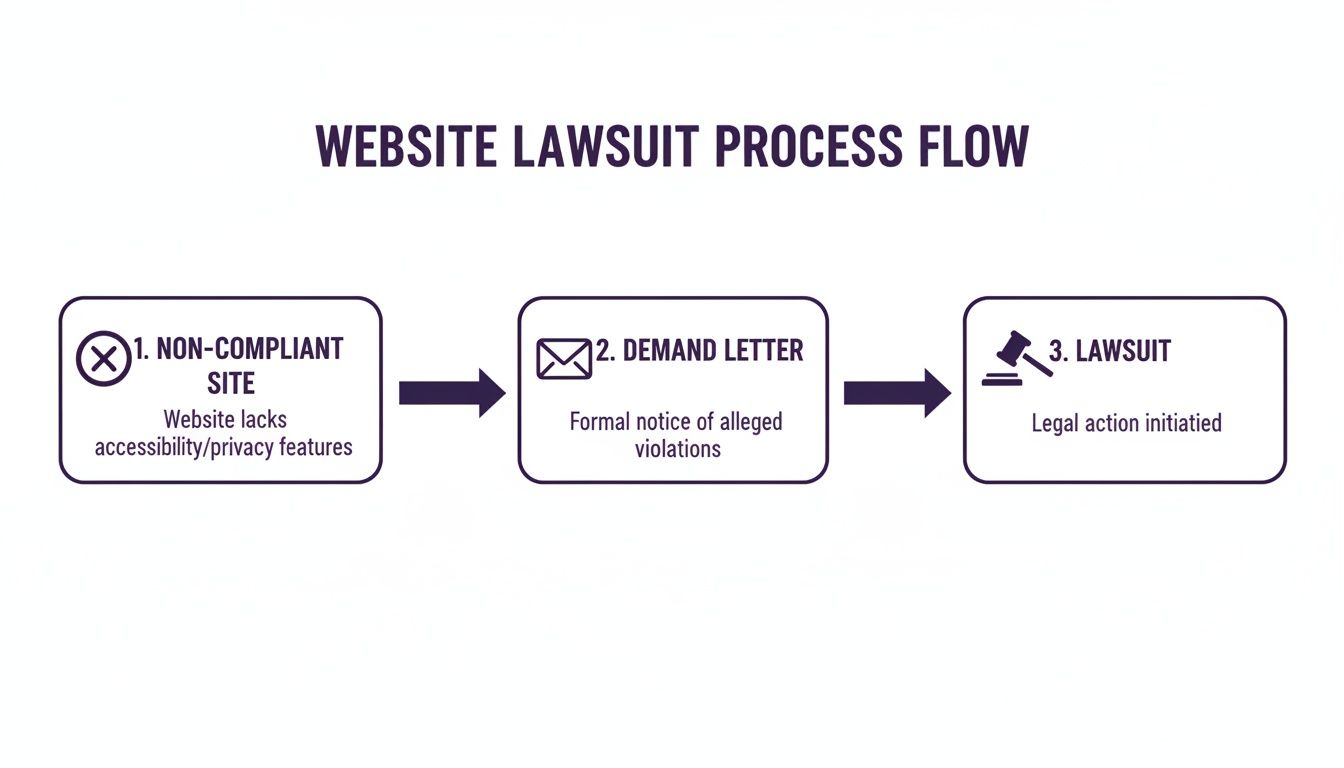
Seeing the direct line from a non-compliant site to a demand letter really puts things into perspective. A proactive audit is your best defense mechanism and the very first step in breaking that chain.
Kicking Off Your Audit with Automated Scanning
Your first move should be to run an automated scan. This gives you a quick, high-level overview of the low-hanging fruit and common technical mistakes. There are several excellent, free tools that can get you started right away.
- Google Lighthouse: This is baked right into the Chrome browser's developer tools. It spits out an accessibility score and a report that details specific failures.
- WAVE (Web Accessibility Evaluation Tool): Available as a browser extension, WAVE overlays icons and indicators directly onto your page, visually flagging accessibility issues in context. It's great for seeing problems "live."
- axe DevTools: Another powerful browser extension that helps developers pinpoint and fix accessibility defects while they're still building.
Run these tools on your most important pages—your homepage, contact page, key product pages, and anything with complex forms or functionality. The reports will generate a list of issues, which becomes the perfect starting point for your audit checklist.
Mastering Essential Manual Testing Techniques
Okay, this is where you move beyond what a machine can see and start experiencing your site the way a user with a disability would. Manual testing is non-negotiable. It's the only way to find the critical usability barriers that automated tools will always, always miss.
Make sure you focus on these key areas during your manual review:
1. Keyboard-Only Navigation
Unplug your mouse. Seriously. Now, try to use your entire website with just the keyboard. Use the Tab key to move forward through links, buttons, and form fields, Shift+Tab to go backward, and Enter to make a selection.
Ask yourself: Can I always see where I am on the page? There must be a visible focus indicator (like a colored box or outline) around the element you've tabbed to. Can I get to and operate every single function, from the main menu to the checkout button? If you get stuck in a "keyboard trap" where you can't tab away from a component, that's a major, show-stopping failure.
2. Screen Reader Simulation
While nothing beats testing with native screen reader users, you can get a surprisingly good feel for the experience by using one yourself. NVDA is a free, popular screen reader for Windows, and VoiceOver is built right into macOS and iOS.
Turn one on and try to navigate your site with your monitor turned off. Are images described properly through their alt text? Do the headings create a logical, skimmable outline of the page's content? When you land on a form field, does it clearly announce its purpose? This test is a reality check that quickly reveals how confusing (or clear) your site is for someone with a visual impairment.
One of the most common things I find during a screen reader test is hearing a link announced as just "Click Here" or "Read More." That's a classic failure of descriptive link text. A screen reader user navigating by links needs to know where that link is going without needing the surrounding sentences for context.
Organizing and Prioritizing Your Findings
As you run through your audit, you need to document everything you find in a spreadsheet or a project management tool. Don't just jot down the problem; you need to provide context.
For each issue, you should record:
- The Issue: A simple description of the problem (e.g., "Submit button has low color contrast").
- Location: The exact URL where you found the issue.
- WCAG Guideline: The specific success criterion it violates (e.g., 1.4.3 Contrast Minimum).
- Impact Level: Assign a priority—High, Medium, or Low—based on how severely it blocks a user from completing a task.
This last step is critical. A missing alt text on a decorative logo might be a "Low" impact issue. But if a user can't use your main menu with a keyboard, that's a "High" impact blocker because it prevents access to the entire site.
Prioritizing is the key to creating an efficient, step-by-step remediation plan that tackles the biggest barriers first.
Prioritizing Common WCAG Failures
Focus your remediation efforts where they matter most. This table categorizes common accessibility errors by their impact on users, helping you create a prioritized fix list.
| WCAG Failure | Impact Level | Example Fix |
|---|---|---|
| Keyboard traps / inaccessible navigation | High | Ensure all interactive elements are focusable and can be operated via keyboard. |
| Missing or inaccurate form labels | High | Add <label> tags programmatically associated with every form input. |
| Missing/uninformative alt text on images | Medium | Write descriptive alt text for informative images; use alt="" for decorative ones. |
| Insufficient color contrast | Medium | Adjust text and background colors to meet a contrast ratio of at least 4.5:1. |
| Vague link text ("Click here") | Medium | Rewrite link text to describe the destination, e.g., "Read our Q3 financial report." |
| No "skip to main content" link | Low | Add a hidden link at the top of the page to let keyboard users bypass navigation. |
Incorrect heading structure (e.g., skipping from <h1> to <h3>) |
Low | Reorganize headings to create a logical, sequential outline of the page content. |
By categorizing your findings this way, you can build a logical repair schedule that delivers the most significant improvements to your users right from the start.
Core Principles of Accessible Web Design
So, your accessibility audit is done and you have a clear picture of what needs fixing. Now the real work starts. Moving from a diagnosis to a solid action plan means you need to get familiar with the philosophy behind ADA compliant website design. This isn't just about ticking boxes on a checklist; it's about fundamentally changing how you think about building websites.
The entire framework is built on the four pillars of the Web Content Accessibility Guidelines (WCAG). You'll often hear them referred to by the acronym POUR: Perceivable, Operable, Understandable, and Robust.
Think of POUR as the constitution for your website. Every design choice you make, every snippet of code, and every bit of content should be held up against these principles. It's how you guarantee you're building an experience that genuinely works for everyone.
This approach shifts accessibility from a last-minute patch to a core part of your design DNA. It's the difference between hastily bolting a ramp onto a finished building and designing a seamless, integrated entrance from day one.
Perceivable: Making Information Available to the Senses
The first principle, Perceivable, is all about making sure users can actually take in the information you're presenting. It means your content can't be invisible to any of their senses. This is where so many of the most common—and easiest to fix—accessibility issues pop up.
A classic example is an image without any alternative (alt) text. For a user with sight, the image is right there. But for someone using a screen reader, that image is just a blank space, a digital void. It's effectively invisible without that descriptive text.
To make your content perceivable, you need to:
- Provide Text Alternatives: Every piece of non-text content, from images to icons, needs a simple text description.
- Offer Alternatives for Multimedia: Videos must have captions for users with hearing impairments. For users with visual impairments, audio descriptions are the gold standard.
- Create Adaptable Content: Your site's structure has to be logical so it can be presented in different ways (like with a screen reader) without losing its meaning.
- Ensure Distinguishable Content: This covers crucial details like using sufficient color contrast between text and its background, which makes your site easier for everyone to see.
Operable: Ensuring Users Can Interact With Your Site
Next up is Operable. This means every user must be able to operate your interface. Your site can't require an interaction that someone is physically unable to perform. This principle is all about functionality and user control.
Imagine a slick dropdown menu that only works with a precise mouse click. For anyone who depends on a keyboard or voice commands to get around, that menu is a dead end. The website is fundamentally broken for them.
Making a site operable is about providing multiple pathways to the same goal. If an action needs a click, it must also work with a keyboard's "Enter" key. If a pop-up appears on a timer, users have to be able to dismiss it or ask for more time.
This principle is also becoming increasingly important for voice-activated assistants. More people are using devices like Alexa or Google Assistant to browse the web. When you optimize your website for voice search, you're not just chasing an SEO trend; you're directly improving your site's operability.
Understandable: Making Content and Operation Clear
The third pillar is Understandable. Your information and the operation of your user interface have to be easy to comprehend. It isn't enough for users to be able to see and operate your site; they also have to understand it.
This is where cognitive accessibility comes into play. It covers everything from using plain, simple language to creating navigation that's predictable and consistent. If your "Contact Us" page is called something clever like "Let's Synergize," you're just creating unnecessary confusion.
Key parts of an understandable design include:
- Readability: Text should be crystal clear. That means simple sentence structures and legible fonts.
- Predictability: Navigation and buttons should look and act the same way across your entire site. No surprises.
- Input Assistance: Forms need clear labels and helpful error messages. Instead of a generic "Error," a good message says, "Please enter a valid email address."
Robust: Ensuring Compatibility Now and in the Future
Finally, the Robust principle means your content must be compatible with a huge variety of user agents, including today's—and tomorrow's—assistive technologies. Put simply, your code has to be clean and stick to established web standards.
This is the most technical of the four pillars, for sure. It's about using valid HTML and ensuring that things like ARIA (Accessible Rich Internet Applications) labels are implemented correctly so screen readers can understand the purpose of custom buttons and widgets.
A robust website doesn't fall apart when a new browser version comes out or when a user shows up with a brand-new assistive device. By adhering to web standards, you're future-proofing your work and ensuring your ADA compliant website design stays effective for years.
Maintaining Long-Term Compliance with AI and Audits
Getting your website accessible is a huge win, but the work doesn’t stop there. Think of ADA website compliance as a continuous process, not a one-and-done project. Your website is a living thing—every new blog post, code update, or product upload is a chance to accidentally introduce new accessibility barriers.
This is where a lot of businesses stumble. They treat accessibility like a checkbox, finish the project, and then find themselves out of compliance months later. The key to breaking this cycle is building a sustainable program that weaves accessibility right into your day-to-day operations. It needs to become a reflex, not an afterthought.
The Role of AI in Continuous Monitoring
Let’s be real: manually auditing your entire site every single month just isn't practical for most companies. This is where modern AI-powered tools become your best friend. While they'll never fully replace manual testing, these platforms are fantastic for automating the crucial job of continuous monitoring. They act as your digital watchdog.
You can set these automated systems to scan your site regularly—daily, weekly, or whatever makes sense for you—and they'll flag new issues as they pop up. For instance, if a marketer uploads an image without alt text or a new page goes live with low-contrast buttons, you get an alert. For a deeper dive, some advanced solutions like AI-powered testers for usability issue detection offer incredibly efficient auditing.
This proactive approach lets you catch and fix small problems before they snowball into major compliance headaches.
Building a Culture of Accessibility
Technology alone won't get you to the finish line. Your team is your single most important asset. Fostering a culture of accessibility means giving everyone who touches the website—from content writers to developers—the knowledge and tools they need to build accessible experiences from the get-go.
This really comes down to a few key things:
- Ongoing Training: Host regular training sessions to keep your team sharp on WCAG best practices. Show writers how to craft meaningful alt text and use proper heading structures.
- Clear Documentation: Create an internal accessibility guide or checklist. This should be your team's go-to resource for your organization's standards, with clear instructions for common tasks.
- Integrated Workflows: Build accessibility checks right into your existing processes. For example, make an accessibility review a mandatory step in your pre-publish checklist for all new content.
The goal is to shift the responsibility for accessibility from one person or department to the entire team.
An accessibility statement is more than just a legal document; it's a public declaration of your commitment to inclusivity. It shows users you care, provides them with a clear channel for feedback, and demonstrates proactive effort to legal bodies.
That kind of transparency builds trust and can be a huge factor in reducing legal risk. Recent ADA Title III lawsuits hit nearly 9,000 in a single year, showing just how much legal focus there is on digital access. The numbers don't lie: the WebAIM Million report found that over 94% of homepages still have WCAG failures, with an average of 50+ errors per page. This reality hammers home the need for continuous monitoring, where AI-powered audits can help businesses stay on top of accessibility standards.
At the end of the day, maintaining compliance is a marathon, not a sprint. By combining the efficiency of AI-driven audits with a well-trained, proactive team, you can build a sustainable program that protects your business and ensures your website is a welcoming place for every single user.
Got Questions About ADA Compliant Website Design? We’ve Got Answers.
Diving into the world of digital accessibility can feel like learning a new language. As you start working toward an ADA compliant website design, it's totally normal to have questions about the laws, the tools, and what this is all going to cost. We’ve pulled together some of the most common questions we hear from business owners and laid out the answers in plain English to help you move forward.
Think of these as the foundational pieces of your entire compliance plan. Getting these concepts right from the beginning will save you a ton of time, money, and headaches down the road.
What's the Difference Between ADA, Section 508, and WCAG?
It’s really easy to get these terms tangled up, but they each have a specific job. The best way to think about it is that some terms define the "what" (the legal requirement) and another explains the "how" (the technical standards).
-
The Americans with Disabilities Act (ADA): This is a major U.S. civil rights law. A key part, Title III, applies to "places of public accommodation," and courts have repeatedly decided that this includes commercial websites. The ADA is what creates the legal need for your site to be accessible.
-
Section 508: This one is a specific U.S. federal law. It requires that federal agencies, and any contractors they work with, make all their technology accessible. While it doesn't usually apply to private businesses, it shows how seriously the government takes digital access.
-
Web Content Accessibility Guidelines (WCAG): Now, this one isn't a law. WCAG is a set of internationally recognized technical guidelines that spells out how to make your website accessible. When you hear about ADA or Section 508 compliance, they are almost always pointing to WCAG 2.1 Level AA as the technical standard to meet.
So, to put it simply: The ADA and Section 508 are the laws that say you must be accessible. WCAG is the detailed, technical playbook that shows you exactly how to do it.
Can I Just Install an Accessibility Widget and Call It a Day?
This is probably the most common—and most dangerous—myth out there. Let's be crystal clear: no. So-called accessibility widgets or overlays that promise an instant compliance fix just don't work, and they absolutely will not protect you in a lawsuit.
These tools try to patch over your website's problems by adding another layer of code. The problem is, they can’t fix deep-seated issues, they often clash with the assistive technology people actually use (like screen readers), and they usually just create a more confusing and frustrating experience for the user.
Don’t just take our word for it. Data from thousands of accessibility lawsuits shows a huge number of the businesses that get sued were using one of these widgets. The Department of Justice and every credible accessibility expert will tell you the same thing: real compliance comes from manual auditing and fixing your website's actual code.
How Much Is This Going to Cost?
There's no single price tag for making a website ADA compliant. The cost really depends on a few things: the size of your site, how complex it is, what platform it's built on, and how many accessibility issues it has right now. A simple audit for a small brochure site might be a few thousand dollars. A full-on remediation project for a massive e-commerce store with tons of features will obviously be more.
But you have to reframe this as an investment, not just another business expense. The cost of ignoring compliance is almost always higher. Lawsuit settlements often start around $10,000 and can easily climb over $100,000, and that’s before you even pay your own lawyers.
Getting proactive about accessibility protects you from that massive financial risk. Better yet, it opens your business to a much wider audience, which can lead to better conversions and a real return on your investment.
At Site Igniters, we help businesses navigate every part of the accessibility process, from deep-dive audits to hands-on code remediation. We make sure your website isn’t just safe from legal risk but is also a welcoming, user-friendly experience for everyone. Ready to get started? Find out more about our ADA compliance services.
Seth Sanders is the founder of Site Igniters, a digital marketing agency in El Dorado Hills, California.