
Website traffic dropped suddenly? Diagnose Causes and Rebuild Your Traffic

That gut-wrenching moment when you see your analytics chart take a nosedive is a feeling most of us in the SEO world know all too well. Your first instinct might be to panic, thinking you've been hit by a penalty or a massive algorithm update.
- A sudden traffic drop requires systematic diagnosis starting with Google Search Console and analytics data.
- Common causes include algorithm updates, technical issues, and unintended on-site changes.
- Build a recovery plan with monitoring alerts so you catch and fix future drops quickly.
But hold on. Before you jump to the worst-case scenario, it's critical to take a deep breath and start with the basics. More often than not, a sudden traffic drop isn't a catastrophe—it's a simple reporting glitch, a broken tracking code, or something else that's surprisingly easy to fix.
This guide will walk you through a calm, methodical process to diagnose what's really going on.
Your First Steps After a Sudden Traffic Drop
The key is to triage the situation like an emergency room doctor. You need to rule out the simple, obvious causes before you start ordering expensive, time-consuming tests for complex problems. We'll start by making sure your data is even accurate in the first place.
This diagnostic flow gives you a high-level look at where to start: verify the data, check for external factors, and only then begin a deeper technical analysis.
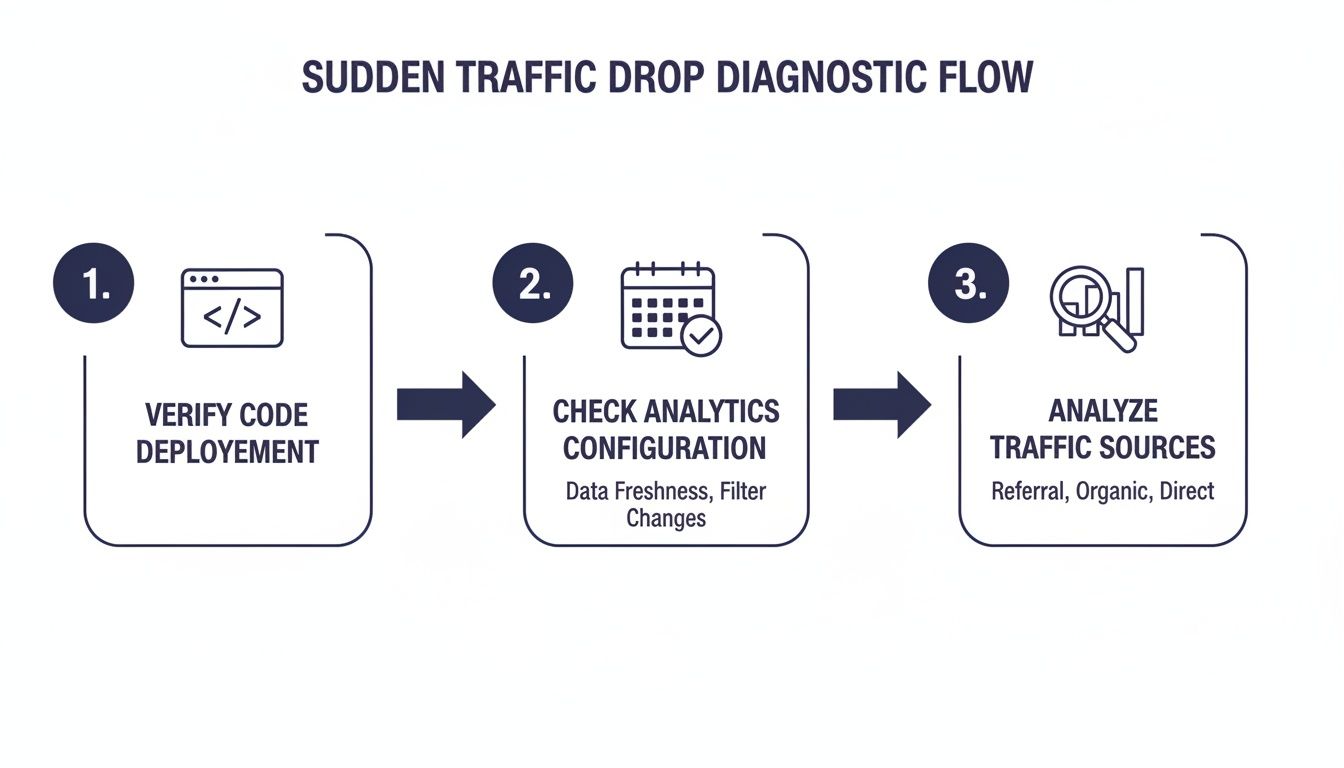
This initial phase is all about confirming the drop is real before you spend hours, or even days, chasing ghosts.
Distinguishing Real Drops from Data Illusions
First things first, let's make sure we're not dealing with a data mirage. Did a recent site update accidentally remove or break your Google Analytics tracking tag? It happens more than you'd think.
You also need to zoom out and look at the bigger picture. Is this drop just a predictable seasonal trend? A quick comparison to the same period last year can be incredibly revealing. Major holidays, news events, or even beautiful weather can pull people away from their screens and cause temporary dips.
To get you started, here's a quick checklist to run through. This table helps you systematically rule out the most common culprits.
Initial Diagnostic Checklist for Sudden Traffic Drops
| Check Area | What to Look For | Tool to Use | Action if Problem Found |
|---|---|---|---|
| Analytics Tracking | Is the tracking code firing on all pages? Any recent site updates that could have removed it? | Google Tag Assistant | Re-install the tracking code immediately and annotate the dates in your analytics. |
| Reporting Glitches | Are there any known issues with your analytics platform? Is the date range correct? | Platform status pages, SEO forums | Adjust date range or wait for the platform to resolve the issue. Don't take action on bad data. |
| Seasonal Trends | Does this dip align with traffic patterns from the same time last year? | Google Analytics (Year-over-Year comparison) | Acknowledge the seasonal trend. No immediate "fix" is needed; focus on long-term strategy. |
| Major Events | Did a major holiday, news event, or industry conference occur during the drop? | Google Trends, News headlines | Note the external factor. Traffic will likely rebound on its own. |
By working through these simple checks, you can quickly confirm if you have a real problem on your hands or just a reporting hiccup.
And don't forget, the search landscape itself is constantly in flux. We're seeing a massive shift some are calling 'the great decoupling,' where search impressions are skyrocketing while actual clicks are in a freefall. This is largely thanks to features like Google's AI Overviews.
One study found that while impressions climbed by 27.56% year-over-year, clicks plummeted by a staggering 36.18%. This tanked the average click-through rate (CTR) from 5.98% to just 3.35%, even for sites with improving rankings. It's a new reality we all have to contend with, and you can learn more about the factors behind declining website traffic and how to adapt.
Think of this as your rapid response plan. The goal is to stabilize the situation and focus your energy where it matters most, allowing you to confidently investigate more complex causes later on.
Building a Foundation for Investigation
Starting with these foundational checks is the smartest move you can make. Here's why this structured approach just works:
- Avoids Wasted Effort: You won't spend days hunting for a phantom Google penalty when the real problem was a broken analytics tag from a simple plugin update.
- Reduces Panic: Having a clear, logical checklist gives you a sense of control during what can be a very stressful situation.
- Pinpoints the Source Faster: By systematically ruling out the easy stuff first, you narrow down the list of potential culprits much more quickly.
This methodical start ensures you build a solid case before digging into more intricate issues like technical SEO problems or backlink audits.
Investigating Google's Impact on Your Traffic

Okay, so your analytics are tracking fine and this isn't just a holiday slump. It's time to turn our attention to the 800-pound gorilla in the room: Google. More often than not, a sudden traffic drop isn't something you did directly, but a reaction to a shift in the search engine's ecosystem.
Your most valuable tool for this part of the investigation is Google Search Console (GSC). This free platform is your direct line to Google, showing you exactly how it sees your site, what problems it's running into, and how you’re performing. If you don't have it set up, stop reading and do that now. It’s non-negotiable for serious website owners.
For a complete picture, you'll want to pair GSC data with a solid grasp of traffic sources. Brushing up on understanding UTM variables in Google Analytics will help you pinpoint exactly which channels are hurting.
Ruling Out the Worst-Case Scenario: Manual Actions
Before we go any further, let's check under the hood for the scariest possible problem—a manual action. This is a direct penalty from a human reviewer at Google who believes your site violates their webmaster guidelines. These are thankfully rare, but they can be catastrophic, sometimes getting your entire site kicked out of the search results.
Here’s how to check:
- Log into your Google Search Console account.
- Find Security & Manual Actions in the menu on the left.
- Click on Manual actions.
If you see a green checkmark and the message "No issues detected," you can take a deep breath. You haven't been manually penalized. If there is an issue listed, GSC will tell you exactly what it is and what you need to do to fix it before you can ask for a second look.
Did a Google Algorithm Update Hit You?
With manual actions off the table, the most likely culprit is a Google algorithm update. Google is constantly making small adjustments, but a few times a year they roll out a big "Core Update" that can completely reshuffle the search rankings. There are also smaller, more focused updates targeting things like spam or content quality.
Now you need to play detective. Pinpoint the exact day your traffic started to tank and compare that date with the public record of algorithm updates. SEO news sites are great for tracking these announcements.
A traffic drop that lines up perfectly with a confirmed Google Core Update is a huge clue. It means the algorithm has fundamentally re-evaluated your site's quality or relevance. This isn't a penalty; it's a re-assessment.
If the dates match, your path to recovery becomes much clearer. For instance, if your drop coincides with a "Helpful Content Update," you know you need to audit your content for expertise, quality, and whether it truly serves the user. Our guide on building a solid search engine optimization (SEO) strategy is a great starting point for creating content that Google and users love.
Digging into Your GSC Performance Reports
Even if there wasn't a major named update, your performance reports in GSC are full of clues. Head over to the Performance report and use the date comparison feature to look at the period before the drop versus the period after.
This report breaks down your total clicks, impressions, average click-through rate (CTR), and average ranking position.
You're looking for specific patterns:
- A drop across all pages and keywords: This points to a site-wide issue. It could be a broad algorithm update or a major technical problem affecting your entire domain.
- A drop for specific pages: Did a few of your top articles suddenly fall off a cliff? Dig into those specific URLs. Is the content outdated? Did a competitor publish something amazing on the same topic?
- A drop for specific keywords: If you lost ground for a group of related, high-value keywords, it might mean search intent has changed or that competitors have simply outclassed you for those terms.
Pay special attention to your impressions versus your clicks. A frustrating new trend is seeing impressions stay steady—or even go up—while clicks plummet. This often happens when Google rolls out new SERP features like AI Overviews or bigger "People Also Ask" boxes. These features answer the user's question right on the search page, so they never have to click through to your site.
This isn't a problem you can "fix" in the traditional sense. It's the new reality of SEO, and it means you have to adapt your strategy to try and win those featured snippet and answer box positions.
Auditing Your On-Site Changes and Technical Health
So, you've checked your analytics and confirmed Google hasn't slapped you with a penalty. The next place to look is in the mirror. More often than not, a sudden traffic drop isn't some external force—it's a self-inflicted wound from a recent change made on your own site.
What seems like a minor tweak can have massive, unintended consequences for your SEO. Think of this part of the process as a digital forensic investigation. You’re going to retrace your steps and scrutinize every single recent modification to find the "smoking gun" that told search engines to ignore your site.
Uncovering Recent Site Changes
First thing's first: you need a timeline. What exactly has changed on the website recently? It’s surprisingly easy to forget a small plugin update or a minor content revision, but search engine crawlers miss nothing. That dip in your traffic graph can almost always be traced back to a specific deployment or update.
Get your team together and start asking the hard questions:
- Content Updates: Did anyone publish new pages, overhaul existing ones, or delete old content?
- Design or UX Changes: Did a new theme get installed? Were the navigation menus reconfigured?
- Plugin Installations: Have any new plugins been added, updated, or removed lately?
- URL Structure: Were any URLs modified, even for a seemingly minor reason?
One poorly executed change is all it takes to cause chaos. I’ve seen a simple plugin update introduce a script that completely broke analytics tracking. Another time, a theme update quietly stripped crucial SEO metadata from every single page header.
Pro Tip: Keep a detailed change log for your website. Documenting every plugin update, content overhaul, and design tweak creates an invaluable record. When traffic drops, you can immediately cross-reference the date of the drop with your change log to find likely culprits.
Inspecting Critical SEO Files and Directives
Some of the most devastating on-site issues come from simple mistakes in the files that tell search engines how to behave. These files are the traffic cops for crawlers, and one wrong directive can bring your visibility to a screeching halt.
The robots.txt file is always a prime suspect. This file, found at the root of your domain (like yourdomain.com/robots.txt), gives instructions to search bots. The most common—and disastrous—mistake is an accidental Disallow: / directive. This single line tells every bot to stay away from your entire site. This often happens when a developer blocks a staging site from being indexed and then forgets to remove that block when the site goes live.
Next, check your page-level meta tags for "noindex" directives. A "noindex" tag is a direct order to Google not to include that page in its search results. If this tag gets accidentally added to important pages—or worse, applied sitewide through a global setting in your CMS—your pages will vanish from the SERPs. Your traffic will disappear right along with them.
Finally, take a hard look at your redirects. Did you recently change your URL structure or migrate the site? Broken links and endless redirect chains are SEO killers. When a user (or a crawler) hits a 404 "Page Not Found" error, it's a dead end. Use a tool like Screaming Frog to crawl your site and hunt down any broken internal links or messy redirect chains that need to be fixed.
Diving Deeper into Technical SEO Health
If the usual suspects don't reveal the problem, it's time to roll up your sleeves for a more thorough technical SEO audit. Your site's technical health is the foundation of its visibility. Cracks in that foundation can lead to a slow crumble or a sudden collapse.
Start with crawlability and indexing. Pop into Google Search Console and pull up the "Coverage" report. This will show you if Google is struggling to access or make sense of your pages. A sudden spike in errors like "Crawled – currently not indexed" or "Discovered – currently not indexed" is a major red flag. It means Google sees your content but has decided it isn't worthy of being in the index.
Site performance is another huge factor. For e-commerce and service brands, a performance dip directly translates to lost leads. Over 83% of users expect a website to load in three seconds or less. And with mobile traffic accounting for 54.4% of all web traffic globally, that patience is even shorter on smaller screens. When visitors bounce because of slow speeds, you're just throwing money away.
Beyond the obvious, a drop in traffic can often be traced back to a slow, clunky user experience. Learning how to optimize website performance gives you a clear roadmap for improving speed and responsiveness, which are absolutely critical for keeping visitors around. Your Core Web Vitals—the specific metrics Google uses to measure user experience—are more important than ever. A sudden nosedive in those scores can directly torpedo your rankings.
If your on-site audit comes up clean, it's time to start looking beyond your own domain. Your website doesn't exist in a vacuum. It’s part of a huge, competitive ecosystem where external forces can have a massive impact.
A sudden traffic drop can absolutely be triggered by things you don't directly control, like your backlink profile or a competitor’s aggressive new strategy. Looking outward is a crucial step that too many site owners miss. They spend weeks scrutinizing their own code and content, never realizing the problem started somewhere else entirely.

Check Your Backlink Profile for Losses and Threats
Your backlink profile is easily one of the most powerful off-site factors in your rankings. Quality links from authoritative sites are like votes of confidence, telling Google your content is valuable. When those votes disappear, your traffic can too.
A surprisingly common reason for a sudden traffic drop is the loss of just a few high-authority backlinks. Maybe a major publication that linked to your best article redesigned their site and the link vanished. Or maybe a partner website just went offline. Tools like Ahrefs, Semrush, or Moz can track your "Lost" backlinks, letting you see exactly what disappeared and when. If the timing lines up with your traffic dip, you've found a major clue.
On the other hand, you also have to be vigilant about new links. If you see a sudden flood of low-quality or spammy links, you might be the target of negative SEO. This is a malicious attack where a competitor tries to tank your reputation by pointing tons of toxic links at your domain.
Keep an eye out for these warning signs:
- A sudden spike in links from totally irrelevant, low-quality sites (think gambling or adult sites).
- Anchor text packed with spammy keywords that have nothing to do with your brand.
- Links coming from foreign-language sites that have no connection to your business.
If you're pretty sure you're under attack, you can use Google’s Disavow Tool to ask them to ignore these links. A word of caution, though: use this tool very carefully. Disavowing the wrong links can cause much more harm than good.
See What Your Competitors Are Up To
Sometimes, your traffic didn't drop because you did something wrong; it dropped because a competitor did something really right. The search results page is a zero-sum game. If a rival launches a massive content campaign or earns a ton of great backlinks, they can leapfrog you in the rankings and start stealing your traffic.
Go back to your most important keywords—the ones that drive your best traffic—and do a few manual searches. Who's ranking now? Is there a new face on page one? Did an old competitor just make a huge jump?
A sudden shift in the SERP landscape for your main keywords is a strong indicator that the traffic drop is due to competitive pressure, not a penalty or technical flaw on your end. This changes your recovery strategy from "fixing what's broken" to "outperforming the new leader."
Analyze what these rising competitors are doing. Is their content more in-depth? Do they have a better user experience? Have they built a stronger backlink profile for that specific page? A solid competitive analysis gives you a clear roadmap for winning back your spot. This is also a good moment to ensure your own online reputation is spotless; our guide on effective review management can help you build the social proof needed to stand out.
Keep Up With the Ever-Changing Google SERPs
Finally, you have to consider that the clicks might be disappearing for everyone. Google is constantly changing the search results page, and new features like AI Overviews are fundamentally altering user behavior. People are getting their answers directly from Google, which means they have no reason to click through to your website.
This isn't just a theory; the data is pretty stark. One study found that Google's AI Overviews led to a brutal 61% plunge in organic click-through rates (CTR) for some queries, dropping from 1.76% to just 0.61%. Even for searches without AI answers, the organic CTR still fell by 41%, pointing to a broader shift in how people use search.
This means your traffic drop might not be a "you" problem at all, but an industry-wide shift. If your impressions in Google Search Console are stable or even going up while your clicks are tanking, this is a likely culprit. Adapting requires a new strategy focused on winning featured snippets and getting your brand mentioned directly within AI-generated answers.
Building Your Traffic Recovery and Monitoring Plan
After digging through all the data, you've probably got a pretty good idea of what's behind your sudden traffic drop. Now comes the hard part: fixing it. The key is to move from diagnosis to recovery with a structured, prioritized plan. You can't fix everything at once. It’s all about hitting the highest-impact issues first to stop the bleeding and get things moving in the right direction again.
Let's be real, not all fixes are created equal. Removing a stray noindex tag that’s making your whole site invisible to Google is way more urgent than tweaking a few meta descriptions. Your first job is to triage your findings and create a clear action list.
Prioritizing Your Action Items
Think about your recovery plan in terms of impact versus effort. Some fixes are quick wins that can bring back traffic almost overnight, while others require more long-term strategic shifts. The goal here is to get the best results without wasting time and resources.
Here’s a practical way to prioritize:
- Critical (Fix Immediately): These are the absolute showstoppers. We're talking about a
Disallow: /rule in yourrobots.txtfile, a sitewide "noindex" directive, a broken analytics tag, or major server downtime. These problems are actively killing your traffic or your ability to measure it. - High Priority (Fix This Week): This next tier includes things like lost backlinks from high-authority sites, a big drop in your Core Web Vitals scores, or a manual action from Google. These take more work but are crucial for getting your site's authority and user experience back on track.
- Medium Priority (Plan for This Month): Here, you'll find issues like a competitor's new content knocking you down the rankings, outdated articles that need a refresh, or a bunch of broken internal links. These fixes are more about sharpening your competitive edge and improving overall site health for the long haul.
For example, if a local business sees its map pack visibility vanish, the first move should be to dive deep into its Google Business Profile and local citations. On the other hand, a publisher that got hammered by a Google Core Update needs a much longer-term plan focused on boosting content quality and proving their expertise, authority, and trustworthiness (E-E-A-T).
A recovery plan without priorities is just a wish list. By sorting your fixes into categories, you turn a chaotic mess of problems into a clear, step-by-step roadmap that actually delivers results.
Documenting and Communicating Your Plan
As you start rolling out fixes, document everything. Seriously. Use a shared document or a project management tool to log every single change: what was done, who did it, and when. This change log is a lifesaver. It helps you connect your actions to traffic changes, gives you a historical record for future audits, and keeps the whole team aligned.
Communication is just as important. If you have stakeholders—clients, your boss, other departments—they need to know what's going on. A sudden drop in website traffic makes people nervous, and clear communication can manage those nerves and build confidence. Share what you found, your prioritized action plan, and a realistic timeline for recovery. This kind of transparency turns a panic-fueled fire drill into a collaborative mission.
When things get really complex, it might be time to call in an expert. If you're exploring that option, understanding how to hire an SEO company can give you a solid framework for finding the right partner.
Setting Up Proactive Monitoring and Alerts
Once you've stabilized the situation, the final step is to switch from being reactive to proactive. You never want to be caught by surprise like this again. A solid monitoring system is your best defense against future crises.
Your analytics platform is your first line of defense. Most tools, including Google Analytics, let you create custom alerts that can automatically flag any unusual changes.
Here are a few must-have alerts to set up:
- Sudden Traffic Drop Alert: Get an email if daily organic traffic drops by more than 20% compared to the same day last week.
- Conversion Rate Plunge: This alert can warn you about a broken contact form or a checkout process that's suddenly failing.
- Spike in 404 Errors: A sudden jump in "Page Not Found" errors can point to broken links or a recent site update gone wrong.
Beyond the automated stuff, schedule regular manual check-ins. Just spending 15 minutes a week reviewing Google Search Console's Coverage and Performance reports can help you spot indexing problems or ranking drops before they snowball. By combining automated alerts with routine human oversight, you create a safety net that protects your most valuable digital asset. This approach transforms the panic of seeing your website traffic drop suddenly into a calm, data-driven strategy for sustainable growth.
Common Questions About Sudden Traffic Drops

After you've run through a full diagnostic, you're bound to have some lingering questions. When your website traffic drops suddenly, it’s only natural to wonder about recovery times and what the "new normal" might look like. Let's tackle some of the most common questions we hear from clients in this exact situation.
How Long Does It Take to Recover from a Traffic Drop?
The honest answer is: it really depends on what caused the drop. I've seen recovery times range from a few hours to several months, and understanding the root cause is the only way to set realistic expectations for your team and stakeholders.
Some fixes can produce results almost immediately. For instance, if you find an accidental "noindex" tag or a rogue Disallow rule in your robots.txt file, you could see traffic bounce back as soon as Google recrawls those pages. That could be just a matter of days.
On the other hand, recovering from a major Google Core Algorithm update is a completely different ballgame. This isn't a penalty you can just "fix." It demands a long-term commitment to seriously improving your content quality, proving your expertise, and making the user experience better. In these cases, you often won't see a significant recovery until the next broad core update rolls out, which could be months away.
Patience is everything after a major algorithm hit. Rushing to make drastic changes without a solid strategy can easily do more harm than good. Focus on sustainable, quality-focused improvements, not quick fixes.
Can a Drop in Traffic Be Temporary?
Yes, and honestly, it often is. Many site owners hit the panic button at the first sign of a dip, but not every drop is a five-alarm fire. You have to learn to distinguish between a temporary fluctuation and a sustained downward trend before you go tearing your strategy apart.
Here are a few scenarios where a traffic drop is probably just a blip:
- Seasonality: A B2B software company is almost guaranteed to see less traffic during major holidays. A gardening blog’s traffic will naturally dip in the winter. It's the cycle of business.
- Competitor Campaigns: Your main rival might launch a massive, short-term paid ad campaign that temporarily siphons away some of your audience.
- Minor Algorithm Fluctuations: Google is always tweaking its algorithm. Small, unconfirmed updates can make rankings dance around for a few days before they settle back down.
Always, always compare your current data to previous periods, especially the same time last year. That's how you spot these patterns.
My Impressions Are Up But Clicks Are Down. What Does This Mean?
This is one of the most common—and frustrating—scenarios in modern SEO. When Google Search Console shows you're appearing in more searches (impressions) but getting fewer clicks, it’s a huge red flag that user behavior on the search results page itself is changing.
The number one culprit? Google. With the massive expansion of features like AI Overviews, featured snippets, and detailed "People Also Ask" boxes, users are getting their answers without ever needing to click through to a website. Your content might be powering the answer, but you aren't getting the visit.
This tells you that your content is visible and relevant, but it's not compelling enough to earn the click. The solution involves a two-pronged attack: start optimizing for these SERP features (aiming to be the source for that snippet or AI answer) while also refining your title tags and meta descriptions to be absolutely irresistible to users who see your traditional blue link. When you see this pattern, your focus has to shift from just ranking to actually winning the click.
Navigating the complexities of a sudden traffic drop requires a clear strategy and expert execution. At Site Igniters, we combine data-driven diagnostics with proven SEO and SEM tactics to not only recover lost traffic but build a more resilient foundation for future growth. Let our team of digital marketing experts in Sacramento help you turn this challenge into an opportunity. Get in touch with us today to start your recovery plan.
Seth Sanders is the founder of Site Igniters, a digital marketing agency in El Dorado Hills, California.