
A Head-to-Head Content Management System Comparison


Picking the right Content Management System (CMS) is easily one of the most critical decisions you'll make for any digital project. It directly shapes everything from your daily workflow to your ability to grow down the line. The "best" CMS is a myth—the right one depends entirely on your specific goals, whether you're running a sleek e-commerce store with Shopify or building a sprawling, custom content machine with WordPress. This guide will give you a clear content management system comparison to match your needs with the perfect platform.
- The right CMS depends on your specific needs, technical skill level, and long-term growth plans, not industry hype.
- Evaluate platforms on customization, SEO capabilities, security, and ongoing maintenance requirements.
- WordPress remains the most flexible and widely supported option for businesses that need scalability and control.
Choosing Your Ideal Content Management System
So, what is a content management system? Think of it as the software that lets you create, manage, and publish digital content without having to write code from scratch. It's the engine running your website, blog, or online store, handling everything from text and images to user permissions and site structure. The sheer number of options can feel overwhelming, but it really just boils down to understanding what each leading platform does best and how that lines up with your business.
This comparison will focus on four heavy hitters in the market: WordPress, Shopify, Wix, and Squarespace. Each one was built for a distinct audience with a unique philosophy.
- WordPress: The undisputed king of customization and flexibility.
- Shopify: The go-to platform for serious e-commerce businesses.
- Wix & Squarespace: All-in-one builders that put ease of use and clean design first.
The global CMS industry is exploding, with its market value projected to soar to $79.3 billion by 2033. As of 2025, a staggering 64% of all websites run on a CMS, which shows just how vital these platforms have become. You can dig deeper into CMS adoption trends to see where the market is headed.
Find Your Fit Fast
Before we get into the nitty-gritty details, this quick table offers a high-level snapshot to help you see which platform might be the right fit. Use it as a starting point to frame your thinking as we explore each system more deeply.
Your CMS is more than a tool; it's the foundation of your entire digital strategy. Choosing a system that aligns with your operational style and growth ambitions prevents costly migrations and limitations down the road.
To help you get your bearings, here's a quick reference guide matching each platform to its ideal user.
Quick CMS Selector At a Glance
| CMS Platform | Best For | Core Strength |
|---|---|---|
| WordPress | Content-heavy sites, blogs, and businesses requiring full control and custom functionality. | Unmatched flexibility, scalability, and a massive ecosystem of plugins and themes. |
| Shopify | E-commerce businesses of all sizes, from startups to large-scale online retailers. | A powerful, all-in-one sales engine with robust inventory and payment tools. |
| Wix | Small businesses, freelancers, and beginners who need a visually appealing site quickly. | An intuitive drag-and-drop editor and a wide range of pre-built templates. |
| Squarespace | Creatives, portfolios, and design-focused brands that value aesthetic and simplicity. | Award-winning templates and a polished, user-friendly interface. |
This table should point you in the right direction. Now, let's dive into what makes each of these platforms tick.
Understanding the Modern CMS Landscape
To really get a handle on any content management system comparison, you have to understand the core ideas driving the biggest players. The CMS world isn't just a random assortment of tools. It's an entire ecosystem built on a tug-of-war between two big ideas: the hunger for total control versus the need for dead-simple usability.
This basic tension explains why certain platforms crush it in specific industries and pull in very different kinds of users.
On one side, you have the open-source giant, WordPress. Its whole appeal is baked into its endless flexibility. Since the software is free and anyone can access the code, developers can twist it, stretch it, and build it into almost anything they can imagine. This has fueled a gigantic, vibrant community that constantly churns out themes and plugins for just about any feature you could ever want.
That's the secret to its massive market dominance. As of April 2025, WordPress commands a staggering 61.3% CMS market share. Put another way, more than three out of every five websites built with a known CMS are running on WordPress. Even more impressive? It powers 43.3% of all websites on the internet. You can dig into the latest CMS market share trends to see just how big its footprint is.
The Power of Open-Source Flexibility
WordPress basically hands you a blank canvas, letting you build exactly what’s in your head without getting locked into a single company's system. This freedom is its greatest asset—and, for some, its biggest headache.
The screenshot from the official WordPress.org homepage below says it all.
The tagline, "Create your website with the world’s most popular website builder," immediately flexes its authority. The big "Get WordPress" button drives home the point that the core software is there for the taking. This open-door philosophy is everything to WordPress.
Flipping the coin, you have the all-in-one, hosted platforms like Wix, Squarespace, and Shopify. People often call these Software as a Service (SaaS) solutions. Their sales pitch is all about simplicity and convenience. Instead of shipping you a box of parts and a manual, they give you a finished product where hosting, security, and support are all rolled into one clean package.
The real question in any CMS comparison isn’t “Which one is better?” It’s “Which philosophy actually helps me reach my goals?” One is about infinite potential, the other is about managed simplicity.
The Rise of All-In-One Simplicity
For a lot of business owners, designers, and entrepreneurs, the thought of messing with hosting, security updates, and plugin conflicts is a nightmare. They just want to focus on their content or sell their products. All-in-one builders are made for them, offering a controlled, predictable playground.
Here’s where their approach is different:
- Integrated Functionality: Things like e-commerce, contact forms, and SEO tools are usually built right in. You don't have to hunt down and test a bunch of third-party plugins.
- Curated Design: Instead of drowning you in thousands of themes, platforms like Squarespace provide a hand-picked selection of top-notch templates to make sure you end up with a professional-looking site.
- Managed Maintenance: The company takes care of all the technical grunt work—security patches, server upkeep, software updates—so you don't have to.
This laser focus on ease of use has helped these platforms grab a huge chunk of the market, especially with people who care more about getting online fast than having deep customization options. Grasping this fundamental split—open-source freedom vs. all-in-one convenience—is the key to making sense of the detailed comparisons that follow.
Evaluating Customization and Core Features
Beyond the high-level philosophy of a CMS lies the day-to-day reality of using it. This is where a content management system comparison gets practical, zeroing in on the tools you’ll actually use to build pages, manage content, and create a unique experience for your visitors. The core features and customization potential of a platform will directly shape your creative freedom and daily workflow.
The most immediate difference you'll feel is in the content creation experience. WordPress, with its block-based Gutenberg editor, offers a structured yet flexible approach. Every piece of content—a paragraph, an image, a heading—is its own block that you can move around, tweak, and even save for later use.
On the other hand, platforms like Wix and Squarespace are built around intuitive, drag-and-drop visual builders. They give you a true "what you see is what you get" (WYSIWYG) experience, letting you click on any element and edit it right on the page. This is often faster for beginners, but you might bump up against limits when it comes to fine-tuning spacing and layout.
Design Freedom and Theme Ecosystems
Design flexibility is another critical battleground. WordPress has a practically infinite theme ecosystem, with tens of thousands of free and premium options. This massive library means you can find a starting point for almost any niche, industry, or design style you can think of.
That variety comes with a catch, though. Quality can be all over the place, and sorting through the options requires a discerning eye. To really get the most out of WordPress's design power, you need a basic understanding of its structure. For anyone new to the platform, a good guide can make all the difference; you can learn more by checking out this unofficial WordPress manual that covers the essentials.
Wix and Squarespace take a totally different path. They provide a curated selection of professionally designed, mobile-responsive templates.
- Squarespace: Known for its award-winning, minimalist, and visually striking designs that are perfect for portfolios, artists, and premium brands.
- Wix: Offers a wider range of templates, often with more built-in bells and whistles, catering to small businesses and service providers.
This curated approach guarantees a high standard of quality and makes it pretty hard to build a bad-looking site. The trade-off is less overall uniqueness, since many sites might share a similar foundational look.
The core choice in design is between limitless options and curated quality. WordPress gives you the keys to the entire workshop, while Wix and Squarespace provide a set of high-quality, pre-assembled kits.
Feature Expansion: Plugins vs. Integrated Tools
How a CMS lets you add new functionality is one of its most defining characteristics. This directly impacts how your site can grow, how much it will cost, and how much maintenance you’ll be doing.
WordPress runs on plugins. With over 59,000 free plugins in its official directory—plus countless premium ones—you can add almost any feature you can imagine. This modular approach is WordPress's superpower, letting it transform from a simple blog into a complex social network, an online course platform, or a full-featured e-commerce store.
Shopify, Wix, and Squarespace favor integrated features. Core tools for SEO, contact forms, and basic analytics are baked right into the platform. This really simplifies things, as you don't need to hunt down, install, and configure third-party add-ons for essential tasks. They have their own app stores, too, but they are much more controlled environments compared to the wild west of the WordPress plugin repository.
Let's walk through a practical scenario to really see the difference.
Real-World Scenario: E-commerce Functionality
Imagine you want to launch an online store selling handmade leather goods. Here’s how that experience would differ across platforms:
-
On Shopify: You sign up, and e-commerce is the default setting. Product management, inventory tracking, payment gateways, and shipping calculators are all integrated from day one. Your entire dashboard is built around one thing: selling products. It's a streamlined process, purpose-built for commerce.
-
On WordPress: You’d start by installing and configuring an e-commerce plugin, most likely WooCommerce. While it's incredibly powerful and flexible, it requires extra setup. You'll need to configure payment options, set up shipping zones, and manage product settings—all within the plugin's own interface, which lives inside your main WordPress dashboard.
The end result can be very similar, but the journey to get there is completely different. Shopify offers a guided, all-in-one path focused purely on sales. WordPress with WooCommerce gives you a more customizable but hands-on route, putting you in control of every detail at the cost of a steeper setup process. This contrast perfectly illustrates the fundamental trade-off you make when choosing a CMS.
Comparing SEO and Marketing Performance
Your choice of a content management system has a massive impact on your ability to rank in search engines and pull in an audience. A great CMS doesn't just hold your content; it gives you the technical backbone needed to make that content visible. Let's move past the sales pitches and dig into the practical search engine optimization and marketing tools each platform actually offers.
The conversation almost always starts with WordPress. Its superpower is unparalleled control, thanks to a massive ecosystem of plugins. Tools like Yoast SEO or Rank Math give you incredibly detailed command over nearly every piece of on-page and technical SEO. You can tweak meta descriptions, build custom URL structures, generate XML sitemaps, and even implement tricky schema markup with just a few clicks.
On the other side of the coin, you have all-in-one platforms like Squarespace and Shopify that build their SEO tools right into the core system. This approach makes things a lot simpler, ensuring every user has the essential features without needing to hunt down third-party add-ons. The trade-off for this convenience, however, is often a lack of advanced control.

Technical SEO Foundations
The real differences show up when you look at technical SEO. This is all the behind-the-scenes stuff that helps search engines crawl and index your site effectively. How well you do here is almost entirely dependent on the flexibility your CMS offers.
Take URL structure, for example. A clean, logical URL is critical for both users and search engines. WordPress lets you create completely custom permalink structures, like /blog/%postname%/, giving you total freedom. Shopify, in contrast, forces a rigid structure for its product and collection pages (you'll always have /products/ and /collections/), and you can't change it.
This doesn't mean Shopify has bad SEO—not at all. Its structure is perfectly optimized for e-commerce. It just means you have less wiggle room to customize that one specific element compared to an open-source platform like WordPress.
The critical distinction comes down to control versus convenience. WordPress gives you all the tools to potentially hit a perfect 100 on technical SEO, but you're the one responsible for making it happen. Platforms like Squarespace handle the basics for you, which lowers the risk but also caps your ability to use advanced tactics.
Here’s how the platforms stack up on a few key technical elements:
- Schema Markup: WordPress plugins let you add incredibly detailed, custom schema for things like recipes, local business info, events, and reviews. Squarespace and Shopify automatically handle schema for core content like products and blog posts, but customization is pretty limited.
- Site Speed: WordPress can be lightning-fast, but its performance really hinges on your choice of hosting, theme, and plugins. Hosted platforms manage the server for you, which usually means good performance right out of the box, but you're locked out of making advanced optimizations yourself.
- Robots.txt and .htaccess: With WordPress, you get direct access to these critical files, allowing for advanced instructions for search engine crawlers. Shopify allows some
robots.txtedits, while Squarespace offers very little control here.
Native Marketing and Integration Potential
Beyond pure SEO, your CMS needs to be the central hub for all your marketing. This means everything from building an email list and integrating with social media to tracking analytics.
This is where Shopify really shines, with native marketing features built specifically for selling products. Its seamless connection to email marketing platforms, abandoned cart recovery tools, and social commerce features (like selling directly on Facebook and Instagram) are baked right in.
WordPress gets this done with its plugin library. You can connect it to any marketing tool you can dream of—from HubSpot to Mailchimp—but each one requires a separate installation and setup process. It gives you endless possibilities but also adds another layer of management to your plate.
Squarespace and Wix take a middle path. They offer their own built-in tools, like Squarespace Email Campaigns and Wix Ascend, which act as all-in-one marketing suites for an extra fee. These are convenient and integrate perfectly, but they might not have the raw power of dedicated, best-in-class third-party services.
Ultimately, the best platform is the one that fits your marketing strategy. A business focused on products will probably lean toward Shopify’s slick sales integrations. A content-heavy organization might prefer the limitless marketing automation options that come with WordPress plugins. The choice really boils down to whether you want a specialized, built-in toolkit or an open platform you can connect to anything.
Navigating Security and Maintenance Demands
Understanding who handles security for your CMS isn't just a technical footnote—it's a core part of your business's risk management. Before you can make a smart content management system comparison, you have to get clear on who is responsible for keeping your site safe and online. The answer varies wildly between an open-source platform you host yourself and an all-in-one SaaS solution.
With a self-hosted platform like WordPress, you’re in the driver's seat. That means total control, but it also means the full weight of responsibility falls on your shoulders. You or your team will have to manage everything from core software updates and security patches to vetting every single plugin for potential weak spots.
In stark contrast, SaaS platforms like Shopify and Wix operate on a managed security model. They take care of all the backend maintenance, server security, and software updates for you. It’s a hands-off approach that massively cuts down your daily workload and technical headaches because security is baked right into their service.
The Self-Hosted Responsibility Checklist
Choosing WordPress is like becoming your own security chief. This isn't a bad thing—it allows for highly customized security setups—but it demands constant attention.
Key tasks you'll be managing include:
- Core Updates: Applying WordPress core updates the moment they’re released to patch vulnerabilities.
- Plugin and Theme Management: Regularly updating every plugin and theme, and tossing any that are outdated or come from untrustworthy sources.
- Hosting Security: Picking a secure hosting provider and configuring server-side protections like firewalls.
- SSL Certificate: Installing and remembering to renew your SSL certificate to keep data encrypted.
This model is perfect for businesses that want granular control or have the tech team to handle these jobs. For everyone else, it can quickly become a major time suck and a source of serious stress.
The infographic below shows how different platforms stack up on key technical SEO tasks, which often overlap with site performance and, by extension, security.
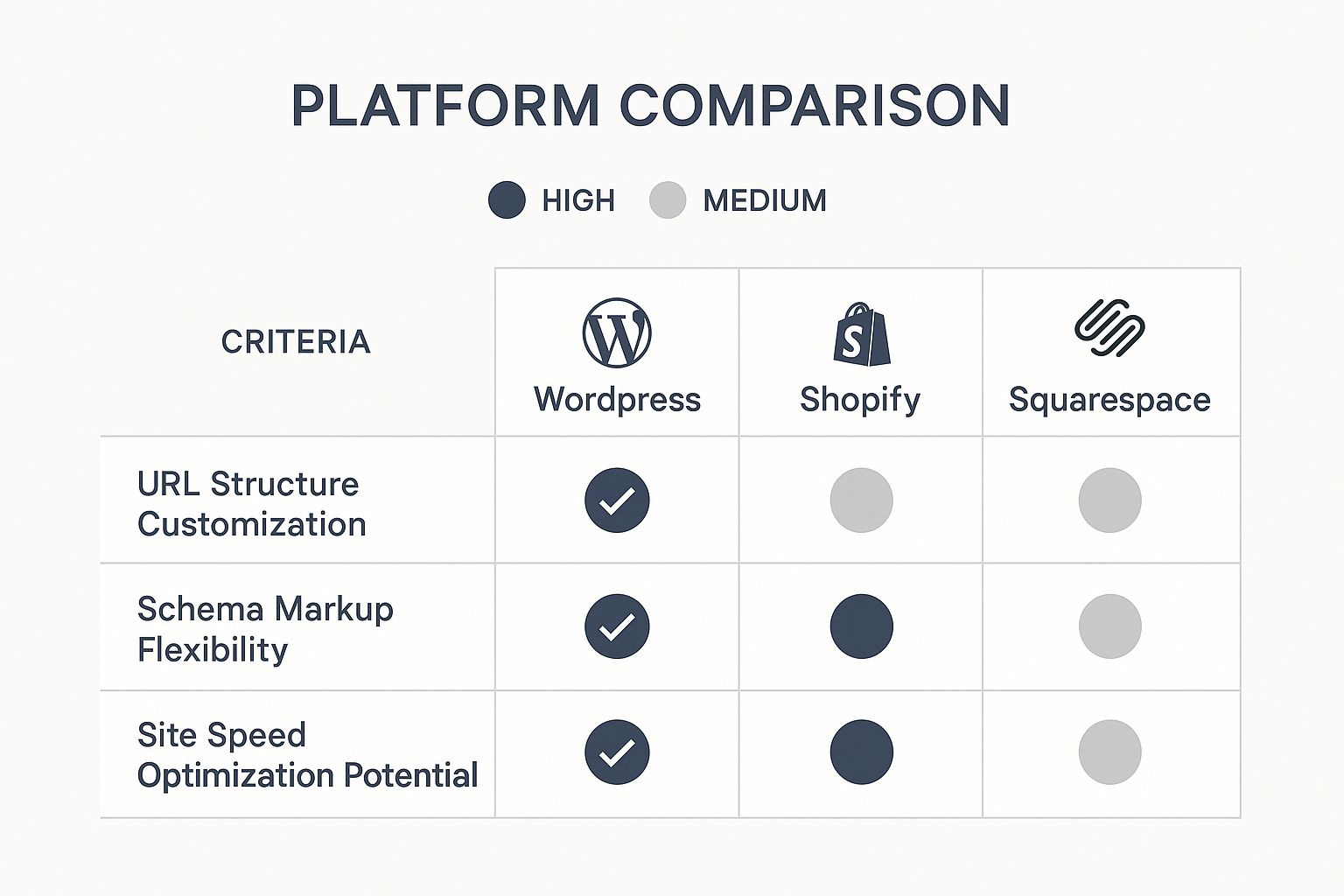
It’s clear that while WordPress offers the most potential for fine-tuning, it also puts the burden of getting it right squarely on your shoulders.
The All-In-One Managed Approach
SaaS platforms like Shopify, Wix, and Squarespace completely flip the script. Their whole pitch is built on giving you a secure, stable environment so you can focus on running your business, not on technical upkeep.
With a SaaS CMS, you are effectively outsourcing your security and maintenance. The platform's team of experts handles threat monitoring, patch management, and infrastructure security around the clock, offering peace of mind in exchange for less control.
This is especially critical for e-commerce. Shopify, for example, is Level 1 PCI DSS compliant right out of the box, meaning it meets the tough security standards needed to handle credit card data. Trying to achieve that on a self-hosted site is a complicated and expensive nightmare.
When it comes down to it, you need to decide if you want to be the one managing the day-to-day security tasks or if you’d rather pay a platform to do it for you. This table breaks down who handles what.
CMS Security and Maintenance Responsibility Breakdown
| Security Task | WordPress (Self-Hosted) | Shopify | Wix & Squarespace |
|---|---|---|---|
| Core Software Updates | You are responsible | Managed by Shopify | Managed by the platform |
| Plugin/App Security | You are responsible for vetting & updating | Apps are vetted; Shopify manages core | Apps are vetted; platform manages core |
| Server Security | Your hosting provider & you | Managed by Shopify | Managed by the platform |
| SSL Certificate | You must install & renew | Included and managed by Shopify | Included and managed by the platform |
| PCI Compliance | You are responsible for achieving it | Included by default (Level 1) | Included with e-commerce plans |
| Threat Monitoring | You or a third-party service | Managed 24/7 by Shopify | Managed 24/7 by the platform |
Ultimately, choosing a platform with built-in compliance and security can be a game-changer, especially if you handle payments or sensitive data. It aligns your choice with your available time, technical skills, and how much risk you're willing to take on. Plus, managing customer data comes with strict legal rules; it’s a good idea to learn more about how to stay up-to-date with privacy policy compliance to make sure you're protecting user information the right way.
So, Which CMS Is Right for You?
After digging through all the details, it's time to connect the dots and pick the right platform for you. The best CMS isn't always the one with the most features or the biggest name. It's the tool that lines up perfectly with what you’re trying to build, your budget, and where you see yourself in a few years.
To make it simple, we've broken it down by a few common scenarios. See which one sounds most like you, and you'll have a clear recommendation to run with.
The Solo Creator or Blogger
If you're a writer, artist, or a one-person show focused on publishing great content and building a personal brand, you need a platform that just works. The last thing you want is to get stuck wrestling with technical issues when you should be creating. Simplicity and great design are your top priorities.
- Top Recommendation: Squarespace. You really can't beat its stunning templates and dead-simple editor. It’s perfect for getting a gorgeous portfolio or blog online with zero fuss.
- Alternative: Wix is another solid choice. It gives you a little more creative freedom with its drag-and-drop builder, which is great if you're a service professional who wants to tweak every little detail.
The Ambitious E-commerce Brand
For anyone who’s serious about selling online, this is a pretty easy call. You need a platform that was born and bred for e-commerce. A generic website builder with a shopping cart plugin just won't cut it when you're managing inventory, processing payments, and running marketing campaigns.
Your e-commerce platform is your digital storefront, warehouse, and cash register all in one. Choosing a specialized system like Shopify isn't just a convenience—it's a strategic business decision that directly impacts your sales and operational efficiency.
- Top Recommendation: Shopify. Its entire world is built to help you sell stuff. From the slick checkout experience to a massive app store for marketing and shipping, Shopify is the undisputed champ for businesses focused on products.
The Content-Driven Business or Publisher
Planning to build a massive, content-rich website? Think media hubs, complex corporate sites, or a blog that you plan to grow into a major publication. Your main concern should be long-term flexibility and total control. You can't afford to be locked into a system that limits your growth.
This is where you need the power of open-source.
- Top Recommendation: WordPress. Nothing else comes close to its level of customization and scalability. With an endless library of plugins and themes, you can build just about anything you can dream up, from a private membership site to a full-blown online course platform. Sure, it takes more hands-on work, but the payoff is complete ownership and unlimited potential.
By matching your goals to these profiles, you can finally make a choice with confidence. The right CMS should feel less like software and more like a partner, ready to support you today and grow with you tomorrow.
Got Questions About Picking a CMS? We've Got Answers.
Even after you've weighed the pros and cons, a few nagging questions can stick around. Let's tackle some of the most common ones head-on to help you get over the finish line and make a choice you feel confident about.
How Much Does a CMS Really Cost?
That initial price tag? It's just the starting point. You might see that WordPress is free to download, but that's only part of the story. You still need to factor in hosting, premium themes, must-have plugins, and maybe even a developer's time, which can easily run anywhere from $50 to thousands of dollars every month.
Platforms like Shopify or Squarespace look simple with their monthly subscriptions, but the costs can creep up. Premium apps, transaction fees, and upgrading to a higher plan all add to your bill. The smart move is to map out your total cost over a full year, not just the monthly fee you see advertised.
Can I Switch My CMS Later On?
The short answer is yes, but it’s a massive headache. Migrating a website is a tricky, expensive, and seriously time-consuming project. You're not just moving text and images; you're exporting every piece of content, every URL, and all your design files, then trying to make them fit into a completely new system.
One wrong move during a migration can absolutely tank your SEO rankings.
Think of your CMS as the foundation of your house. Sure, you could jack up the entire house and pour a new foundation later, but it’s a risky, disruptive, and wildly expensive job. It’s always better to get the foundation right the first time.
Which CMS Is Best for Future Growth?
If you’re planning for limitless, long-term growth, WordPress is the undisputed champion. Because it’s open-source, there are virtually no boundaries on what you can build. As your business changes, you can add an online store, a full-blown learning platform, or any custom feature you can dream up without hitting a wall.
On the other hand, if your growth is all about e-commerce, Shopify provides a more straightforward path. Its higher-level plans are specifically engineered to manage huge sales volumes and global operations. It’s a purpose-built scaling solution for retail. The right choice really boils down to what kind of growth you see in your future.
Choosing and setting up the right CMS is a huge first step. The next is turning it into a machine that brings you business. At Site Igniters, we build high-octane websites and then drive the right kind of traffic with expert SEO and digital marketing. Contact us today and let's turn your new website into a powerful growth engine.
Seth Sanders is the founder of Site Igniters, a digital marketing agency in El Dorado Hills, California.